
Last updated: · By Asael Dreyer
Short answer: Cloudways add-ons are separately priced services that you enable from the platform and that are billed on the same invoice: Rackspace mailboxes (from $1.50 per mailbox per month), email sending with Elastic Email (from $0.10 per month), DNS management with DNS Made Easy (from $0.50 per domain per month), Cloudflare Enterprise, Malware Protection, Site Manager and extended support. None of them is required. The server runs without them, and I only add an add-on when there is a clear need.
What an add-on is on Cloudways, and why they exist
This section explains what you get with the server itself, and what is left to add-ons.
A Cloudways server includes what you need to run a site: web server, PHP, database, cache, SSL certificates, backups and monitoring. What it does not include are services you would usually buy from another provider: mailboxes, DNS management, an enterprise CDN, advanced malware protection and code-level support.
Add-ons are Cloudways’ way of offering these services without you opening more accounts. According to the add-ons page, everything is billed under one Cloudways account. In practice that means one invoice, one payment method and one place to manage it all. The downside: it is not always the cheapest price on the market, and sometimes a free alternative is enough.
What each add-on costs, at a glance
The table summarizes the main add-ons. The “from” prices are accurate as of 6 Nov 2026, in US dollars, as shown on the product pages. Tax is applied according to your billing country, and prices change, so check the add-ons page before you decide. You can find all prices in one table in the Cloudways add-ons pricing.
| Add-on | What it does | Price (from) | Do you need it? |
|---|---|---|---|
| Rackspace Email | Business mailboxes on your domain (receiving and sending) | $1.50 per mailbox per month | If you do not have Google Workspace or Microsoft 365 |
| Elastic Email | Sending automated emails from the site (orders, password reset) | From $0.10 per month (up to 1,000 emails a month), up to $57 for 1,000,000 emails a month | Almost every site that sends email |
| SMTP (Your Own SMTP) | Connect your own external sending provider | Free (you pay the external provider) | If you already have SendGrid, Mailgun and the like |
| Gmail SMTP | Sending through a Gmail or Google Workspace account | Free | A small site with few emails |
| DNS Made Easy | Managing DNS records from the platform | $0.50 per domain per month | If your domain provider’s DNS is slow or limited |
| Cloudflare Enterprise | CDN, edge page caching and enterprise WAF | From $4.99 per month (depends on the number of domains), including a 30-day trial | Business sites, global audience, security |
| Malware Protection | Automatic malware scanning and cleanup (Imunify360) | $4 per application per month ($2–$3 in volume) | Stores and sensitive sites |
| Site Manager (includes SafeUpdates on the Pro plan) | Managing WordPress sites, safe updates and regression tests | See the add-ons page | Agencies and anyone managing many sites |
| Support Add-ons (Advanced / Premium) | Extended support with access to senior engineers | From $100 per month (see the note on a temporary promotion below) | Businesses that depend on the site and have no developer |
| Application Upgrade | Core updates (WordPress, for example) performed by the team | From $50 per month | Anyone who does not want to manage updates themselves |
| Application Migration | Site migration performed by the team | WordPress and WooCommerce: free. Other: $99 per migration | When you move from another host |
Email add-ons: Rackspace, Elastic Email and SMTP
This is the area where the most people get confused, because there are two completely different kinds of email.
Transactional email is automatic email the site sends: an order confirmation, a password reset, a contact form. A mailbox is an address like info@yourbusiness.com where you receive and send email yourself. Cloudways does not provide mail hosting servers, so each need has a different add-on.
| Need | The right add-on | Note |
|---|---|---|
| The site sends automated emails | Elastic Email (recommended by Cloudways) or SMTP | Only one of them per server |
| Mailboxes on your domain | Rackspace Email | Meant for regular receiving and sending from a mailbox, not for automated sending from the site |
| A small site, no budget | Gmail SMTP | Low daily quota, not suitable for an active store |
A few rules from the documentation: you can enable only one sending add-on per server, Elastic Email or SMTP. The SMTP add-on sets the sending provider for all applications on the server; if you need a different provider for a specific site, use a site-level plugin such as WP Mail SMTP. Every sender address needs SPF and DKIM records in DNS, otherwise your emails will land in spam. And if you set up SMTP yourself, use port 587 or 2525, because providers such as Vultr and Google block port 25.
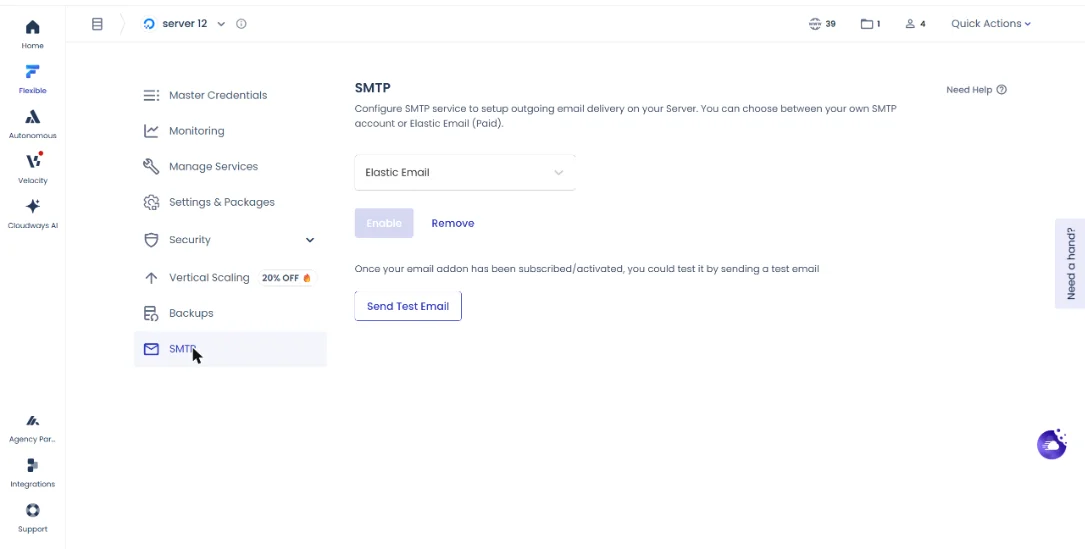
According to the product page, Elastic Email is priced by monthly sending volume: from $0.10 per month for 1,000 emails, $2.30 for 25,000, $15 for 100,000 and $57 for a million emails (as of 6 Nov 2026). One plan can be connected to several servers. The full Elastic Email setup and domain verification are in the Elastic Email guide, and a comparison of all email options is in email options on Cloudways.
A tip: if you already have Google Workspace or Microsoft 365, there is no reason to pay for Rackspace as well. Leave your mailboxes where they are, and use Elastic Email only for sending from the site.
What DNS Made Easy gives you
DNS Made Easy is a fast DNS provider that you can manage from the Cloudways platform, even if the domain is registered elsewhere. When is it worth it? When your domain registrar’s DNS interface is slow, restrictive or does not support the records you need.
According to the product page, the price is $0.50 per domain per month, and it includes 500,000 DNS queries per domain per month. Beyond that it is $0.10 per additional 100,000 queries, and Cloudways does not block or slow the service if you exceed it. You enable it through Integrations > DNS Made Easy > Get Started, add a domain (up to 10 at a time), and update the nameservers at your registrar. The full setup is in the DNS Made Easy guide.
Security and performance: Cloudflare Enterprise and Malware Protection
These two add-ons add layers that do not exist on the basic server.
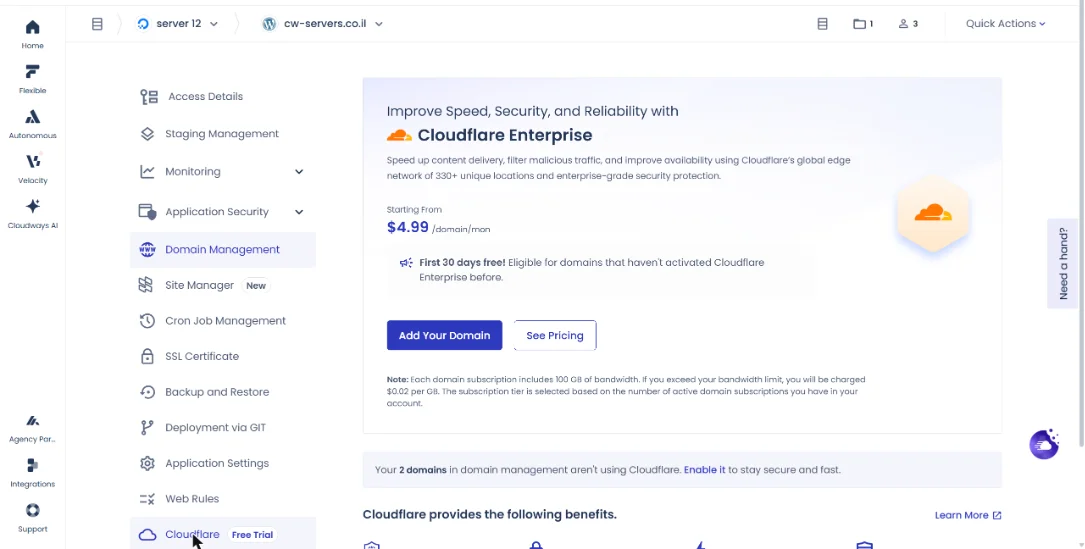
Cloudflare Enterprise adds a global CDN, page caching at the network edge (Edge Page Caching), smart routing and an enterprise firewall. According to the product page, the price starts at $4.99 per month, including a 30-day trial and 100GB of bandwidth, and beyond that $0.02 per GB. The price depends on the number of domains (fewer than 5, 5 to 9, 10 to 24, 25 and above), and you see the exact price for each tier on the add-on page. It integrates with Breeze with no configuration. Details in the Cloudflare Enterprise guide.
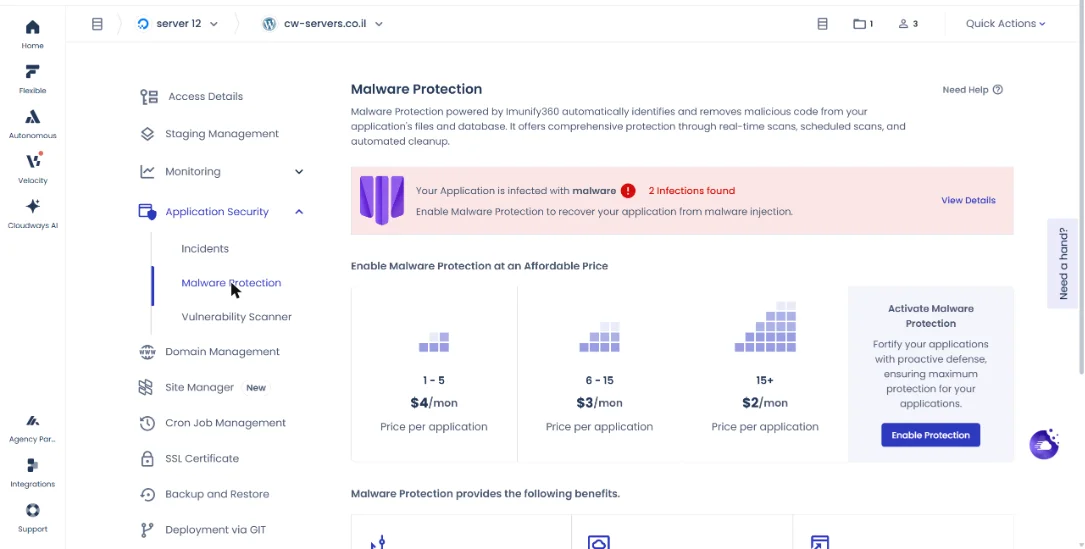
Malware Protection scans and cleans malware automatically, based on Imunify360, and includes phishing protection for the system and the database. The price is per application per month: $4 for 1 to 5 applications, $3 for 6 to 15, and $2 for 16 and above. Details in the Malware Protection guide.
Management and support: Site Manager, extended support and team services
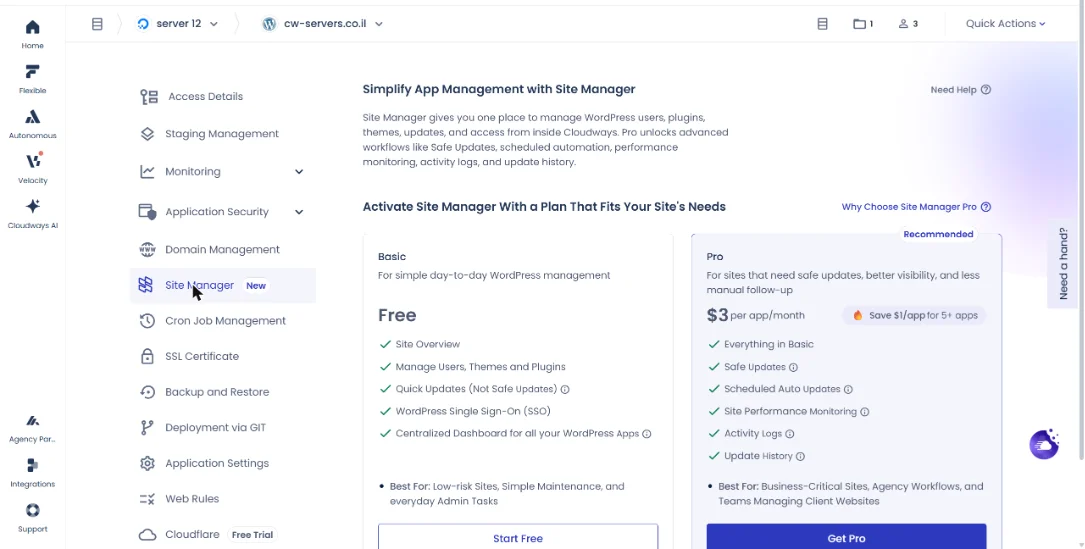
Site Manager brings the management of your WordPress sites into one dashboard: monitoring, managing multiple sites, safe updates, visual regression tests and SSO. SafeUpdates, which used to be sold separately, is now included in the Pro plan of Site Manager. The explanation of safe updates is in the SafeUpdates guide.
Support Add-ons (Advanced and Premium) give you queue priority and access to senior engineers, from $100 per month. As of 6 Nov 2026 the Cloudways pricing page shows a temporary 75% discount on Advanced Support with no end date, so the actual price may be lower than listed. Check in the platform before you enable it. Standard support is available 24/7 on all plans, so the add-on mainly suits a business whose site is critical and that has no permanent developer. Before you upgrade, it is worth knowing how to file a ticket properly; see how to contact Cloudways support.
Application Upgrade (from $50 per month) is a service where the team performs core updates for you. Application Migration moves a site from another host: according to the add-ons page, free for WordPress and WooCommerce, and $99 per migration for other applications. See free site migration to Cloudways.
How to enable an add-on
- In the platform’s side menu click Integrations, then View All.
- In the list of Add-Ons, choose the add-on.
- Choose a plan or quantity (for example the number of mailboxes or email volume) and click Subscribe or Get Started.
- Complete the setup the add-on requires: usually domain verification with DNS records, or connecting it to a server (for example Elastic Email on the server’s SMTP screen).
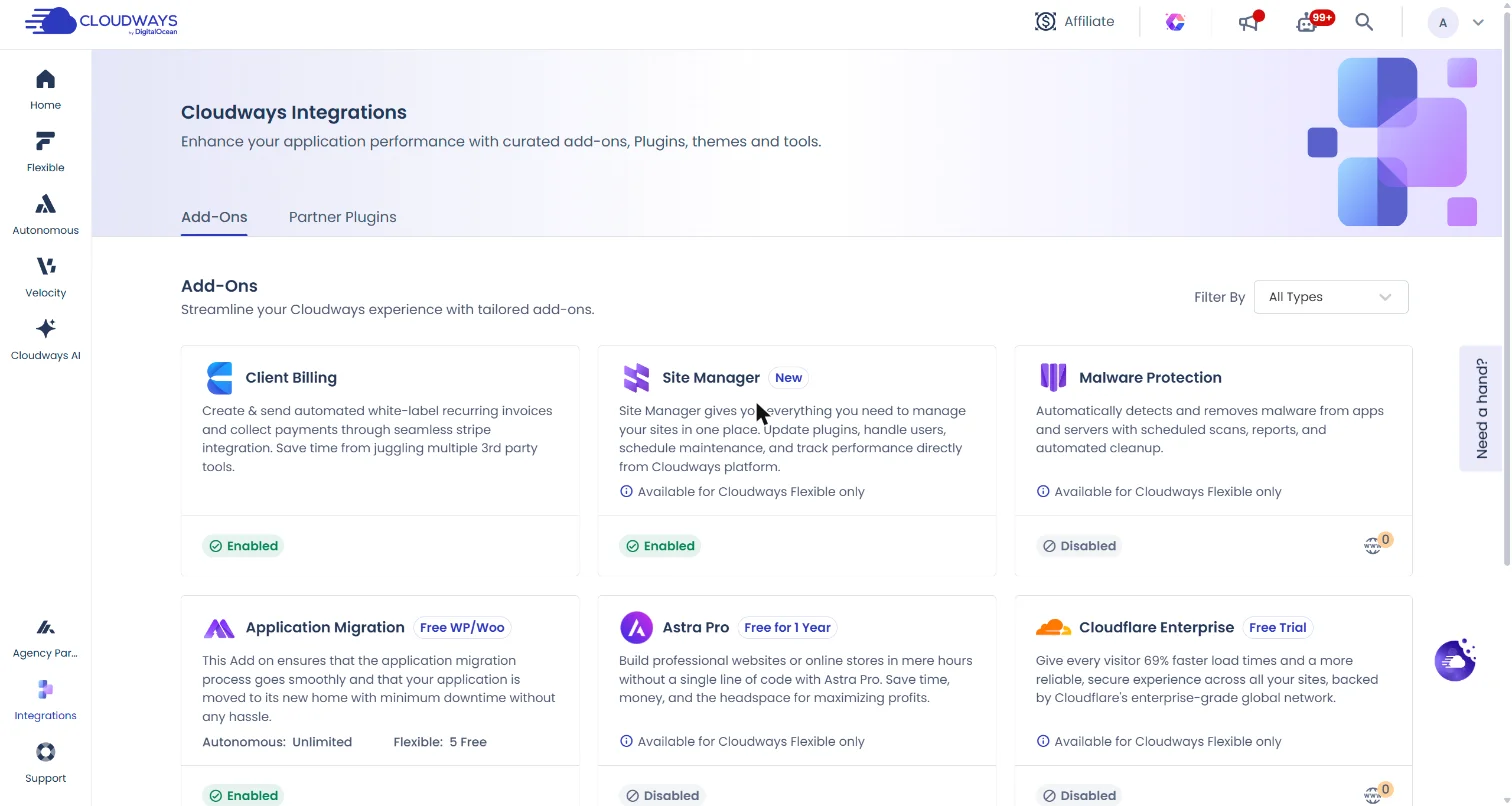
Application-level add-ons, such as Cloudflare Enterprise and Malware Protection, are usually enabled from the application screen. A team member who enables an add-on needs the right permissions, including billing; see team members and permissions.
How add-ons are billed, and how to stop
All add-ons go on your Cloudways invoice, next to your servers. A breakdown of each line, downloading invoices and payment methods are covered in the guide to invoices and payment methods. According to the Cloudways documentation, tax is applied according to the billing country you set in your account. If the invoice matters for your bookkeeping, you can confirm with support before enabling an add-on.
Two important points about stopping billing:
- Deleting a server does not cancel add-ons. According to the FAQ on the pricing page, what actually stops billing is deleting the servers and canceling every paid add-on. You will get a final invoice for usage up to the day of cancellation. The full process is in how to cancel a server or account on Cloudways.
- Overage lines: a line like “DNS Made Easy (Excessive DNS Query Usage)” on the invoice means a domain went over 500,000 queries in the month. It is not a penalty, it is usage-based billing.
Did you get an email saying a domain was removed from an add-on?
This happens when another Cloudways user verifies ownership of the same domain, usually with a TXT record. Two common scenarios: you sold or transferred the domain and did not remove it from the add-on, or an agency that used to manage your site still held the domain in its account, and you have now moved it to your own account. Only that domain is removed; your other services are not affected. If the domain is still yours, add it to the add-on again and verify ownership.
When you do not need an add-on
To avoid paying for what you do not need:
- Do you have Google Workspace or Microsoft 365? You do not need Rackspace.
- Is free Cloudflare enough for you? You can connect it through DNS with no add-on; see Cloudflare CDN setup.
- Is the DNS interface at your registrar comfortable? You do not need DNS Made Easy.
- A small brochure site with one form? Free Gmail SMTP or the SMTP of a provider you already have will be enough.
- Do you have a developer who knows the site? The extended support add-on is less necessary.
The code BFCM802 takes 80% off your bill for the first two months (up to $200 off per month), including unlimited free site migrations. New customers only, and only until the offer ends.
The offer ends on December 4, 2026 at 23:59 (UTC+2).
Start with a free trial, no credit card. Enter the code at checkout and check that it shows up.
After Black Friday: 30% off for 3 months with the code ASAEL. On a large server (above about $444 a month) ASAEL already saves more today. BFCM802 vs. ASAEL calculator
Start a free trial server, no credit card. When you move to a paid plan, the code ASAEL takes 30% off your bill for the first three months.
The link fills in the code on the signup form. Just make sure it shows up.
Sources
This page is based on the following official documentation and pages:
- Cloudways Add-ons
- Which Email Add-on should I use (Cloudways Knowledge Base)
- How to activate the DNS Made Easy Add-on (Cloudways Knowledge Base)
- How to activate the Elastic Email Add-on (Cloudways Knowledge Base)
- Understanding domain removal notifications for add-ons (Cloudways Knowledge Base)
Frequently asked questions
No. Cloudways does not provide mail hosting servers. For mailboxes there is the Rackspace Email add-on, and for sending automated emails from the site there is Elastic Email or SMTP. You can also use an external provider such as Google Workspace.
According to the add-ons page, Rackspace Email starts at $1.50 per mailbox per month, as of November 2026. The mailboxes are meant for regular receiving and sending, not for bulk sending from the site.
No. You can enable only one sending add-on per server. If you need a different provider for a specific site, use a site-level plugin such as WP Mail SMTP.
No. To stop billing you need to delete the servers and also cancel every paid add-on. The last invoice will include usage up to the day of cancellation.
No. The server works without any add-on. Add one only when you have a defined need, such as mailboxes, an enterprise CDN or malware scanning.
Because another Cloudways user verified ownership of the domain, for example after a domain transfer or after finishing work with an agency. Only that domain is removed. If it is still yours, add it again and verify ownership.
Related guides
- Invoices and payment methods on Cloudways
- How to contact Cloudways support and open a ticket properly
- How to cancel a server or account on Cloudways and stop billing
- How to give access to a server: team members and permissions
- All guides on this topic: Cloudways account, team and billing
- What the server itself costs: Cloudways pricing
Official source: Cloudways Platform Add-Ons, Which Email Add-on Should I Use?, How to Activate the DNS Made Easy Add-on, How to Activate the Elastic Email Add-on, Understanding Domain Removal Notifications for Add-ons (Cloudways). Written and checked by Asael Dreyer · Updated: 6 Nov 2026
Disclosure: this is an independent site, not the official Cloudways site. Some links on this site are affiliate links: if you sign up through them we earn a commission, at no extra cost to you. Full details

