
Last updated: · By Asael Dreyer
Short answer: On Cloudways there is no root access to the server, but you do get SSH and SFTP and broad server settings from the platform. Every server gets one dedicated IP address, which stays the same when you scale the server up. Cloudways doesn’t host email on its servers, and offers email add-ons instead (Rackspace, SMTP). There is no cPanel, no name servers of its own, and no free hosting, only a trial period. The Cloudways FAQ below has the full answers, including what to do in each case.
Cloudways FAQ: what you get and what you don’t, in a quick table
These are the questions that come up most for people arriving from shared hosting. The answers are based on Cloudways knowledge base articles, as of November 2026.
| Question | Short answer | What to do instead |
|---|---|---|
| Root access | No | SSH and SFTP, and Settings & Packages in the platform |
| Dedicated IP | Yes, one per server | – |
| Email hosting on the server | No | The Rackspace add-on for mailboxes, SMTP add-ons for sending |
| cPanel or WHM | No | The Cloudways management platform, and SFTP or SSH for files |
| Cloudways name servers | No | DNS at your registrar, Cloudflare or the DNS Made Easy add-on |
| Free hosting | No, trial only | Free trial: 5 days on Flexible, 3 days on Autonomous |
| Free SSL | Yes | Let’s Encrypt in one click |
| Free migration | Yes, for WordPress and WooCommerce | Managed migration or the free Migrator plugin |
What access do you get to the server?
Why is there no root access, and what can you do instead?
root is the superuser on a Linux server, with permission to run any command and touch any file. Cloudways doesn’t give it out. Its explanation: the platform is a network of thousands of servers that are managed centrally, and every server runs tools that make that management possible. Root access would let you break them by accident, and then Cloudways couldn’t update, back up and secure the server.
What you do get: SSH and SFTP access with the Master Credentials or with per-application users, and the Settings & Packages area on the server. That’s where you change settings that usually require root: execution time, upload size, memory limit, time zone, plus PHP and database versions and Apache and NGINX settings. If a particular setting is missing, you can suggest it to Cloudways.
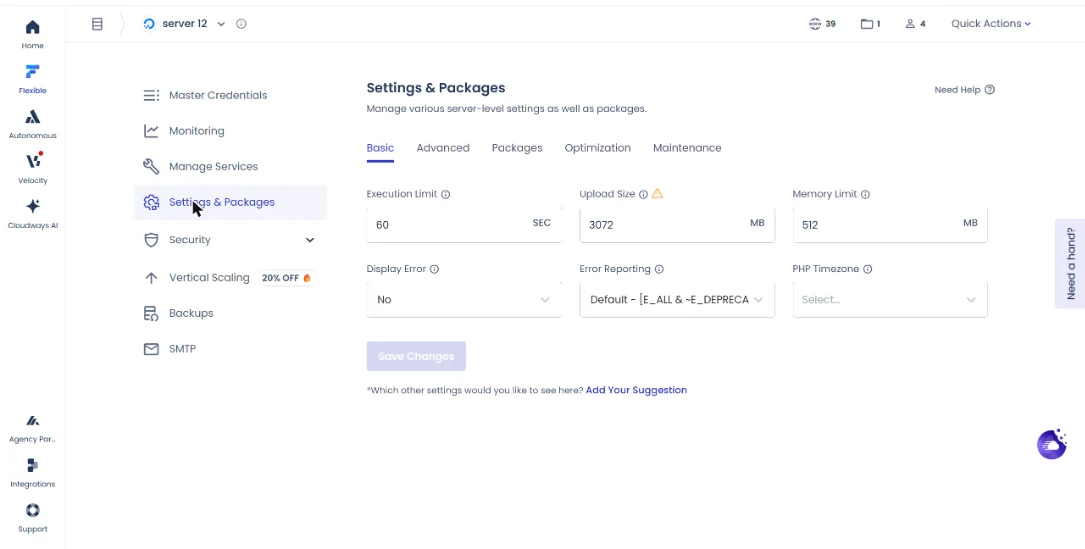
Who it’s a problem for: anyone who needs to install system software that isn’t in the platform, a special daemon or a custom kernel. In that case Cloudways is a poorer fit, and an unmanaged server is better.
Is there cPanel, WHM or a file manager?
There is no cPanel and no WHM. Cloudways has its own management platform, where you manage servers, applications, domains, SSL, backups and staging. There is no built-in file manager in the platform. You connect to files over SFTP (for example with FileZilla) or SSH, and the full explanation is in the guide to accessing files and the application folder. People used to cPanel usually adjust within a day or two. Missing cPanel? See why there is no cPanel on Cloudways and what you get instead.
How many sites can you put on one server?
On Flexible there is no hard limit, and it depends on the type of sites, the traffic and the server size. Cloudways’ example: a 2GB server holds 4–5 small sites with up to about 110 thousand page views a month combined. For stores (Magento, PrestaShop and the like), Cloudways recommends one site per server, or grouping them on larger servers. On Autonomous each plan holds one site.
Why is a server of at least 2GB recommended?
According to Cloudways, 1GB servers are meant mainly for testing and staging. For a live site, especially WordPress with plugins, 2GB gives headroom for cache, PHP and the database. If you started small, you can scale the server up without moving the site.
Is there a dedicated IP, DNS and name servers?
Does Cloudways give you a dedicated IP?
Yes. Every server, with every cloud provider, gets one dedicated IP address. The address stays the same when you scale the server up, so you don’t need to update DNS after scaling. The exception is cloning a server: cloning creates a completely new server, with a new IP address.
Note that the IP belongs to the server, not the site. All applications on the same server use the same address. If you need a separate address for a particular site, for example because of an allowed-IP list at a payment gateway, put it on its own server. On Autonomous the site sits behind Cloudflare Enterprise, and you connect it with the CNAME or A records the platform gives you.
Does Cloudways have name servers? Where do you manage DNS?
Cloudways has no name servers of its own for sites. It helps to understand the difference: the domain registrar is the company you bought the domain from, and DNS can be hosted at the same registrar or at another service. There are three common ways:
- On Cloudflare – point the name servers to Cloudflare and manage the records there.
- With the Cloudways DNS Made Easy add-on – you get DNS Made Easy name servers, update them at your registrar, and manage the records from the platform. This is a paid add-on.
Can you host email on a Cloudways server?
No. Cloudways doesn’t host email on its servers. This is the biggest difference from shared hosting, and you need to sort it out before you switch DNS. There are two different needs, and it’s best not to mix them up:
| Need | Solution on Cloudways | Notes |
|---|---|---|
| Mailboxes (info@, staff names) | The Rackspace Email add-on | You can also use Google Workspace or Microsoft 365 outside Cloudways |
| Sending email from the site (forms, orders) | An SMTP add-on: Elastic Email, Gmail/Google Workspace SMTP, or your own SMTP | The limit is inconsistent between Cloudways articles: about 100 emails a day according to the Gmail SMTP setup guide, and 500 (free Gmail) or 2,000 (Google Workspace) according to another article. Check Google’s policy before relying on high volume |
| Sending through an external provider | Custom SMTP with Mailgun, Mandrill, AuthSMTP and similar | You enable the SMTP add-on on the server |
If you currently have mailboxes with your existing hosting company, don’t change your MX records until the new mailboxes are ready. All the email guides are collected in the Cloudways email guides.
How do the account, the trial and billing work?
Is there free hosting?
No. There is a free trial period, 5 days on Flexible and 3 days on Autonomous, with no credit card, and after that you pay as you go. On Flexible the trial starts when you create the trial server, not when you sign up. Cloudways recommends upgrading to a full account before the trial ends. The details of the trial and the upgrade are in the guide to opening a trial account.
What do you pay for besides the server?
Backup storage (a small charge per GB per server), and any paid add-ons you enable, such as Cloudflare Enterprise and the SMTP and email add-ons. On AWS and Google Cloud, bandwidth also affects the bill. If you chose Block Storage on DigitalOcean, the price shown already includes the server and the storage together, so don’t add them up twice.
How do you pay, and what about invoices and VAT?
With Visa, MasterCard and American Express credit cards. PayPal is possible on request from support. Billing is in US dollars, and the invoice comes from Cloudways as a foreign company. Check with your accountant how to record it and how VAT applies to a service bought from abroad in your country.
The code BFCM802 takes 80% off your bill for the first two months (up to $200 off per month), including unlimited free site migrations. New customers only, and only until the offer ends.
The offer ends on December 4, 2026 at 23:59 (UTC+2).
Start with a free trial, no credit card. Enter the code at checkout and check that it shows up.
After Black Friday: 30% off for 3 months with the code ASAEL. On a large server (above about $444 a month) ASAEL already saves more today. BFCM802 vs. ASAEL calculator
Start a free trial server, no credit card. When you move to a paid plan, the code ASAEL takes 30% off your bill for the first three months.
The link fills in the code on the signup form. Just make sure it shows up.
Migration, support and what “managed” includes
Does Cloudways migrate sites for free?
Yes, in two ways. A managed migration by the Cloudways team, which is free for WordPress and WooCommerce sites (for other applications, such as Magento or Laravel, it is $99 per application as of November 2026, and some plans include a free quota), and the Cloudways WordPress Migrator plugin, which is completely free. The managed migration is available only after you upgrade from the trial. Every application gets a temporary address, so you can test the migrated site before you switch DNS. All the details are in the guide to the free Cloudways migration service.
What exactly does “managed hosting” include on Cloudways?
According to Cloudways, management is split into four layers:
- Managed server – operating system and security updates, firewall rules and managing the machines.
- Managed platform – launching servers and applications, starting and stopping, unlimited SSL certificates, staging, and changing PHP, MySQL, Apache and NGINX settings, including installing Redis and Elasticsearch.
- Application-level support – basic help: connecting domains, backup and restore problems, SSL installation and basic .htaccess changes. Deeper support is available in the advanced support add-ons.
- 24/7/365 support by chat and tickets, in English.
What isn’t included: development, fixing plugins and themes, and design. That stays with you or your developer.
More frequently asked questions
No. According to Cloudways, the address stays the same when you resize the server, so there is no need to update DNS. The address changes only when you clone a server, because cloning creates a new server.
No. Cloudways doesn’t give root on any plan, because the tools that manage the server have to work without interference. The alternative is SSH and SFTP, and the server settings in Settings & Packages.
You enable an SMTP add-on on the server, for example Elastic Email, Gmail or Google Workspace SMTP, or the SMTP of another provider such as Mailgun. That way emails go out through a reliable sending service and don’t fall into spam.
Yes. You can manage DNS on regular Cloudflare and point to the server with an A record, or enable the Cloudways Cloudflare Enterprise add-on. On Autonomous, Cloudflare Enterprise is already built in.
I found no option for support in other languages in Cloudways’ sources. The platform, the help articles and support are all in English. That’s what this site is for: step-by-step guides for every common task.
Support is available 24/7 by chat and tickets. According to the Autonomous product page, the first response time there is under a minute, as stated by Cloudways. For complex tickets, include screenshots and the exact server and application name.
Related guides
- A glossary of web hosting terms
- How to launch your first server and WordPress site on Cloudways
- Flexible or Autonomous: how to choose
- Cloudways Flexible: what it is and how to start
- How to open a free trial account on Cloudways
- All guides on this topic: getting started with Cloudways guides
Official source: Getting Started FAQs, Does Cloudways Provide Dedicated IP?, Does Cloudways Provide Servers for Email Hosting?, Why Can’t I Have Root Access to My Server? (Cloudways Knowledge Base). This guide was written and checked by Asael Dreyer · Updated: 6 Nov 2026
Disclosure: this is an independent site, not the official Cloudways site. Some links on this site are affiliate links: if you sign up through them we earn a commission, at no extra cost to you. Full details

