
Last updated: · By Asael Dreyer
Short answer: you contact Cloudways support from inside the management panel: live chat 24/7 for quick questions, or a support ticket for problems that need investigation. Email doesn’t work. Basic support (Standard) is free and covers the server and the platform, not your code or plugins. The official target for a first response is up to 12 hours. In practice, the ticket I opened on 6 Nov 2026 was answered in about 4 hours, and my technical tickets in 2026 got a first reply in anywhere from 21 minutes to 4 hours.
What is the difference between chat and a ticket, and when should you use each?
Both routes reach the same team, but they are built for different kinds of problems.
Live Chat is a real-time conversation with an agent. It is great for “how do I” questions, a quick check (“is my server down?”) and simple requests. According to the support page, a basic-support chat that isn’t resolved within 15 minutes is automatically turned into a ticket.
One thing to note: when I tested on 6 Nov 2026, the chat widget only loaded after I accepted Functional cookies in the cookie banner. If you rejected non-essential cookies, you may not see the chat at all until you change that setting and refresh the page.
A Support Ticket is a written request that is saved with a number, a history and attachments. It suits a problem that needs investigation: recurring 500/502 errors, performance, email problems, a request to enable a PHP module or change a server-level setting. The advantage is that everything is documented, and you can return to the thread a week later.
| Situation | What to choose |
|---|---|
| A question about a feature or setting | Chat |
| The site is down right now | Chat, and if it isn’t resolved, a high-priority ticket |
| A problem that comes and goes | Ticket, with exact times and examples |
| A server change request (a module, a special setting) | Ticket |
| A billing problem or a blocked account | Ticket to the billing team |
| “I’ll just email them” | Doesn’t work. See what happened when I emailed support |
Before you open a request, it’s worth trying two self-service tools: the Cloudways Knowledge Base, and Cloudways Copilot, which analyzes server problems and suggests a fix. Often that saves you the wait.
What does Cloudways support cover, and what doesn’t it?
This is the part that confuses people most. Support for a managed server is not “someone who will fix my website”.
| Topic | Standard (free) | Advanced / Premium |
|---|---|---|
| Setting up servers and applications, cloning, scaling | Yes | Yes |
| Domains, Let’s Encrypt SSL, backups | Yes | Yes |
| SFTP/SSH connection problems | Yes | Yes |
| Managed migration to Cloudways | Yes | Yes |
| Configuring Breeze and CloudwaysCDN | Yes | Yes |
| Problems with the cloud provider (launching, starting, scaling) | Yes | Yes |
| Troubleshooting plugins and themes | No | Yes |
| Investigating server errors (500, 502, 503) and database problems | Guidance only | Yes |
| Performance and database optimization | No | Yes |
| Server tuning (extra PHP packages, Nginx/Varnish settings) | No | Yes |
| Dedicated account manager | No | Yes |
| Private Slack channel and phone support | No | Premium only |
Some things aren’t included at any level: changing a site’s content or design, changing how a plugin works, debugging custom code, application-level security issues, code review, updating plugins and themes (though they will help you find the cause of a failed update), SEO, and migrating a site away from Cloudways to another provider. Broadly: anything that requires editing code on your site.
How long does a reply take, and how do the support levels differ?
With free support, the first-response target for a ticket is up to 12 hours. The data comes from the official support page, as checked on 6 Nov 2026:
| Level | Price | Chat | Ticket: first response | High-priority ticket |
|---|---|---|---|---|
| Standard | Free, included with every account | 24/7, turns into a ticket after 15 minutes | Up to 12 hours | Up to 3 hours |
| Advanced | $100 per month or 10% of the invoice (whichever is higher) | 24/7 with senior staff, turns into a ticket after 30 minutes | Up to 6 hours | Up to 30 minutes |
| Premium | $500 per month or 10% of the invoice (whichever is higher) | 24/7, no time limit | Up to 2 hours | Up to 10 minutes |
A few more details from the page: the Advanced and Premium add-ons require a commitment of at least six months, are billed monthly, apply to the whole account (not a single server), and are available only on a paid account, not during the free trial. You activate them by contacting the team, and activation usually takes 24 to 48 hours.
The list price of Advanced is $100 per month. The support page also showed a temporary “Limited Time Offer” (checked on 6 Nov 2026 and again on 7 Nov 2026): a saving of $75 per month, that is 75% off, $25 per month instead of $100, worded as “for life”, running alongside the Black Friday campaign. An offer like this can end at any moment, so check the current price before you decide, and don’t plan a budget around the discounted price.
Cloudways publishes an average chat response time of 90 seconds and a customer satisfaction score (CSAT) of 95%. These are the vendor’s own figures and I haven’t verified them independently. The time to a full resolution depends on how complex the problem is.
How do you open a ticket on Cloudways, step by step?
You open a ticket only from inside the management panel, using the form in the ticketing system. This is how I did it on 6 Nov 2026:
- Sign in to the Cloudways management panel.
- Click the support icon (the question mark) to open the Support Center.
- Choose Create a Ticket.
- The form opens in a new tab at tickets.cloudways.com (the Cloudways ticketing system).
- Fill in the fields (details in the next section), write a full description and attach files.
- Submit. The ticket number appears immediately, with the status Open.
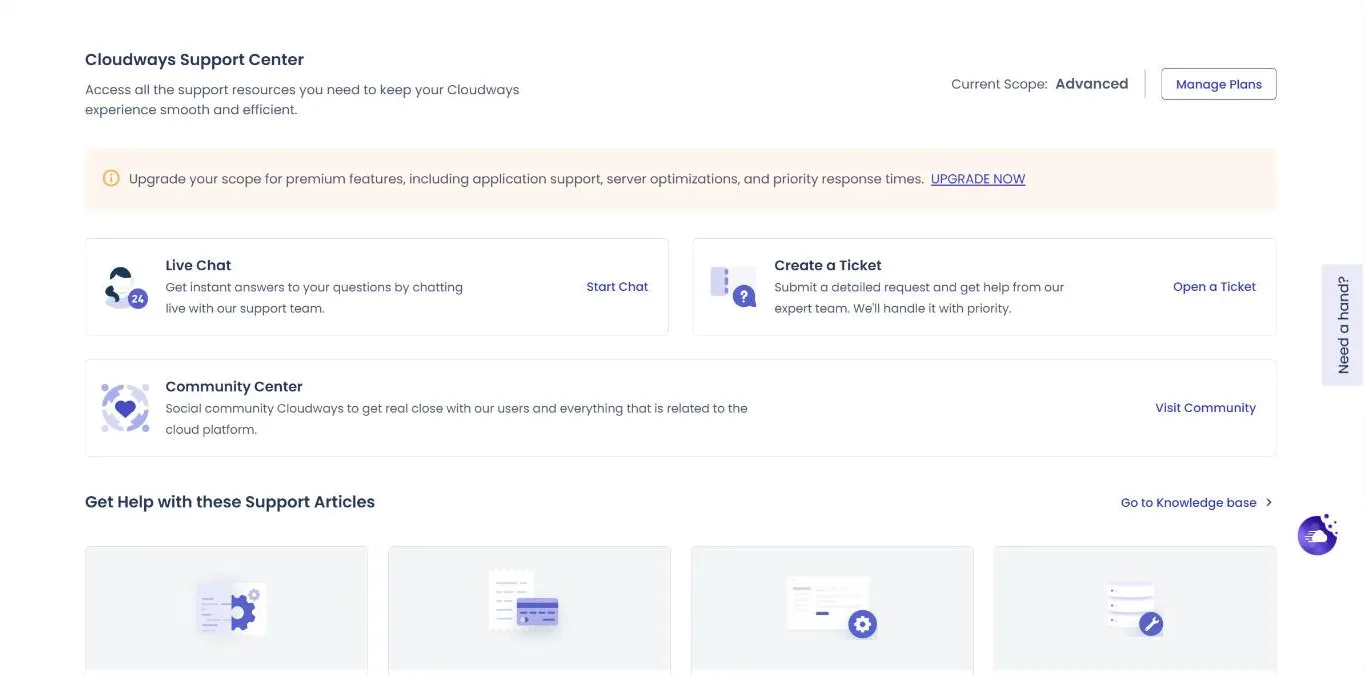
The official guide describes the route a little differently: the Need a hand? widget, then Support Ticket, then Submit a request in the portal. Both routes lead to the same “Submit a request” form in the ticketing system.
If you are a team member on someone else’s account, agree on who opens the ticket and who follows it, so the reply doesn’t only reach the person who isn’t handling the problem.
What did I find when I contacted support (6 Nov 2026)?
On 6 Nov 2026 I contacted Cloudways support in two ways, by email and through the form. Only the form worked. These are the findings, from my own account:
- Email doesn’t open a ticket. I sent an email to support@cloudways.com. Within minutes an automatic reply came back from Zendesk: there was a problem submitting the request by email, and I should sign in to the panel and use Create a Ticket. The full story is in the guide on opening a ticket by email.
- The form worked immediately. I opened it through Support Center > Create a Ticket and got a ticket number with the status Open right on submission. The request was about blocking AI bots on my servers. The reply came in about 4 hours (7 Nov 2026), and the block was removed on all four servers in the account.
- The IP field accepts a single address only. I tried to enter several server IP addresses and the form rejected it. The workaround: the IP of the main server in the field, and the other servers (name and IP) in the description.
- Chat depends on cookies. The chat widget only loaded after I accepted Functional cookies.
These are the fields I saw in the form, and what is worth writing in each:
| Form field | What I saw | Tip |
|---|---|---|
| Product | The product type: Flexible, Autonomous and others | Pick the product the problem server runs on |
| Department | For example Technical Support | Billing goes to a different department, don’t mix them |
| Topic | For example Website/Application Errors | The topic routes the request, so pick the most precise one |
| Subject | A free-text subject line | The problem + the server, for example: 403 for ClaudeBot on all apps |
| Description | Free-text description | Use the template in the next section |
| Priority | Priority level | High priority only for a problem that takes a site down |
| first time reporting | A yes/no question: is this the first time you are reporting it | If there is an earlier ticket, mention its number in the description |
| Server IP | One IP address only | Other servers go in the description |
| Application name | The application name | The name as it appears in the panel, not the site URL |
How long did Cloudways support actually take to answer me?
In all of my technical tickets in 2026 that I measured, the first human reply arrived within 21 minutes to 4 hours, far below the 12-hour target for free support. Full resolution is a different story: sometimes several days and several rounds of replies. These figures come from real tickets in my account, based on the timestamps in the emails, so they are rounded.
| Date | Topic | First reply | Outcome |
|---|---|---|---|
| 6 Nov 2026 | nginx block on AI bots | About 4 hours | Resolved |
| 3 Oct 2026 | OPcache and blocked bots | About 1.3 hours | Resolved after about 4 rounds over 4 days |
| 2 Oct 2026 | OPcache on a second server | About 1.5 hours | Resolved |
| 30 Sep 2026 | MariaDB restarts | About 50 minutes | Resolved |
| 25 Sep 2026 | OPcache and memory pressure | About 3.3 hours | Resolved |
| 23 Sep 2026 | Repeated MariaDB restarts | About 21 minutes | Partial |
| 8 Feb 2026 | A client site hacked through wp-file-manager (from chat to ticket) | Chat within minutes, fix about 13.5 hours after escalation | Resolved |
| 4 Jan 2026 | A failed migration | Chat within minutes, ticket about 1.3 hours | Closed automatically |
| 20 Oct 2025 | A panel bug blocked file downloads | About 5 minutes | Resolved after about 5 hours |
| 30 Jun 2025 | An Object Cache Pro problem | About 4.6 hours | Partial (waited for a platform fix) |
| 2021–2025 (about 14 requests) | DNS records for the Rackspace add-on (automated) | 1–10 minutes | Instructions from a template |
| 28 Mar 2024 | A backup failed because of load | About 3.8 days (a request I initiated) | Closed automatically |
| 2025–2026 (about 7 alerts) | Full disk, failed backups and MySQL disruptions | Automated message | Closed automatically with no resolution |
What I learned from the table: chat answers within minutes, and when the problem needs the technical team, it becomes a ticket. The first reply is fast, but problems that need a server change (OPcache, nginx) were only closed after several rounds. When the problem sits with a third party, such as Rackspace or Elastic Email, the time stretches: about 15 hours to get an answer from Rackspace in one of my 2024 tickets.
The automatic closing cycle: if a ticket goes unanswered, reminders arrive, and after them the ticket moves to the Solved status. Replying by email to such a ticket reopens it. Several of my tickets were closed this way with no resolution, just because I didn’t get back to them in time.
An email from an address that isn’t registered on the account is rejected. In three cases in 2026 I emailed support and got an automatic rejection instead of a ticket. The details are in the guide on opening a ticket by email.
What did Cloudways support actually do for me, and what didn’t it do?
Support fixes server settings you have no access to, but it won’t clean up your disk, your code or malware for you. This is the summary from the tickets in my account, 2023–2026:
| What I asked for | What support did | Guide with the details |
|---|---|---|
| Removing the nginx block on AI bots | Removed it on all four servers, within about 4 hours (Nov 2026) | Blocking AI bots |
| OPcache that was full and wouldn’t update from the panel | Fixed the PHP 8.4 configuration file and increased OPcache (Sep–Oct 2026) | Full OPcache in WordPress |
| Repeated MariaDB restarts | Found the OOM killer, increased swap from 2GB to 4GB, and cut idle PHP-FPM processes from about 112 to 3 (Sep 2026) | MariaDB restarts |
| A hacked client site | Identified the wp-file-manager plugin, removed it and reported to Imunify360, about 13.5 hours after escalation (Feb 2026) | The wp-file-manager hack |
| Full disk and failed backups | Only an automated alert: “free up space or upgrade the server”. Most requests were closed automatically with no resolution | Full disk and inodes |
| Malware cleanup | In 2023 it declined to clean and recommended Sucuri. In 2025 the cleanup went through a paid add-on | Malware Protection |
The takeaway: a platform-level problem (nginx, PHP settings, memory) gets solved with a ticket. A problem that comes from the site itself, like a disk that keeps filling up or a compromised plugin, stays your responsibility. Support will help you find the source, not clean it up.
How do you write a ticket that gets solved with the first reply?
Most of the time lost with support goes on back-and-forth over missing details. A good ticket answers in advance every question the agent is going to ask. Write in English: the support page and forms are in English, and I found no mention of support in other languages. You don’t need perfect English, just precise details.
What must be included:
- The server name and the application name as they appear in the panel, and the site URL. For several servers, put each on its own line.
- What happened and what you expected to happen, one sentence each.
- When: date and time, preferably in UTC. That way the agent finds the right line in the logs.
- How to reproduce it: the page URL, the action you took, and the exact error (copied, not described). For a problem related to the server’s response, paste the output of
curl -I: it shows the response code and the headers. - What you already tried: clearing the cache, restarting a service, disabling a plugin.
- A screenshot of the error.
- Whether changes are allowed on the live site (for example disabling plugins for testing), or whether they should work on staging.
Don’t write passwords in a ticket. If the agent needs WordPress access, create a temporary user for them and delete it afterwards.
A sample template, to copy and fill in:
Server: my-server-name | Application: my-app-name
URL: https://example.com/checkout/

Issue: Since 05.11.2026 around 14:00 UTC, the checkout page
returns "502 Bad Gateway" for about 1 in 5 requests.
Expected: Checkout loads normally.

Steps to reproduce: Add any product to cart > go to /checkout/.
What I tried: Purged Varnish, restarted PHP-FPM, disabled the
caching plugin. No change.
Screenshot and curl -I output attached.

Other affected servers (the form takes one IP only):
- my-second-server (IP in the panel)

You may disable plugins for testing on the staging app
(my-app-staging), not on live.
Two lines that explain “what, where, when and what I tried” are worth more than a long paragraph about how urgent it is.
Special requests: billing, a blocked account and server changes
- Billing and payments: card problems, an unrecognized charge or a refund request are handled by the billing team. Details on what to attach are in the guide to invoices and payment methods.
- An account locked for suspicious activity: reviewed by the Trust & Safety team. Include the registered email address and a phone number.
- PHP or Apache modules that aren’t enabled by default: you can request them in a ticket, and support will check whether it’s possible.
- A server-level block you didn’t set up: for example a 403 for certain bots. Only support can change the platform’s nginx settings. Mine was handled in a single ticket, in about 4 hours. See how I checked and asked for the AI bot block to be removed.
- Requesting to cancel an account: you can do most of it yourself from the panel. See the guide to cancelling an account and servers.
- Managed migration: you request it from the panel. According to the support page, WordPress and WooCommerce sites of paying customers are migrated for free.
The code BFCM802 takes 80% off your bill for the first two months (up to $200 off per month), including unlimited free site migrations. New customers only, and only until the offer ends.
The offer ends on December 4, 2026 at 23:59 (UTC+2).
Start with a free trial, no credit card. Enter the code at checkout and check that it shows up.
After Black Friday: 30% off for 3 months with the code ASAEL. On a large server (above about $444 a month) ASAEL already saves more today. BFCM802 vs. ASAEL calculator
Start a free trial server, no credit card. When you move to a paid plan, the code ASAEL takes 30% off your bill for the first three months.
The link fills in the code on the signup form. Just make sure it shows up.
Common mistakes when contacting support
Sending an email and waiting: an email to the support address gets an automatic reply and no request is opened from it. Open a ticket from the panel.
“The site isn’t working”, with no details: the agent will start with questions, and each round can take hours. Use the template above.
Trying to fit several IPs in one field: the form rejects it. One address in the field, the rest in the description.
Opening several tickets about the same problem: it doesn’t speed things up, it just splits the information between agents. Add information to the existing ticket.
Asking support to fix a plugin or code: that is out of scope for basic support. Ask instead for help finding the source of the problem (logs, which process is using resources), and fix it yourself or with a developer.
A team member doesn’t know a ticket was opened: tell them the ticket number, so a duplicate isn’t opened.
Forgetting to state the time zone: “at three in the afternoon” could be your local time or UTC. Write the time in UTC.
Frequently asked questions
I found no mention of support in other languages on the official support page, and the forms and documentation are in English. Write in English. Basic English with precise details is enough, and the template in this guide helps you write a clear request.
No. On 6 Nov 2026 I emailed support@cloudways.com and within minutes got an automatic reply saying the email submission failed and asking me to use Create a Ticket in the panel. You open a ticket only from the panel, or you use chat.
Only with the Premium Support add-on, which costs $500 per month or 10% of the invoice, whichever is higher. Free basic support offers live chat and tickets, 24/7.
With basic support, the first-response target is up to 12 hours, and up to 3 hours for a high-priority ticket. In chat, according to Cloudways, the average response time is about 90 seconds. The time to resolution depends on the problem.
Probably because of cookies. In my test the chat widget only loaded after I accepted Functional cookies. Change the cookie setting on the site and refresh the page.
Not with basic support. It handles the server and the platform. With Advanced and Premium, the engineers help you find conflicts in plugins and themes and suggest a fix, but they don’t edit custom code.
Yes, chat and tickets are available during the trial too. The Advanced and Premium add-ons are available only after you move to a paid account, and require a commitment of at least six months.
Related guides
- Can you open a Cloudways ticket by email? What happened when I tried
- Blocking AI bots on Cloudways: what I measured and how to ask for removal
- Invoices and payment methods on Cloudways
- How billing works on Cloudways
- How to cancel an account and servers on Cloudways
- How to give a team member access to a server
- The Cloudways affiliate program · Program rules: what is and isn’t allowed · Building a hosting affiliate site
- All guides on this topic: Account, billing and support
- What it costs: Cloudways pricing · The full picture: Cloudways review
Sources: How to Create a Support Ticket (Cloudways Knowledge Base), Cloudways Support (checked 6 Nov 2026), the Submit a request form in the ticketing system (requires sign-in), and the tickets I opened myself in my account between 2021 and Nov 2026, based on the timestamps in the emails. Written and checked by Asael Dreyer · Updated: 7 Nov 2026
Disclosure: this is an independent site, not the official Cloudways site. Some links on this site are affiliate links: if you sign up through them we earn a commission, at no extra cost to you. Full details

