
Last updated: · By Asael Dreyer
Short answer: Cloudways servers don’t have a mail server, so an email setup for your site covers two separate needs. For your site to send automatic emails (order confirmations, password resets, forms), you connect a sending service: Cloudways’ Elastic Email (tiered by monthly volume, from $0.10 a month), or an external SMTP provider such as Gmail, SendGrid or Mailgun through the free Custom SMTP add-on. To send and receive regular email at an address like info@yourbusiness.com, you need a mailbox: Rackspace through Cloudways ($1.50 per mailbox per month, as of November 2026), or Google Workspace and Microsoft 365.
If you plan to forward emails automatically between mailboxes, it’s worth knowing the limits on Rackspace email forwarding.
Which two kinds of email shouldn’t you mix up?
Most of the confusion around email on Cloudways comes from treating “email” as one thing. In practice there are two different services, and you usually need both.
Transactional email is email your site sends by itself in response to something a visitor did: a WooCommerce order confirmation, a password reset link, a notification that a contact form was submitted. Nobody writes it by hand, and nobody replies to it. What matters is that it lands in the right inbox, not in spam.
A mailbox is what you and your team open in the morning: an address on your domain that receives email, stores it, and lets you reply from Outlook, your phone or the browser.
Why not just send from the server? A cloud server is an IP address the big mail providers don’t recognize, and sometimes it already has a bad history. Email sent straight from it tends to land in spam, and some cloud providers (according to the docs, Vultr and Google Cloud) block port 25 by default. That’s why Cloudways recommends sending through a dedicated external service, whose reputation, along with your verified domain, decides whether the email arrives.
The four options at a glance
| Solution | What it gives you | Cost (as of 11.2026) | Best for |
|---|---|---|---|
| Elastic Email (Cloudways add-on) | Sending from the site: transactional and marketing, with logs | Tiered by monthly volume, from $0.10 a month | Most sites and stores. Cloudways’ recommendation |
| Custom SMTP (the “Your Own SMTP” add-on) | Connects the server to your own sending provider: SendGrid, Mailgun, Gmail and others | The add-on is free, you pay the provider | Anyone already working with a sending provider, or who needs its features |
| Gmail SMTP (through Custom SMTP) | Sending through a Gmail or Google Workspace account | Free, with a low daily sending limit | A small brochure site with few forms |
| Rackspace Email (Cloudways add-on) | Real mailboxes on your domain, 25GB per mailbox | $1.50 per mailbox per month, billed daily | A business that wants team email, managed from the same account |
Two rules from the docs worth remembering: on each server you can enable only one sending add-on, Elastic Email or SMTP, not both. And the sending add-on is configured at the server level, so every application on that server sends through it.
Elastic Email: the default for sending from your site
Elastic Email is a sending service that Cloudways sells as an add-on. You enable it once on the server, verify your domain, and every email your site sends goes through it. You can connect one plan to several servers.
| Emails per month | Price per month |
|---|---|
| 1,000 | $0.10 |
| 3,000 | $0.30 |
| 5,000 | $0.50 |
| 12,000 | $1.10 |
| 25,000 | $2.30 |
| 50,000 | $8.00 |
| 100,000 | $15.00 |
| 1,000,000 | $57.00 |
The price is set by the monthly volume tier. These are list prices as of 6 Nov 2026, and they may change. Prices for the other add-ons are collected in the Cloudways add-on pricing guide. The table is abbreviated: there are more tiers between these values, and you’ll find all of them on Cloudways’ add-on page.
Pros: very cheap, managed from the same account and the same invoice, includes logs for the last seven days (sent, opened, bounced, marked as spam), and also supports marketing emails from the site. Cons: it isn’t a mailbox, and you can’t receive email with it. Domain verification is also required before sending, so you need access to the domain’s DNS.
The full setup, including the DNS records, is in the guide to verifying a domain in Elastic Email.
How do you connect your own sending provider with Custom SMTP?
The Custom SMTP add-on is free, and lets you enter the SMTP details of any provider on the server: SendGrid, Mailgun, Mandrill, Gmail or any other provider that gives you SMTP details. You’ll find it on the server under SMTP, in the Your Own SMTP option. For a comparison of Elastic Email with SendGrid, Brevo and Mailgun, see Elastic Email vs SendGrid, Brevo and Mailgun for WordPress.
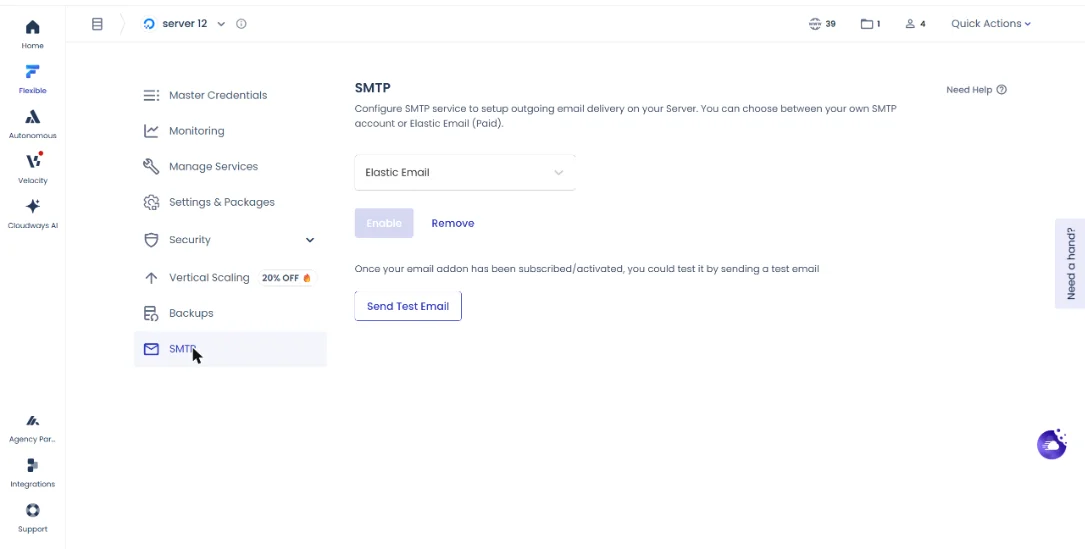
When it’s better than Elastic Email:
- You already have an account with a sending provider, with a domain reputation you’ve built up.
- You need a particular provider’s features: templates, webhooks, advanced analytics.
- You send volumes at which your provider is cheaper.
Note that the add-on itself is free, but you pay the external provider’s bill directly to them. Instructions for each provider, including Gmail, SendGrid and Mailgun, are in the guide to setting up SMTP on Cloudways.
What about free Gmail SMTP?
You can, and for a small site it works. You connect Gmail or Google Workspace through Custom SMTP with an app password. The limit is volume, and Cloudways’ articles disagree on it: the Gmail SMTP article (March 2026) mentions about 100 emails a day, while older articles mention about 500 a day on a free account and 2,000 on Google Workspace. Google sets the limit and it changes, so check the current numbers with them before you rely on them. To choose between providers, I recommend reading the comparison on business email with your own domain.
For a WooCommerce store it isn’t enough. One sale day with dozens of orders, plus account emails and password resets, can go past the quota, and then emails simply don’t go out. For a store, use Elastic Email or a dedicated sending provider.
How do you get mailboxes on your domain with Rackspace Email?
Rackspace is a business mailbox service that Cloudways sells and manages through the panel, with no separate subscription at Rackspace. According to the add-on page (checked 6 Nov 2026):
- Price: $1.50 per mailbox per month, billed daily, so you only pay for the days the mailbox is active. Aliases for an existing mailbox cost nothing.
- What you get: 25GB per mailbox, attachments up to 50MB, browser Webmail, secure IMAP/SMTP for Outlook, Gmail, Thunderbird and iOS Mail, contacts and a calendar in Webmail, spam and virus filtering, aliases and email forwarding (up to four addresses).
- Migrating existing mailboxes from another provider: a separate service, $10 per mailbox.
- Setup: enable the add-on under Integrations, then View All and Rackspace Email, add a mailbox, and update two MX records (mx1.emailsrvr.com and mx2.emailsrvr.com), an SPF record and an autodiscover record in the domain’s DNS. Cloudways support can help with DKIM.
Important: Rackspace isn’t suitable for bulk sending from your site. It has a rate limit on outgoing email, so even if you have Rackspace, you still need Elastic Email or SMTP to send from the site.
Rackspace vs Google Workspace and Microsoft 365
Many businesses already work with Google Workspace or Microsoft 365, and there’s no reason to switch. They work great with a site on Cloudways: the site sits on Cloudways (an A record), and the email is at Google or Microsoft (MX records). These are two separate records in the same DNS, and they don’t interfere with each other.
| Topic | Rackspace through Cloudways | Google Workspace / Microsoft 365 |
|---|---|---|
| Price | $1.50 per mailbox per month | Depends on the plan. Check the current price with the provider |
| What’s included | Email, Webmail, calendar and contacts | Email, plus a full productivity suite: documents, file storage, video meetings |
| Management | From the same Cloudways account, on the same invoice | A separate account and admin console |
| Best for | A small business that only needs email, or an agency managing email for clients | A business that already works in Google or Microsoft tools |
How to decide: three questions
- Does your site need to send email? Almost always yes (forms, orders, users). Then you need Elastic Email or SMTP. For a store or a site with users: Elastic Email. For a small brochure site with no budget: Gmail SMTP may be enough.
- Do you need an email address to receive and reply from? If you already have Workspace or 365, keep it. If not, and you only need email, Rackspace is the cheapest and simplest.
- How many sites are on the server? If each site needs a different sending provider, remember the add-on is at the server level. You can set a different provider per site through a WordPress plugin like WP Mail SMTP, instead of the server add-on.
A combination that works well for a typical small business: a WordPress site on Cloudways, Elastic Email for email from the site, and Google Workspace for the team’s mailboxes.
The code BFCM802 takes 80% off your bill for the first two months (up to $200 off per month), including unlimited free site migrations. New customers only, and only until the offer ends.
The offer ends on December 4, 2026 at 23:59 (UTC+2).
Start with a free trial, no credit card. Enter the code at checkout and check that it shows up.
After Black Friday: 30% off for 3 months with the code ASAEL. On a large server (above about $444 a month) ASAEL already saves more today. BFCM802 vs. ASAEL calculator
Start a free trial server, no credit card. When you move to a paid plan, the code ASAEL takes 30% off your bill for the first three months.
The link fills in the code on the signup form. Just make sure it shows up.
Moving from shared hosting: where is your email now?
Regular shared hosting (with cPanel or a similar interface) usually includes mailboxes on the same server. When you move to Cloudways, your email doesn’t come with you, because Cloudways has no mailboxes on the server. This is where the most people trip up.
- Before the move, check where your email lives today: open the DNS management at your registrar or DNS provider, and see where the MX records point.
- If the MX points to your old host’s server, you need to move the mailboxes before you cancel it: to Rackspace (Cloudways can do the migration for a fee), to Workspace or to 365.
- When you update the A record to Cloudways, don’t touch the MX. And if you’re moving all your DNS to Cloudflare, copy all the MX, SPF and DKIM records first.
The full details are in the guide to migrating from your current host and the guide to your domain’s DNS.
Common mistakes and how to fix them
Emails from the site land in spam: the From address doesn’t belong to a verified domain, or the SPF and DKIM records are missing. Verify the domain, and send from an address on your own domain, not gmail.com. The full explanation is in the guide to SPF, DKIM and DMARC.
Trying to enable Elastic Email and SMTP on the same server: you can’t. Choose one at the server level, or use an SMTP plugin in WordPress for a site that needs a different provider.
Expecting to receive email through Elastic Email: it only sends. To receive email you need a mailbox.
Two SPF records on the domain: after adding a sending service and mailboxes, you sometimes end up with two separate SPF records, which breaks both. You need to merge them into one record.
Sending from the site through Rackspace: its rate limit will stop large sends. Use it for mailboxes only.
Sources
- Cloudways Knowledge Base: Which email add-on should I use
- Cloudways Knowledge Base: How to activate the custom SMTP add-on
- Cloudways Knowledge Base: How to configure Gmail SMTP
- Cloudways Elastic Email
- Cloudways Rackspace Email Add-on
FAQ
Not on the server itself. Cloudways doesn’t provide mail servers, but it offers the Rackspace Email add-on for $1.50 per mailbox per month (as of November 2026). You can also connect Google Workspace or Microsoft 365.
Gmail SMTP is free, but limited to a small number of emails a day and only suits a small site. Among dedicated services, Cloudways’ Elastic Email starts at $0.10 a month for 1,000 emails, and rises by monthly volume (list prices, 6 Nov 2026).
No. You can enable only one sending add-on per server. If a particular site needs a different provider, set it up through an SMTP plugin in that site’s WordPress.
Yes, and it’s the usual setup. You only update the domain’s A record to the Cloudways server, and don’t touch Google’s MX records.
Because email from a cloud server without a verified sending service usually lands in spam, and some cloud providers block port 25. A sending service with a verified domain greatly improves the chance the email arrives.
No. It has a rate limit on outgoing email and is meant for regular correspondence. For newsletters use a dedicated mailing service, and for email from the site use Elastic Email.
Related guides
- How to set up SMTP on Cloudways: Gmail, SendGrid and Mailgun
- How to set up SPF, DKIM and DMARC
- Verifying a domain in Elastic Email
- How to set up the WP Mail SMTP plugin
- All guides on this topic: Email and message delivery
- The full picture: Cloudways website hosting
Official source: Which Email Add-on Should I Use?, How to Activate the Custom SMTP Add-on, How to Configure Gmail SMTP (Cloudways Knowledge Base), Elastic Email Add-on, Rackspace Email Hosting (checked 6 Nov 2026). Written and checked by Asael · Updated: 6 Nov 2026
Disclosure: this is an independent site, not the official Cloudways site. Some links on this site are affiliate links: if you sign up through them we earn a commission, at no extra cost to you. Full details

