
Short answer: Vultr or DigitalOcean on Cloudways? For a site with lots of dynamic pages (a store, a customer area, search) whose visitors are far from DigitalOcean’s regions, Vultr High Frequency usually wins: it has more than 30 locations in the panel versus about 10 for DigitalOcean, starting at $16/month for a 1GB NVMe server. DigitalOcean is the cheapest provider on Cloudways (from $11/month) and is more flexible when you want to scale a server back down. For a content site with good caching, DigitalOcean Premium in a nearby region such as Frankfurt is usually enough. Prices exclude taxes, as of November 2026.
What you’re actually choosing when you pick a cloud provider on Cloudways
On Cloudways, the cloud provider is the company that owns the physical server: DigitalOcean, Vultr, Linode, AWS or Google Cloud. Cloudways installs and manages the software on top of the server, so the panel, backups, staging and support are identical across providers.
The difference between providers is the infrastructure itself: price for each size, CPU and disk type, locations, included bandwidth, and how you scale the server up and down. That’s exactly what this page compares.
Vultr vs DigitalOcean: comparison table
Data from the official Cloudways price list and from checking the server launch screen on 6 Nov 2026. Prices are per month, before taxes.
| Topic | DigitalOcean | Vultr |
|---|---|---|
| Entry server (1GB) | $11 (Basic Standard, SSD) · $14 (Basic Premium, NVMe) | $14 (Standard, SSD) · $16 (High Frequency, NVMe) |
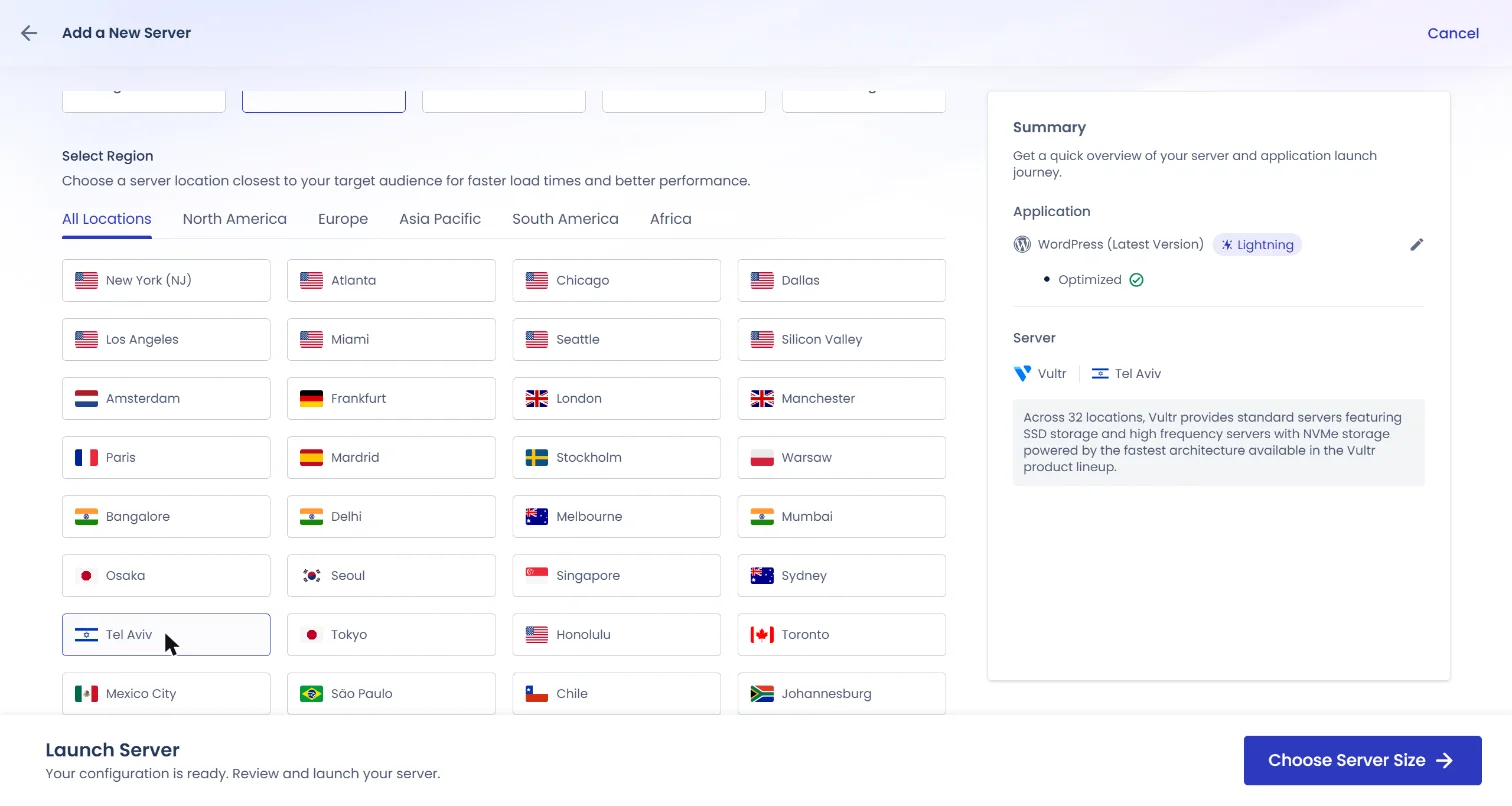
| Middle East location (Tel Aviv) | None | Yes (I saw it on the launch screen on 6 Nov 2026) |
| European locations | Frankfurt, Amsterdam, London | Several European locations |
| Number of locations in the panel | About 10 | More than 30 |
| Server types | Basic (Standard / Premium), General Purpose, CPU Optimized | Standard, High Frequency, General Purpose, CPU Optimized |
| Bandwidth included on a 4GB server | 4TB | 3TB |
| Bandwidth overage | $0.02 per GB | $0.01 per GB in North America and Western Europe. Not published for Tel Aviv |
| Scaling down | You can go back to the original size if you only scaled CPU and RAM | Scaling up is permanent. You can only downsize by cloning to a new server |
| Object Cache Pro | Included from a 4GB server | Included from a 4GB server |
| Free trial | Yes, 5 days on Flexible | Yes, 5 days on Flexible |
What does each server size cost?
The price depends on server size and provider, and these are the sizes most sites need. Linode is included for comparison because it’s the third low-cost provider on Cloudways.
| RAM | DO Basic Standard | DO Basic Premium | Vultr Standard | Vultr High Frequency | Linode |
|---|---|---|---|---|---|
| 1GB | $11 · 25GB SSD | $14 · 25GB NVMe | $14 · 25GB SSD | $16 · 32GB NVMe | $14 · 25GB SSD |
| 2GB | $24 · 50GB | $28 · 50GB | $28 · 55GB | $30 · 64GB | $28 · 50GB |
| 4GB | $46 · 80GB | $54 · 80GB | $54 · 80GB | $60 · 128GB | $59 · 80GB |
| 8GB | $88 · 4 vCPU | $99 · 4 vCPU | $99 · 4 vCPU | $118 · 3 vCPU | $105 · 4 vCPU |
Two important notes. DigitalOcean also has a Small+ plan at $37/month (2GB, 2 vCPU, 60GB NVMe), which appears on the pricing page cards. And on Vultr, an 8GB High Frequency server gives you 3 vCPU, not 4, so at that size it’s worth asking whether the faster disk is worth one less CPU. All the full tables: DigitalOcean pricing, Vultr pricing and Linode pricing.
When is a server close to your visitors worth it?
A server close to your visitors pays off when the site is dynamic, and location coverage is Vultr’s clearest advantage: with more than 30 locations, it often has a data center where DigitalOcean doesn’t (Tel Aviv is one example). A nearby server cuts latency for your visitors, which lowers TTFB, the time to first byte.
But you won’t feel the difference on every page. Pages that are cached and served through a CDN reach the visitor from a nearby edge server anyway. The difference shows on pages that are rebuilt every time: cart, checkout, search, customer accounts and the WordPress admin.
- A nearby Vultr location is worth it for: a WooCommerce store, a site with registration or a customer area, a booking system, or a site your team edits a lot from that region.
- A DigitalOcean region a bit further away is enough for: a brochure site, a blog, a content site with good caching, or a site whose audience is spread across many countries.
According to the official price list, Vultr’s price is the same in every location. The bandwidth overage price isn’t published for every location (Tel Aviv, for example), so if your site uses a lot of bandwidth (video, large files), ask support before you launch. A comparison of all locations is in my guide to Cloudways server locations.
CPUs and disks: Premium vs High Frequency
DigitalOcean Basic Premium uses 2nd- or 3rd-generation Intel Xeon Scalable CPUs, NVMe disks and up to 10Gbps networking, according to Cloudways’ DigitalOcean page. The difference from Standard is a few dollars a month, and for most sites it’s worth it.
Vultr High Frequency combines NVMe storage with faster CPUs, and according to Cloudways it’s the fastest architecture in Vultr’s lineup. On the smaller servers it also gives you more disk space than Standard at the same RAM size.
I’m not publishing speed benchmarks here, because the result changes with the site, the plugins and the location. The right way is to measure your own site, see below.
Scaling a server up and down: the difference people discover too late
Vertical scaling means moving to a server with more RAM and CPU. With both providers you do it from the panel, with a short downtime. The difference is what happens when you want to go back, according to the Cloudways knowledge base.
- DigitalOcean: you can scale only CPU and RAM, without the disk, and then go back to the original size (not below it). That’s ideal for a temporary boost before a sale. If you also scale the disk, the upgrade is permanent.
- Vultr: scaling up is always permanent. To downsize, you clone the server to a smaller one and move the domain. You also can’t upgrade a Standard server to High Frequency: that requires a clone too.
In practice: on Vultr, choose High Frequency from the start if you want it, and start at the size that fits your normal traffic, not your sale traffic. On DigitalOcean you can start small and scale up for busy periods.
The code BFCM802 takes 80% off your bill for the first two months (up to $200 off per month), including unlimited free site migrations. New customers only, and only until the offer ends.
The offer ends on December 4, 2026 at 23:59 (UTC+2).
Start with a free trial, no credit card. Enter the code at checkout and check that it shows up.
After Black Friday: 30% off for 3 months with the code ASAEL. On a large server (above about $444 a month) ASAEL already saves more today. BFCM802 vs. ASAEL calculator
Start a free trial server, no credit card. When you move to a paid plan, the code ASAEL takes 30% off your bill for the first three months.
The link fills in the code on the signup form. Just make sure it shows up.
How to compare them yourself, step by step
- Open a trial account and launch a 1GB Vultr High Frequency server in the location closest to your audience, with a WordPress application.
- Launch a second server: a 1GB DigitalOcean Basic Premium in DigitalOcean’s closest region (for example Frankfurt).
- Clone the same site (or install the same theme and plugins) on both servers.
- Measure TTFB from where your visitors are, several times at different hours, on the home page and on a dynamic page (cart or search).
- Test the admin too: how long it takes to save a post or edit a product.
- Delete the server that lost. Billing is hourly, so a test of a few days costs very little.
My recommendation by site type
| Site type | Recommended provider and server | Why |
|---|---|---|
| Brochure site or blog | DigitalOcean Basic Premium 1GB, nearest region | Cheap, NVMe, and most pages are cached |
| WooCommerce store with a regional audience | Vultr High Frequency 2GB–4GB, in the location closest to your customers | Checkout and cart are the pages most affected by distance |
| A store that spikes during sales | DigitalOcean Premium | You can scale CPU and RAM before the sale and go back afterwards |
| Agency with lots of small sites | DigitalOcean Premium 4GB, or Vultr HF near the clients’ audience | Unlimited sites on one server, Object Cache Pro included |
| A high-bandwidth site (video, downloads) | DigitalOcean or Linode | Generous included bandwidth and a known overage price |
What about Linode?
Linode (owned by Akamai) starts at $14/month for a 1GB server, the same as Vultr Standard. It has no Tel Aviv location, and it’s a little more expensive than DigitalOcean at the mid sizes. Its strength is generous included bandwidth on the big servers (for example 16TB on a 32GB server). For most sites, the choice is between the two providers on this page. Full details on the Linode on Cloudways page.
When neither one is a fit
If you have a regulatory or contractual requirement for data to sit with a specific cloud provider (AWS or Google Cloud), or you need those providers’ services, choose them, even at a higher price. And if you don’t want to manage a server at all and are looking for a service that scales itself under load, consider Cloudways Autonomous instead of Flexible. The general comparison of all the options is on the hosting comparisons page.
Black Friday deal: until 4 Dec 2026 Cloudways is offering 80% off the first two months with the code BFCM802, on any of the providers. Details on the Cloudways coupon page.
Frequently asked questions
For a site with lots of dynamic pages, like a store, Vultr High Frequency is better when it has a location closer to your visitors than DigitalOcean does. For a brochure or content site with good caching, DigitalOcean Premium is cheaper and usually enough.
As of 6 Nov 2026 I counted about ten DigitalOcean locations on the Cloudways launch screen, with Frankfurt, Amsterdam and London in Europe. It has no Middle East location; for a server in Tel Aviv you’d pick AWS, Vultr or Google Cloud.
No. According to the official Cloudways price list, the price is the same in every Vultr location. The bandwidth overage price isn’t published for every location (Tel Aviv, for example), so if your site uses a lot of bandwidth, ask support.
Premium uses NVMe storage and newer-generation Intel Xeon CPUs, and costs a few dollars more per month ($14 vs $11 for a 1GB server). For most sites the difference is worth it.
Yes, but not with one click. You clone the application to a new server on the other provider, test it, and move the domain. That’s why it pays to compare before you move the live site.
Not directly. According to the Cloudways knowledge base, scaling up on Vultr is permanent, and to downsize you clone to a smaller server. On DigitalOcean you can return to the original size if you only scaled CPU and RAM.
Yes. The 5-day Flexible trial includes DigitalOcean, Vultr and Linode, with no credit card. AWS and Google Cloud aren’t included in the trial.
Related guides
- DigitalOcean on Cloudways
- Vultr on Cloudways, including choosing a location
- Linode on Cloudways
- Server locations: which one to choose
- All guides in this area: cloud provider guides
Sources
- Cloudways Pricing
- Guide to Scale Servers on the Cloudways Platform
- Cloudways DigitalOcean Hosting
- Cloudways Vultr Hosting
Official sources: Cloudways Pricing, Guide to Scale Servers on the Cloudways Platform (Cloudways Knowledge Base), Cloudways DigitalOcean Hosting, Cloudways Vultr Hosting. Written and reviewed by Asael Dreyer · Updated: 6 Nov 2026
Disclosure: this is an independent site, not the official Cloudways site. Some links on this site are affiliate links: if you sign up through them we earn a commission, at no extra cost to you. Full details