
Short answer: Hostinger is the cheapest way to start a WordPress site: from $1.99 a month in its Black Friday promotion, but paid upfront for 48 months and on a shared server. Cloudways costs more to get in, $11 a month (DigitalOcean Standard), and in return gives you a private cloud server, monthly billing with no commitment, one-click scaling and a much wider choice of data center regions. For a small personal site on a minimal budget, Hostinger is enough. For a growing business, a store or several client sites, Cloudways is the safer choice.
Hostinger and Cloudways: two different price worlds
Hostinger is a large hosting company that sells shared hosting, managed WordPress hosting, cloud hosting and VPS servers. Its WordPress plans run on LiteSpeed servers, include email and a domain for the first year, and come with AI tools for building and maintaining a site. The low price comes in exchange for a long commitment and upfront payment. If your site has already outgrown Hostinger, read about Hostinger alternatives.
Cloudways doesn’t sell “hosting plans” in the usual sense. It manages a private cloud server for you on DigitalOcean, Vultr, Linode, AWS or Google Cloud, and you pay by server size, by the hour, with a monthly cap. Coming from Bluehost? Read Cloudways vs. Bluehost.
One concept worth knowing: shared hosting is one server running many customers’ sites, which is why it’s cheap. A private server allocates you CPU and memory that nobody else uses. That difference explains most of the gap in price and performance between the two.
Comparison table: Hostinger vs. Cloudways
| Topic | Hostinger (WordPress) | Cloudways (Flexible) |
|---|---|---|
| Hosting type | Managed shared; cloud and VPS sold separately | Private, managed cloud server |
| Entry price | $1.99/month (Premium, Black Friday promo price, checked 6 Nov 2026), $95.52 upfront for 48 months | $11/month (DigitalOcean 1GB), before taxes |
| Renewal price | $10.99/month for the same term | The same price every month |
| Commitment | Upfront payment for the whole term | None; hourly billing with a monthly cap |
| Sites | Premium: 3; higher plans: unlimited | Unlimited, within the server’s resources |
| Storage | 20GB SSD up to 100GB NVMe | 25GB on the smallest server and up |
| Backups | Weekly on Premium; daily on higher plans | Automatic at a frequency you choose, plus on demand, on every server |
| Included for the first year | Not included (Rackspace add-on or an outside provider) | |
| Data centers | Europe, Asia, the US and Brazil | Dozens of locations across five providers, covering North America, Europe, Asia-Pacific, the Middle East and Africa |
| Scaling resources | Move to a higher plan | Scale the server with a slider in the panel |
| Support | 24/7 | 24/7 via chat and tickets, in English |
| Trial / refund | 30-day money-back guarantee | 5-day free trial, no credit card |
As of 6 Nov 2026, based on Hostinger’s WordPress hosting page, its server locations article and the Cloudways pricing page. Hostinger is currently running a promotion, and prices may change.
What’s the real price: 48 months upfront vs. month to month?
At Hostinger, the monthly price on the banner is a split of an amount you pay upfront. Hostinger says so itself: every plan is paid upfront, and the monthly price is the total divided by the number of months.
| Plan | Paid today | Promo price per month | Renewal per month | What’s included |
|---|---|---|---|---|
| Hostinger Premium | $95.52 for 48 months | $1.99 | $10.99 | 3 sites, 20GB SSD, weekly backup |
| Hostinger (unlimited-sites plan) | $133.92 for 48 months | $2.79 | $16.99 | Unlimited sites, 50GB NVMe, daily backup, CDN |
| Hostinger Cloud Startup | $383.52 for 48 months | $7.99 | $25.99 | 100GB NVMe, daily and on-demand backups |
| Cloudways 1GB (DigitalOcean) | $11 at the end of the month | $11 | $11 | Private server, 25GB, 1TB transfer |
| Cloudways 2GB (DigitalOcean) | $24 at the end of the month | $24 | $24 | Private server, 50GB, 2TB transfer |
Let’s do the math fairly over four years. Hostinger Premium costs $95.52 for the whole term. A 1GB Cloudways server costs $528 over the same period. No argument there: for a small site, Hostinger is far cheaper. After four years, though, renewing Premium for the same term costs about $527, roughly the same as Cloudways.
The point isn’t only the price. At Hostinger you pay four years upfront for a plan chosen today. If the site grows six months in, you move to a more expensive plan. On Cloudways you pay for what you need this month, and change the server size when your needs change.
The code BFCM802 takes 80% off your bill for the first two months (up to $200 off per month), including unlimited free site migrations. New customers only, and only until the offer ends.
The offer ends on December 4, 2026 at 23:59 (UTC+2).
Start with a free trial, no credit card. Enter the code at checkout and check that it shows up.
After Black Friday: 30% off for 3 months with the code ASAEL. On a large server (above about $444 a month) ASAEL already saves more today. BFCM802 vs. ASAEL calculator
Start a free trial server, no credit card. When you move to a paid plan, the code ASAEL takes 30% off your bill for the first three months.
The link fills in the code on the signup form. Just make sure it shows up.
How do payment, currency and tax work?
Both companies charge in USD by credit card, so if your card is in another currency, your card issuer may add a conversion fee. Cloudways prices are shown before taxes, and at Hostinger it’s worth checking on the checkout page whether VAT or sales tax will be added for your country. If you buy as a business, ask your accountant how to record an invoice from a foreign supplier.
The practical difference is cash flow. At Hostinger, four years’ worth goes out in one go ($95.52 on Premium, $383.52 on Cloud Startup). On Cloudways, a small amount goes out each month, based on the hours the server ran: an $11 server is $11 a month before taxes. Full details are on the Cloudways pricing page.
Three common mistakes when choosing between them
Comparing $1.99 with $11: the first number is a promo price paid upfront for four years, the second is a fixed monthly price. Compare what you’ll actually pay over the whole term, including renewal.
Buying “too far ahead” for a site that hasn’t proven itself: if you’re not sure the project will last four years, a long commitment is a risk. On the other hand, if it does last and grow, you’ll probably need to upgrade plans halfway through.
Forgetting about email: moving from Hostinger to Cloudways means you need a new email provider. It’s half an hour of settings, but if you don’t do it before you cancel, the mailboxes disappear.
What’s the performance difference between shared LiteSpeed and a private cloud server?
Hostinger runs its WordPress sites on LiteSpeed servers with built-in caching, code minification and automatic image optimization. For a brochure site or a blog, that gives a very good result for the price. The cheapest plan suits small sites, and Hostinger itself recommends its cloud plans for high-traffic projects.
On Cloudways the caching is layered: Varnish or NGINX caching at the server level, Redis or Object Cache Pro for the database (Object Cache Pro is included on servers of 4GB and up), and the Breeze plugin. The main advantage isn’t the caching but the isolation: no other customer shares your CPU, and the graphs show you exactly how many resources your site uses.
Both companies publish their own speed tests, and each one wins its own test. That’s why I haven’t included numbers like that. The right way is to copy your own site to a trial server and measure both on the same day, from the same place.
What happens when your site grows
This is where the difference between the two is felt most. At Hostinger, more traffic means moving to another plan, and sometimes to another hosting type (cloud or VPS). On Cloudways you move a slider on the Vertical Scaling tab, and the server grows within minutes, with a short downtime.
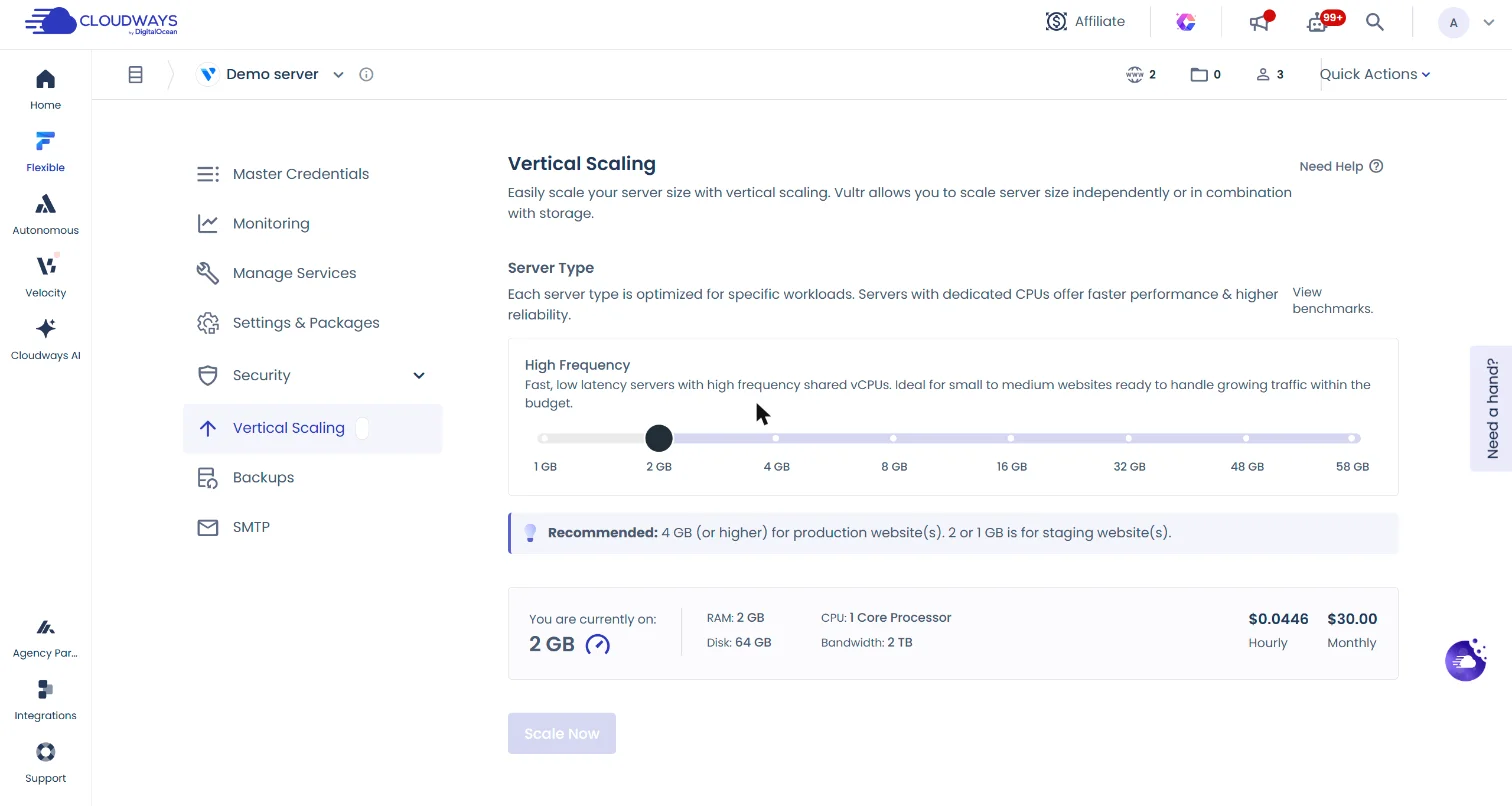
On DigitalOcean you can scale only CPU and memory and go back to the original size later, for example for a week of sales. Scaling that also includes disk is permanent. On Vultr every scale-up is permanent, and to downsize you have to clone the server to a smaller one. That’s how the Cloudways knowledge base describes it as of November 2026.
Server location and what it means for your visitors
According to Hostinger’s support article, its hosting and cloud plans are available in France, Germany, Lithuania, the Netherlands and the UK, in India, Indonesia and Malaysia, and in the US and Brazil. Hostinger notes that the list varies by plan and that the list shown in the panel at setup is the one that counts.
Cloudways covers those regions and several Hostinger’s list doesn’t, such as Canada, Japan, Singapore, Australia, South Africa and the Middle East. On DigitalOcean, Vultr and Linode the price is the same in every location; Google Cloud and AWS need an upgraded account and cost more. As always, the list on the server launch screen is the one that counts.
Tools, email and support
- Email: Hostinger gives you free mailboxes for the first year (2 per site on Premium, unlimited on the higher plan). Cloudways has no email on the server: you add Rackspace for a fee, or connect the domain to Google Workspace.
- Staging and development: both have one-click staging, SSH, Git and WP-CLI. On Cloudways you can also run non-WordPress PHP applications, such as Magento and Laravel, on the same server.
- AI: Hostinger has an AI agent for managing WordPress through chat and an AI-based website builder. Cloudways has Copilot, which monitors the server and suggests fixes.
- Site migrations: Hostinger offers unlimited free WordPress migrations. On Cloudways, managed WordPress migration is free on an upgraded account.
- Support: both offer 24/7 support in English. On Cloudways the chat handles the server and the platform, and in-depth application support is available as a paid add-on.
Pros and cons
Hostinger
- Pros: the lowest entry price; email and a domain for the first year; LiteSpeed servers; a beginner-friendly interface; AI tools; 30-day money-back guarantee; free migrations.
- Cons: 48 months upfront to get the low price; a price jump at renewal; a shared server; only weekly backups on the basic plan; fewer data center regions; scaling means changing plans.
Cloudways
- Pros: a private server; monthly billing with no commitment; the same price over time; unlimited sites; one-click scaling; a wide choice of data center regions; five cloud providers; on-demand backups on every server.
- Cons: several times more expensive to start with for a small site; no email included; no free domain; support in English only; a more technical panel for complete beginners; no root access.
Hostinger or Cloudways: who each one suits, and who it doesn’t
| If you… | My recommendation |
|---|---|
| are starting a blog or personal site on a minimal budget | Hostinger |
| want email, a domain and hosting in one cheap bundle | Hostinger |
| don’t want to pay four years upfront | Cloudways |
| run a business whose site brings in revenue and needs stability | Cloudways |
| run a WooCommerce store with sales and traffic spikes | Cloudways |
| are a freelancer or agency managing client sites | Cloudways |
| need a data center in a region Hostinger doesn’t list, such as Canada, Australia or the Middle East | Cloudways |
| are a developer who wants full root at a low price | Hostinger VPS, or an unmanaged server from a cloud provider |
Cloudways won’t suit you if the site is a hobby, traffic is low and every dollar counts. Hostinger won’t suit you if you need reserved resources, the flexibility to grow without switching plans, or you’re not willing to commit for a long term.
How do you move from Hostinger to Cloudways?
- Check when the term you paid for ends, and whether Hostinger’s terms give you a prorated refund.
- Launch a Cloudways server close to your visitors.
- Move the site with the Cloudways migration plugin or with managed migration (on an upgraded account).
- Move your email to another provider before you cancel, and update the MX records.
- If the domain is registered at Hostinger, you can leave it there and update only the A record, or transfer it to another registrar.
Estimated time: one to three hours for a regular WordPress site. The common mistake: cancelling the plan before you’ve moved the email and the domain.
The offer ends on December 4, 2026 at 23:59 (UTC+2).
Start with a free trial, no credit card. Enter the code at checkout and check that it shows up.
Start a free trial server, no credit card. When you move to a paid plan, the code ASAEL takes 30% off your bill for the first three months.
The link fills in the code on the signup form. Just make sure it shows up.
Frequently asked questions
Yes, to get started, and by a wide margin. Premium costs $1.99 a month in the Black Friday promotion (checked 6 Nov 2026), paid upfront for 48 months, against $11 a month for a Cloudways server. Prices are correct as of November 2026 and depend on the promotion.
The Premium plan renews at $10.99 a month for the same term, and the unlimited-sites plan at $16.99. Hostinger shows the renewal price below the promo price on its plans page.
According to Hostinger’s support article, its WordPress and cloud hosting locations are in Europe, Asia, the US and Brazil. Cloudways adds regions such as Canada, Japan, Australia, South Africa and the Middle East across its five cloud providers.
When the site starts slowing down at peak times, when you need more resources without switching plans, when you have several client sites, or when renewal is coming up and you don’t want to commit to a long term again.
Yes. Flexible has a 5-day trial with no credit card, and Autonomous 3 days. Hostinger has no free trial, only a 30-day money-back guarantee after you pay.
More comparisons
- Cloudways vs. SiteGround
- Cloudways vs. Kinsta
- Hosting companies compared 2026
- Cloudways pricing · ASAEL coupon code
Sources (checked on 6 Nov 2026): Hostinger – Managed Hosting for WordPress, Hostinger – Where are your servers located, Cloudways Pricing, Guide to Scale Servers on the Cloudways Platform (Cloudways Knowledge Base). Written and checked by Asael Dreyer · Updated: 6 Nov 2026
Disclosure: this is an independent site, not the official Cloudways site. Some links on this site are affiliate links: if you sign up through them we earn a commission, at no extra cost to you. Full details