
Short answer: WP Engine is an established managed WordPress host that charges per site and per visit allowance, starting at $35/month for one site (or $28/month billed annually, at a first-year promotional price). Cloudways charges by server size, starting at $11/month (DigitalOcean Standard), and lets you run several sites on the same server. If you manage several sites or want to pick your own data center, Cloudways usually works out cheaper. If you want a closed, opinionated WordPress product with an SLA and phone support on the business plans, that’s what WP Engine sells.
Two different models: per-site hosting vs a server of your own
Before you compare numbers, understand that these are two different kinds of product. The pricing model moves the final bill more than any single feature.
WP Engine is a managed WordPress platform. You buy a plan defined by number of sites, monthly visits, storage and bandwidth. You don’t see or choose the server itself. On the entry plan (Essential) the environment is shared, and only the Business plan gives you isolated resources. Looking at options beyond WP Engine? Read about the best WP Engine alternatives.
Cloudways is a management layer on top of cloud providers: DigitalOcean, Vultr, Linode, AWS and Google Cloud. You choose a provider, location and server size, and pay for the server. One server can run as many applications (sites) as it can handle, with no extra charge per site. There’s no visit cap, only a bandwidth allowance tied to server size.
Put simply: on WP Engine you pay for “how many sites and how many visitors”. On Cloudways you pay for “how much computing power”. With one site the difference is small, but the more sites you have, the wider the gap.
Cloudways vs WP Engine: comparison table
The data comes from WP Engine’s plans page and the Cloudways pricing page, as of 6 Nov 2026. On the day I checked, WP Engine’s page showed an active discount on annual plans, so the annual price may change.
| Feature | Cloudways (Flexible) | WP Engine (Essential) |
|---|---|---|
| Starting price | $11/month (DigitalOcean 1GB) | $35/month billed monthly, or $336/year ($28/month) |
| Billing model | Hourly usage, monthly invoice, no commitment | Monthly, or annual upfront |
| Number of sites | Whatever the server can handle, no per-site fee | 1, 3, 10 or 30 sites, depending on the plan |
| Visit cap | None; the limit is server resources | 25,000 to 400,000 visits a month |
| Storage and bandwidth at entry level | 25GB disk, 1TB bandwidth | 10GB storage, 75GB bandwidth |
| Environment | A cloud server dedicated to you | Shared on Essential, isolated on Business |
| Cloud providers and locations | 5 providers, dozens of locations to choose from | WP Engine’s own infrastructure, no provider choice |
| Supported applications | WordPress, WooCommerce, Magento, Laravel and PHP | WordPress only |
| Caching | Varnish, Redis, Memcached, Object Cache Pro (free from 4GB servers) | EverCache (WP Engine’s own) |
| CDN | Cloudflare Enterprise as a paid add-on | Cloudflare CDN included |
| Backups | Automatic on a schedule, offsite backup storage $0.033 per GB | Daily automatic and on-demand, kept 30 to 60 days |
| Staging | Included | Included |
| Git and CI/CD | Deployment via Git included | Not on Essential, included on Business |
| Support | 24/7 chat and tickets in English; extended support is paid | 24/7 chat on Essential; phone from Business |
| Free trial | 5 days on Flexible, 3 days on Autonomous | No free trial shown on the plans page |
| Disallowed plugins | No banned-plugin list | Yes, some plugins are removed for security or performance |
What do one, three and ten sites cost on each?
The next table turns the models into real-world scenarios. On the WP Engine side are the Essential plan prices by number of sites. On the Cloudways side is a reasonable DigitalOcean server size for the same number of small to mid-sized sites. That part is my estimate, because one heavy site can need more resources than ten brochure sites.
| Scenario | WP Engine Essential | Cloudways Flexible (DigitalOcean) |
|---|---|---|
| One brochure site | $35/month, or $28 billed annually (25,000 visits, 10GB) | $11/month (1GB RAM, 25GB, 1TB) |
| 3 sites | $65/month, or $624/year ($52/month) | $24/month (2GB RAM, 50GB, 2TB) |
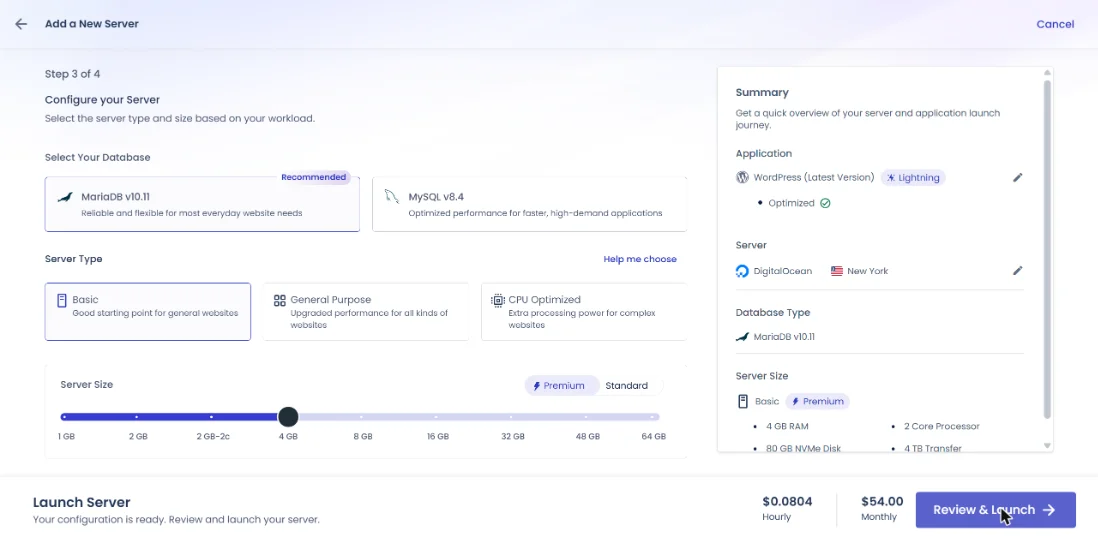
| 10 sites | $130/month, or $1,248/year ($104/month) | $46/month (4GB RAM, 2 vCPU, 80GB, 4TB) |
| 30 sites | $330/month, or $3,168/year ($264/month) | $88/month (8GB RAM, 4 vCPU, 160GB) or two servers |
The monthly prices are list prices. The annual prices include a first-year promotion for new customers, according to WP Engine’s plans page, so they may go up at renewal. Two more things to keep in mind. First, on WP Engine the CDN and caching software are included in the price, while on Cloudways Cloudflare Enterprise is a paid add-on. Second, on Cloudways offsite backups are billed by volume ($0.033 per GB), so media-heavy sites will add a few dollars. Even with those extras, Cloudways is much cheaper once you run several sites.
On tax: WP Engine notes on its plans page that taxes may be added at checkout, and Cloudways shows prices before tax. What you actually pay depends on where you and your business are based, so check the total on your first invoice, and if you run a registered business, ask your accountant how to handle invoices from a foreign company. Details on Cloudways invoices are in my Cloudways pricing guide.
What about performance and speed for your visitors?
The speed your visitors feel depends on three things: distance to the server, the amount of resources, and caching. The two companies approach each one differently.
- Server location. On Cloudways you can put the server close to your audience by choosing among AWS, Google Cloud, Vultr, DigitalOcean and Linode locations. That cuts the initial response time on every dynamic page, such as a shopping cart. On WP Engine there’s no provider choice; the Cloudflare CDN serves static files from nearby, but uncached pages still come from the origin server.
- Resources. On WP Engine’s Essential plan the environment is shared. On Cloudways the server is yours, and if you need more, you scale RAM and CPU from the panel.
- Caching. WP Engine uses its own EverCache. Cloudways layers Varnish, Redis and Object Cache Pro, which is free on 4GB servers and up.
Cloudways published a load test against WP Engine and Kinsta in which it comes out on top. The test was run by Cloudways itself, with data from August 2020, so I treat it with caution. The only reliable test is your own site: move a copy to a trial server and measure from where your visitors are. See also my full hosting comparison.
Management, flexibility and limitations
Here the difference is “everything set up for you” versus “you’re in control”. Both are legitimate.
What WP Engine does well: a closed WordPress experience. WordPress and PHP updates, daily backups and the CDN are managed for you, staging and dev environments are one click away, and you can build a site and hand it over to a client’s account (transferable sites). Business and Enterprise plans come with a 99.99% SLA, phone support and an onboarding manager.
WP Engine’s limitations: WordPress only. There’s a list of disallowed plugins, which the company removes from your site for security or performance reasons. Going over your visit cap or site count means moving up a plan. And the Essential plan has no Git CI/CD.
What Cloudways does well: choice of provider and location, non-WordPress PHP apps, SSH and SFTP access, per-application PHP version switching, one-click server scaling, and hourly billing. Agencies get team management and per-project permissions. If you don’t want to think about servers at all, Cloudways Autonomous handles scaling for you.
Cloudways’ limitations: no mailboxes on the server (you’ll need Google Workspace or an add-on like Rackspace), no root access, and you still need to understand a little about server sizing and caching. Support is in English only, and plugin- and theme-level support is a paid package.
The code BFCM802 takes 80% off your bill for the first two months (up to $200 off per month), including unlimited free site migrations. New customers only, and only until the offer ends.
The offer ends on December 4, 2026 at 23:59 (UTC+2).
Start with a free trial, no credit card. Enter the code at checkout and check that it shows up.
After Black Friday: 30% off for 3 months with the code ASAEL. On a large server (above about $444 a month) ASAEL already saves more today. BFCM802 vs. ASAEL calculator
Start a free trial server, no credit card. When you move to a paid plan, the code ASAEL takes 30% off your bill for the first three months.
The link fills in the code on the signup form. Just make sure it shows up.
Who is each company for?
| Your situation | My recommendation | Why |
|---|---|---|
| Freelancer or agency with 5+ sites | Cloudways | One server for many sites, no per-site fee, and team permissions |
| WooCommerce store with a regional audience | Cloudways, with a server in that region | Faster response on dynamic pages and control over resources |
| One WordPress site for a large company that needs an SLA and a contract | WP Engine Business or Enterprise | SLA, phone support, dedicated account team |
| A team that never wants to see a server or touch settings | WP Engine, or Cloudways Autonomous | Both manage the infrastructure for you |
| Laravel or non-WordPress PHP application | Cloudways | WP Engine supports WordPress only |
| One small site on a minimal budget | Cloudways ($11) | Less than a third of WP Engine’s entry price |
How do you move from WP Engine to Cloudways?
The move itself is fairly simple, because both sides run standard WordPress. Cloudways offers free WordPress migrations done by its team, and there’s also a migration plugin if you want to do it yourself. In practice it takes from an hour to a few hours per site, plus time for DNS propagation.
- Create a Cloudways server in the location closest to your audience.
- Move the site (managed migration or plugin) and test it on the temporary URL.
- Lower the domain’s TTL at your registrar in advance, then point the A record to the new server’s IP.
- Issue a Let’s Encrypt SSL certificate on Cloudways, and only cancel the old plan after a few stable days.
Watch out: if your domain’s DNS is managed by WP Engine or by Cloudflare, update the record wherever the DNS is actually managed. And if you’re on an annual plan, check the cancellation terms first. According to WP Engine’s terms of service (checked 6 Nov 2026), payments are non-refundable unless the agreement says otherwise, so don’t cancel the old plan before the move is complete.
The bottom line
WP Engine is a good product if you want managed WordPress without making any technical decisions and you’re willing to pay per site and per visit. Cloudways is the better fit if you manage several sites, want to choose where your server lives, or need flexibility in server size and application type. For most business owners and agencies I work with, the price gap once you have several sites settles it in favor of Cloudways.
The offer ends on December 4, 2026 at 23:59 (UTC+2).
Start with a free trial, no credit card. Enter the code at checkout and check that it shows up.
Start a free trial server, no credit card. When you move to a paid plan, the code ASAEL takes 30% off your bill for the first three months.
The link fills in the code on the signup form. Just make sure it shows up.
FAQ
Yes, in most scenarios. One site costs $11/month on Cloudways versus $35 monthly ($28 billed annually) on WP Engine. The gap grows with every extra site, because on Cloudways you pay for the server, not the site.
It depends on what matters to you. If you want managed WordPress without seeing a server, look at Kinsta or Cloudways Autonomous. If you want control over resources and per-server pricing, choose Cloudways Flexible.
WP Engine’s plans page offers no choice of provider, and I found no location picker there. The included Cloudflare CDN serves static files from nearby. On Cloudways you pick the provider and data center for every server, from AWS, Google Cloud, Vultr, DigitalOcean and Linode.
The plans page I checked on 6 Nov 2026 showed no free trial. Cloudways has a free trial of 5 days on Flexible and 3 days on Autonomous. Under WP Engine’s terms of service, payments are non-refundable unless stated otherwise, so before paying annually, confirm the cancellation terms with their sales team.
Yes. Copy the site, test it on the temporary URL, and only then switch the A record. If you lower the TTL first, the switch is barely noticeable. Cloudways offers free WordPress site migrations.
Almost all. Cloudways has no disallowed-plugins list like WP Engine’s, but some caching plugins can clash with Varnish or Breeze. If that happens, keep just one caching layer.
More comparisons
- Cloudways vs SiteGround: entry price vs renewal price
- Cloudways vs Hostinger: private server vs budget hosting
- Web hosting comparison 2026: every alternative in one table
- Full Cloudways pricing guide and Cloudways coupon code
Sources (checked 6 Nov 2026): WP Engine Plans & Pricing · WP Engine Disallowed Plugins · WP Engine Terms of Service · Cloudways Pricing · Cloudways vs WP Engine · Cloudways Performance Test. Written by Asael Dreyer · Updated: 6 Nov 2026
Disclosure: this is an independent site, not the official Cloudways site. Some links on this site are affiliate links: if you sign up through them we earn a commission, at no extra cost to you. Full details