
Short answer: web designers have three ways to manage hosting for clients: the client opens an account and gives you access, all clients sit on your server and you charge a hosting fee, or you build on your account and hand the server over to the client at the end. For most freelancers a mix works best: small sites on a shared server of yours, bigger clients on a separate server. On Cloudways all three models are supported in the same panel, as of November 2026.
Key numbers at a glance (as of 6 Nov 2026):
- Cloudways server cost (DigitalOcean): 1GB at $11, 2GB at $24 (Standard) or $28 (Premium), 4GB at $46 a month, before tax. There’s no limit on the number of sites per server.
- My example calculation: 20 brochure sites at $20 a month each leave about $299 a month after server costs, before tax and before your time.
- Client Billing: Free for one client, Growth at $4.99 and Scale at $13.99 a month. The document sent to the client is a Stripe invoice; whether it counts as a tax invoice depends on your country.
- Handing a server to a client: the approval link is valid for 48 hours, and both accounts must be paid accounts.
- Cloudways’ response time to you: a 3-hour target for a site-down issue on standard support. Don’t promise your client anything faster without a backup plan of your own.
This page is the starting point for everything about client hosting on this site. It explains the models, the money and the tools, and points to the detailed guides: maintenance packages, managing multiple sites and the pricing calculator. My comparison of reseller hosting and managed cloud is here: reseller hosting vs managed cloud.
Why manage your clients’ hosting yourself?
Because that way you control the site’s quality, build recurring revenue and avoid rescue jobs nobody pays for. Many web designers start like this: they finish a site, tell the client “open an account with some hosting company”, and disappear. A year later the client calls because the site is down, has no idea where the passwords are, and the cheap hosting they picked can’t carry the site. The time you spend on that rescue won’t be paid.
Managing the hosting yourself solves three problems. You control the environment the site runs in, and therefore its quality. You get recurring revenue built on hosting and maintenance, not just projects. And the client doesn’t need to understand servers, which is a service they’re willing to pay for. The downside: you’re the one responsible when something goes down. That’s why the choice of model and tools matters.
What models are there for hosting client sites?
There are three models: the client owns and you manage, everything sits with you (reseller), or you build on your account and hand over to the client. The main differences are who pays the provider, who owns the server and who’s responsible when something goes down.
| A. Client owns, you manage | B. Everything with you (reseller) | C. Build with you, hand over to the client | |
|---|---|---|---|
| Who pays the provider | The client, on their own card | You, and you bill the client | You during the build, the client after the handover |
| Server ownership | The client | You | The client, from the handover onwards |
| Recurring hosting revenue | None (maintenance only) | Yes, your margin | None after the handover |
| Risk | Low | Higher: you’re responsible for the whole server | Low |
| Best for | A large client, a store, an organization that requires ownership and transparency | Lots of small brochure sites | A one-off project, a client who wants independence |
| How on Cloudways | Team Member on the client’s account | One server with unlimited applications | Transfer Server between accounts |
Model A: the client owns it, you get access
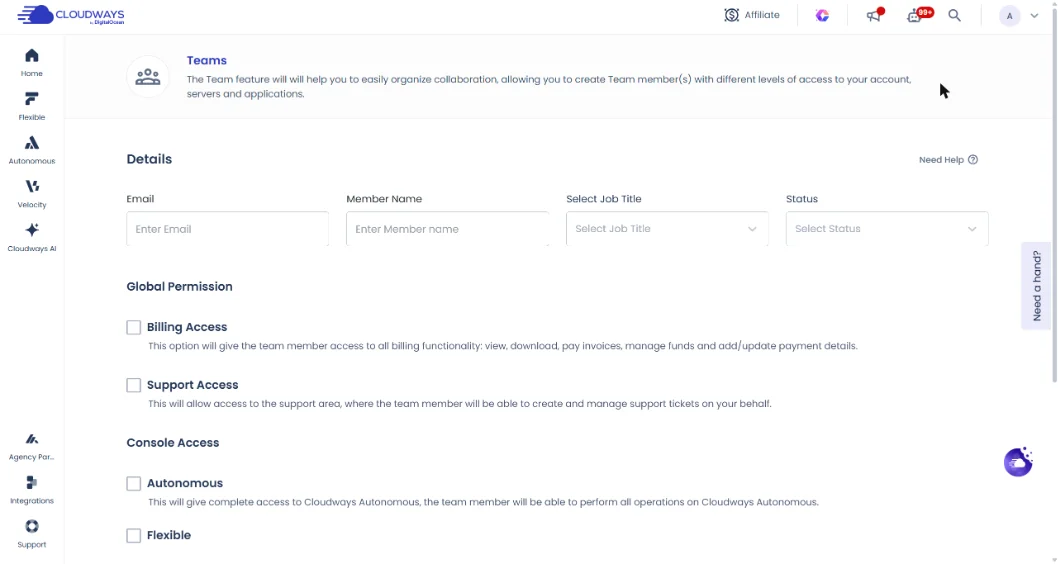
The client opens an account, pays the provider directly, and invites you as a team member. On Cloudways, the account owner creates a team member from the My Teams menu and sets permissions: access to specific servers, to billing or to support. The team member gets an activation email and chooses their own password.
One trap worth knowing: according to Cloudways, an email address already associated with a Cloudways account (even a trial account) can’t be used as a team member. If you have your own account, give the client a different email address for the invite, such as a dedicated address for client work.
If someone only needs to work on files (a designer, an outside developer), you don’t need to give them panel access at all. Create SFTP credentials for that specific application only. Full guide to both options: team members and access permissions.
Model B: all clients on your server
This is the model where the profit is. On Cloudways you can install an unlimited number of applications on each server, and you pay per server, not per site. One server can host ten brochure sites, and you charge each client a monthly or annual hosting fee.
A few rules that make this model safe:
- Separate site types. Small brochure sites can share a server. A WooCommerce store with traffic, or a site that runs campaigns, gets its own server. One heavy site can slow down all its neighbors.
- Separate credentials for each application. If a client brings their own developer, that developer gets SFTP access to their site only.
- Backups with long retention. When one of your clients deletes a page by mistake, you’ll want a backup from two weeks ago.
- Server-level security. One hacked site on a shared server puts the rest at risk. The server-level firewall is included on Flexible servers, and you can add Malware Protection only to the sites that need it (see what to do when a site is hacked).
Model C: build on your account, hand over to the client
You build the site on a server in your account, and at the end of the project you transfer the whole server to the client’s account, billing included. On Cloudways this is done with Transfer Server: you enter the email of the destination account, and the client receives an email with an approval link valid for 48 hours.
What to know before you transfer:
- Both accounts must be full paid accounts, not trial accounts. Only the account owner (not a team member) can transfer.
- You transfer a whole server, not a single site. So build each such client on its own server from the start.
- Your team members’ access to the server is removed, along with any SFTP credentials they created. If you’ll keep maintaining the site, the client has to invite you as a team member.
- The server’s Elastic Email connection is removed, and the new owner has to enable it again. Check that forms send email after the transfer.
- In the month of the transfer, each account pays for the period the server was with it.
The full step-by-step guide: transferring a server between Cloudways accounts.
The code BFCM802 takes 80% off your bill for the first two months (up to $200 off per month), including unlimited free site migrations. New customers only, and only until the offer ends.
The offer ends on December 4, 2026 at 23:59 (UTC+2).
Start with a free trial, no credit card. Enter the code at checkout and check that it shows up.
After Black Friday: 30% off for 3 months with the code ASAEL. On a large server (above about $444 a month) ASAEL already saves more today. BFCM802 vs. ASAEL calculator
Start a free trial server, no credit card. When you move to a paid plan, the code ASAEL takes 30% off your bill for the first three months.
The link fills in the code on the signup form. Just make sure it shows up.
Which server should you choose for client sites?
Three decisions determine most of the performance and cost: the cloud provider, the server location and its size. All of them can be changed later, so you don’t need to guess right on day one.
- Cloud provider: for brochure sites and small stores, DigitalOcean and Vultr are the cheap starting point. AWS and Google Cloud cost more, and mostly make sense when the client requires them or when you need a specific data center. A comparison by provider is on the pricing page.
- Location: choose the data center closest to most of the client’s visitors, for example Frankfurt or London for a European audience. The difference in response time is felt mostly in stores and sites with many dynamic pages. Details in Cloudways server locations.
- Size: start small and scale based on the graphs. Scaling a server on Cloudways is an action in the panel, and in most cases takes minutes. There’s no point paying up front for an 8GB server for three sites.
My rule of thumb from experience (not an official figure, and it depends heavily on plugins and traffic): a 1GB server suits one or two small sites, a 2GB server comfortably holds several brochure sites with good caching, and an active WooCommerce store starts at 2GB to 4GB on its own server. When CPU or memory stays above 70%–80% over time, it’s time to scale up or split.
Another habit that saves confusion: clear names. Give every server a name that describes its role (“brochure-1”, “store-client-X”), and every application the client’s name. When you have 40 sites, you’ll thank yourself.
What should your hosting agreement with the client say?
The agreement doesn’t need to be long, but it has to answer the questions that come up on a bad day:
- What’s included: hosting, backups, SSL, updates, monitoring. And what isn’t: design changes, new content, mailboxes.
- Response times: how long until you respond to an outage, and during which hours. “24/7” is a promise that’s hard to keep alone.
- Ownership: who owns the domain, who owns the site (files and content), and what the client gets when they leave (full backup, server transfer).
- Price and price changes: billing frequency, how the price is adjusted (exchange rate, provider changes), and what happens with late payment.
- Liability: you’re not responsible for damage from a plugin the client installed themselves, or from a password they handed out. Put that in writing.
What does a sample service level (SLA) clause look like?
A good service level clause defines what’s included, how quickly you respond and what the client gets when you miss it. Here’s a sample wording I wrote, to adapt to your business. The numbers in brackets are examples, not recommendations, and this isn’t legal advice.
- Scope of service: “The service includes hosting on a managed cloud server, daily backups retained for [14] days, an SSL certificate, WordPress and plugin updates once a [week] and uptime monitoring. The service does not include design changes, new content or mailboxes.”
- Response times: “For an issue that takes the site down: work begins within [4] hours Monday to Friday between 9:00 and 18:00, and within [12] hours at other times. For a regular request: within one business day.”
- Definition: “Response time means the time until work begins, not until the issue is resolved.”
- Compensation: “If the response time for a site-down issue misses the target, the client receives a credit of [10]% of that month’s service fee, up to the month’s fee.”
- Ownership and exit: “The domain is registered in the client’s name. When the engagement ends, the client receives a full backup of the site within [7] days, or a transfer of the server to their own account.”
- Price: “The price is reviewed once a year, with [30] days’ advance notice.”
Don’t promise more than your provider promises you. According to the Cloudways SLA document (checked 6 Nov 2026), the response target for a site-down ticket is 3 hours on standard support, 30 minutes with the Advanced add-on and 10 minutes with Premium, and the compensation there is 5% of the monthly bill for every hour over. If you commit to one hour with your client, you need to be able to handle it yourself, or buy a faster support add-on.
What does client hosting cost you, and what should you charge?
On Cloudways you pay per server, by the hour of use, with no commitment. As of November 2026, a DigitalOcean server starts at $11 a month (1GB), and a 2GB Premium server costs $28 a month. On top of that you pay for off-server backup storage ($0.033 per GB) and any add-ons you choose. All prices, by provider: Cloudways pricing.
A simple example (an estimate, before tax and discounts): a 2GB Premium server at $28 with eight small brochure sites. The direct cost per site is about $3.50 a month, plus backups. If you charge each client $20 a month for hosting alone, there’s margin left for the time you’ll spend when something breaks. Run the numbers with your own figures, including maintenance and add-ons, in the pricing calculator for web designers.
Watch two things. First, the Cloudways bill is in USD, so if you charge clients in another currency, the exchange rate moves. Leave a margin for that, or charge in USD. Second, hosting alone is easy to compare with a cheap host. What the client is really buying is peace of mind: updates, backups, monitoring and someone who answers the phone. So sell a package, not “hosting”. On building the package: website maintenance packages. Which update policy should you set with clients? See update policy for clients.
How much do you make from 20 and 50 clients? An example calculation
In my calculation, 20 brochure sites leave about $299 a month and 50 sites about $782, after server costs and before your time. The assumptions: each client pays $20 a month for hosting alone, 8 brochure sites per DigitalOcean Premium 2GB server ($28), 5GB of off-server backup per site ($0.033 per GB), and Client Billing on the Scale plan. The $20 fee is my assumption, not a market rate.
| 20 clients | 50 clients | |
|---|---|---|
| Servers | 3 servers × $28 = $84 | 7 servers × $28 = $196 |
| Off-server backup | 100GB × $0.033 = $3.30 | 250GB × $0.033 = $8.25 |
| Client Billing Scale | $13.99 | $13.99 |
| Monthly cost | $101.29 | $218.24 |
| Revenue ($20 × clients) | $400 | $1,000 |
| Left before tax and your time | ≈ $299 | ≈ $782 |
What the calculation doesn’t include: VAT or sales tax (if you’re registered, you charge it on top of the price and pass it on), coupon discounts, add-ons such as Malware Protection or Site Manager Pro, and stores, which need their own server and a different price. And if you bill through your own invoicing system rather than Client Billing, remove the $13.99 line. Run it with your own numbers in the pricing calculator.
The takeaway from the table: the real profit doesn’t come from hosting. $20 per client covers the server and leaves a little, and every hour you spend on an incident eats the margin of several clients. That’s why you sell a package with maintenance, not hosting on its own.
How do you bill clients, and does Client Billing issue a tax invoice?
Client Billing collects payment from clients through Stripe, but it isn’t an accounting system. Client Billing is a Cloudways tool for sending invoices to clients and collecting payment via Stripe. You can set up recurring billing (monthly or annual), add your own logo (white label), charge in any of the 135+ currencies Stripe supports, and configure tax and discounts. There’s also Client Reporting, which shows the client what was done on the site: updates, backups, security scans and performance.
| Plan | Price (November 2026) | Clients | Services | Reports per month |
|---|---|---|---|---|
| Free | $0 | 1 | 2 | 1 |
| Growth | $4.99 a month (first month free) | 10 | 15 | 10 |
| Scale | $13.99 a month | Unlimited | Unlimited | Unlimited |
Stripe’s transaction fees are charged separately. The billing part also works for sites hosted with other providers, but the reports pull data from your Cloudways account, so they only work for sites hosted there.
The tax side matters: the document Client Billing sends is a Stripe invoice. Whether it meets the requirements for a tax invoice depends on your country’s rules, and in many countries it won’t replace the invoice your accounting software issues. If you’re registered for VAT or sales tax, you may still need to issue a compliant invoice or receipt in your own software and report it as usual. This is general information, not tax advice. Client Billing can save you the collection work and the reminders, but not the bookkeeping.
There are two workable approaches: collect through Client Billing and issue a compliant invoice for each payment that comes in, or skip Client Billing and bill directly through your own invoicing system, many of which already support recurring card payments. For most freelancers with only domestic clients, the second is simpler. Client Billing is worth more when you have clients abroad paying in their own currency. Either way, check the setup with your accountant. Details on the tool: Client Billing on Cloudways.
Which tools do web designers actually use?
Most day-to-day work relies on four tools: staging for testing, Site Manager for updates, team members for access, and Client Billing for collection. The table sums up what’s included and what costs extra.
| Need | The Cloudways tool | Cost |
|---|---|---|
| Test a change before it reaches the live site | Staging environment, with push/pull between environments | Included |
| WordPress updates without breaking sites | Site Manager (formerly SafeUpdates): testing on a temporary copy and automatic rollback on failure | Basic free, Pro paid per application |
| Managing plugins, users and updates across many sites | Site Manager, a central dashboard and bulk updates | Central dashboard in Basic and Pro; safe updates only in Pro |
| Access for developers and staff | Team Members and SFTP credentials per application | Included |
| Security for client sites | Server firewall (included), Malware Protection per site | Malware Protection from $2 to $4 per application |
| Knowing why a site went down | Server alerts (included), Copilot | Copilot from $3.99 a month |
| Billing and reports | Client Billing & Reporting | Free for one client, then from $4.99 |
| Moving a new client’s existing site | Migration service | First migration free |
All add-on prices are collected on the add-ons pricing page. My comparison of Site Manager with external tools such as MainWP and ManageWP is in the guide to managing multiple sites.
How do you onboard a new client, step by step?
In seven steps, from deciding on the model to documenting the domain. The step people skip most is the last one, and it’s also the one that prevents the most outages.
- Decide on the model (A, B or C) before you start, and write it into the quote. “Who owns the server” is a question that comes up at the end of the relationship, and it’s better if the answer is in writing.
- Create a new application on the right server (or a new server, for model C).
- If the client has an existing site, move it with the migration service or yourself (free migration to Cloudways).
- Connect the domain, install SSL and set up email sending from the site.
- Set up backups, managed updates and protection according to the package the client bought.
- Set up recurring billing and create a client record in your invoicing system.
- Note in the client record where the domain is registered, who pays for it and when it renews. An expired domain is one of the most common reasons sites go down.
What should you check on the day you move a client’s existing site?
Most migration-day problems are prevented in preparation: a backup, documented DNS and email, and testing on a temporary URL before you point the domain. This is the order I work in:
- Download a full backup (files and database) from the old host and keep it yourself.
- Screenshot or export all existing DNS records, especially MX, SPF and DKIM. Find out where the client’s email lives before you touch anything.
- A day before the move, lower the TTL of the A record so the new pointing propagates quickly.
- Check that the PHP version on the new server matches the site and its plugins.
- Move the site and test it on the application’s temporary URL: pages, forms, login, and checkout if there’s a store.
- If the site takes payments, update the new server’s IP address and callback URLs with the payment provider.
- Change the A record, install SSL and clear the cache.
- Submit a test form, and check in Search Console that there are no new crawl errors.
- Keep the old hosting active for at least a week, and only then cancel it.
The full checklist, including what to do when something fails, is in my hosting migration checklist, and payment issues after a migration are covered in the callback and IP guide.
What’s the difference between reseller hosting with cPanel and WHMCS and a cloud server?
With reseller hosting you buy a plan with a fixed number of cPanel accounts, and each client gets their own panel and mailboxes. With a managed cloud server you pay for resources, sites are unlimited, and you manage everything from one panel, with no cPanel for the client. WHMCS is software for client management, billing and support tickets used by hosting businesses; it isn’t hosting in itself.
| Reseller plan (example: Webgate) | Cloud server on Cloudways (DigitalOcean Premium 2GB) | |
|---|---|---|
| Monthly price | $59 | $28 |
| What you get | 50GB disk, unlimited bandwidth, up to 50 accounts, unlimited domains and mailboxes | 2GB memory, 50GB NVMe, 2TB bandwidth, unlimited applications |
| Client panel | cPanel for each account (WHM for the admin) | No cPanel. Access via team members or SFTP |
| Included | Not included (Rackspace add-on, Google Workspace or Microsoft 365) | |
| Resources | Shared, within CloudLinux limits | Reserved for the server, scaling from the panel |
Prices per Webgate and the DigitalOcean pricing on Cloudways, checked on 6 Nov 2026. Webgate doesn’t state whether the price includes tax. WHMCS, according to its pricing page, has a Plus plan at $34.95 a month for up to 250 active clients and Professional at $54.95 for up to 500, self-hosted and before tax. If you’re considering it, check with your accountant whether the documents it produces meet your country’s invoicing requirements.
When reseller hosting fits better: when your clients expect their own panel and email, and when most sites are very small. When a cloud server fits better: when you have stores or heavy sites, when you manage the sites yourself, and when you want reserved resources you can scale without changing providers.
When is Cloudways not a good fit for web designers?
- Clients want email in the same place. Cloudways servers have no built-in mail server. There’s the Rackspace add-on ($1.5 per mailbox a month), or Google Workspace and Microsoft 365. If most of your clients expect “hosting with email” at one price, you’ll have to explain and price it separately.
- You want to give every client their own cPanel. Cloudways has no cPanel. The client gets access via team members or SFTP, not an independent branded panel.
- You need the hosting provider to invoice you in your local currency. Cloudways bills in USD.
- You have two clients with simple brochure sites. A monthly paid server can cost more than basic shared hosting. If the client is happy on Wix and doesn’t need more, there’s no reason to move them.
When does it fit? From about ten sites up, when you have stores or sites whose uptime is worth money, and when you want to build recurring revenue from maintenance. My comparison with other hosting companies: hosting company comparisons.
And there’s one more revenue stream web designers miss: if you recommend that clients open their own account (model A), you can join the Cloudways affiliate program and earn a commission on the referral. Tell the client you get a commission; it’s part of working fairly. And if you host clients on your own account, look at the Agency Partner program too.
Black Friday deal: until 4 Dec 2026, new Cloudways customers get 80% off for two months with code BFCM802. Details and terms on the coupon page.
The offer ends on December 4, 2026 at 23:59 (UTC+2).
Start with a free trial, no credit card. Enter the code at checkout and check that it shows up.
Start a free trial server, no credit card. When you move to a paid plan, the code ASAEL takes 30% off your bill for the first three months.
The link fills in the code on the signup form. Just make sure it shows up.
What mistakes do web designers make with client hosting?
No written agreement: what’s included, what the response time is, who owns what, and what happens when the client leaves. Without it, every outage turns into an argument.
A heavy store on a server of brochure sites: at the first sale it will slow everyone down. Separate them.
The same password for every site: breaking into one opens them all. Separate credentials and a password manager.
Pricing by server cost alone: you forget your time, the add-ons and the exchange rate. Price the service, not the resources.
“I’ll just send a Stripe invoice”: depending on your country, that may not be a valid tax document. Issue a proper invoice or receipt as you would for any other sale.
Sources
- Cloudways SLA document
- Webgate
- WHMCS pricing page
- Collaboration Features on Cloudways Platform
- How to Create and Update Team Members
- How to Transfer a Server to Another Cloudways Account
- What is Client Billing
- How to Use Cloudways Site Manager
- Cloudways Client Billing
- Cloudways Pricing
Frequently asked questions
Consolidate the sites on a few servers in one account, separate heavy sites from light ones, and give everyone who works on a site separate access. A central update tool such as Site Manager or MainWP saves you logging in to each site separately.
For a large site, a store, or a client who requires full ownership, yes. For small brochure sites, hosting them yourself is simpler and creates recurring revenue. You can mix: most clients with you, the big ones on their own account with access for you.
It sends a Stripe invoice. Whether that counts as a valid tax invoice depends on your country, and in many cases you still need to issue a compliant invoice or receipt in your own accounting software. Check with your accountant.
There’s no limit on the number of applications per server. The practical limit is resources: several light brochure sites can share a 2GB server, while an active store needs a server of its own. Watch the CPU and memory graphs and scale the server when needed.
On Cloudways you use Transfer Server and enter the email of the client’s account. The client approves via a link valid for 48 hours, and from then on the server and its billing are theirs. Both accounts must be full paid accounts.
Yes, and that’s what most freelancers do. Leave a margin for exchange rate changes, or set an annual price review in the agreement. You can also bill in USD if the client agrees.
There are tools aimed at agencies, such as client billing, reports, team members and server transfers, and there’s an affiliate program. Check the current terms of the agency programs with Cloudways.
In my example calculation, 20 brochure sites at $20 a month each leave about $299 a month after Cloudways server costs, before tax and before your time. Hosting alone covers itself quickly, but the real profit comes from a maintenance package.
WHMCS is client management, billing and ticketing software for hosting businesses, starting at $34.95 a month according to its site. With Cloudways it isn’t necessary: you can bill through Client Billing or through your own invoicing system. It’s useful mainly if you sell hosting at scale.
Related guides
- Cloudways for agencies and freelancers
- Website maintenance packages: what to include and what to charge
- Managing multiple sites: tools for 10 to 100 sites
- Client hosting and maintenance pricing calculator
- Team members and access permissions
- Client Billing on Cloudways
- Transferring a server between accounts
Official sources: Collaboration Features on Cloudways Platform, How to Create and Update Team Members, How to Transfer a Server to Another Cloudways Account, What is Client Billing, How to Use Cloudways Site Manager (Cloudways Knowledge Base); Cloudways Client Billing; Cloudways Pricing; Cloudways Support SLA; WHMCS Pricing; Webgate (checked on 6 Nov 2026). Written and reviewed by Asael Dreyer · Updated: 6 Nov 2026
Disclosure: this is an independent site, not the official Cloudways site. Some links on this site are affiliate links: if you sign up through them we earn a commission, at no extra cost to you. Full details