
Short answer: SiteGround is managed shared WordPress hosting with a very low first-year price, email included and good support, but the price jumps 7 to 9 times at renewal. Cloudways gives you a private cloud server from $11/month (DigitalOcean Standard), at the same price every month, with unlimited sites. For one small site for one year, SiteGround is cheaper. From year two, and for anyone running several sites or a store, Cloudways is the better deal.
SiteGround vs Cloudways: what each one actually sells
SiteGround is a long-established host that builds its service on Google Cloud infrastructure. Its popular plans (StartUp, GrowBig, GoGeek) are managed shared hosting: your site sits on a server that also serves other customers, and SiteGround manages everything, including email, CDN and daily backups. Above those sit the Cloud plans, with dedicated resources.
Cloudways is a platform that manages a private cloud server for you on one of five providers: DigitalOcean, Vultr, Linode, AWS or Google Cloud. You pay by server size, not per site, and run as many sites as the server can hold.
The core difference: with SiteGround you buy a package paid upfront for a year or more. With Cloudways you pay month to month for what you use, and you can cancel or scale at any time.
SiteGround vs Cloudways: comparison table
| Feature | SiteGround (WordPress) | Cloudways (Flexible) |
|---|---|---|
| Hosting type | Managed shared; Cloud sold separately | Private, managed cloud server |
| Entry price | $1.99/month for the first year (Early Black Friday sale price, checked 6 Nov 2026), paid upfront for 12 months, before tax | $11/month (DigitalOcean 1GB), before tax |
| Renewal price | $17.99/month (StartUp) | The same price; there’s no promo price vs renewal price |
| Number of sites | StartUp: one site; GrowBig and GoGeek: unlimited | Unlimited, limited only by server resources |
| Storage | 10GB / 50GB / 100GB | 25GB on the smallest server, up to hundreds of GB on large ones |
| Infrastructure | Google Cloud only | Five cloud providers to choose from |
| Data centers | 11 | Dozens of locations across the five providers |
| Staging | From GrowBig | On every server |
| Backups | Daily on all plans; on-demand from GrowBig | Automatic and on-demand on every server; storage $0.033 per GB |
| Included | Not included (Rackspace add-on or an outside provider) | |
| Support | 24/7 chat, in English | 24/7 chat and tickets, in English |
| Refund / trial | 30-day money-back guarantee | 5-day free trial, no credit card |
| Applications | Mainly WordPress and PHP | WordPress, WooCommerce, Magento, Laravel and PHP |
As of 6 Nov 2026, based on SiteGround’s WordPress hosting page and the Cloudways pricing page. SiteGround is currently running a sale, and the banner prices may change after November.
SiteGround’s real price: year one vs year two
This is the difference you most need to understand. SiteGround’s low price depends on paying a year upfront, and it applies only to the first term. At renewal you move to the regular price, which is several times higher.
| Plan | First year (sale) | Renewal price | Year-one cost | Year-two cost |
|---|---|---|---|---|
| SiteGround StartUp | $1.99/month | $17.99/month | about $24 | about $216 |
| SiteGround GrowBig | $3.99/month | $29.99/month | about $48 | about $360 |
| SiteGround GoGeek | $5.99/month | $44.99/month | about $72 | about $540 |
| Cloudways 1GB (DigitalOcean) | $11/month | $11/month | $132 | $132 |
| Cloudways 2GB (DigitalOcean) | $24/month | $24/month | $288 | $288 |
My calculation from the published prices, before tax. The first-year prices are temporary sale prices (Early Black Friday, checked 6 Nov 2026), and the renewal prices are the regular prices SiteGround publishes. In year one, SiteGround is much cheaper. In year two, a 1GB Cloudways server costs less than StartUp, and a 2GB server costs less than GrowBig. What you get in return on SiteGround is included email. On Cloudways you get a private server and more storage.
A tip from experience: if you’re already on SiteGround, put a reminder in your calendar a month before renewal. That’s when to decide, not after the annual charge has gone through.
The code BFCM802 takes 80% off your bill for the first two months (up to $200 off per month), including unlimited free site migrations. New customers only, and only until the offer ends.
The offer ends on December 4, 2026 at 23:59 (UTC+2).
Start with a free trial, no credit card. Enter the code at checkout and check that it shows up.
After Black Friday: 30% off for 3 months with the code ASAEL. On a large server (above about $444 a month) ASAEL already saves more today. BFCM802 vs. ASAEL calculator
Start a free trial server, no credit card. When you move to a paid plan, the code ASAEL takes 30% off your bill for the first three months.
The link fills in the code on the signup form. Just make sure it shows up.
What each SiteGround plan includes
SiteGround packs a lot into the base package, and that’s a real advantage. What separates the plans is the number of sites, the storage and the developer tools.
- All plans: free SSL and CDN, daily backups stored in a separate location, email, multi-layer caching, the Speed Optimizer and Security Optimizer plugins, automatic updates, WP-CLI and SSH. The current sale also adds a free domain and free site migration.
- StartUp: one site, 10GB, unmetered traffic.
- GrowBig: unlimited sites, 50GB, on-demand backups, staging and faster PHP (30% faster, according to SiteGround).
- GoGeek: 100GB, staging with Git, white-label client access and priority support.
Cloudways has no feature tiers. Every server, even the smallest, gets staging, cloning, on-demand backups, SSH and Git. Only the amount of resources changes. On servers with 4GB RAM and up, Object Cache Pro is included too.
Shared hosting vs a private server: how do performance and resources differ?
On shared hosting like StartUp or GrowBig, CPU and memory are shared between customers. Shared hosts cap each account’s usage so one noisy neighbor can’t take everyone down. On a typical brochure site you won’t notice. On a store with lots of open carts, or a site with heavy plugins, you can hit the ceiling.
SiteGround’s answer to that is its Cloud plans: Jump Start costs $100/month, billed monthly before tax, with 4 cores, 8GB of memory, 40GB SSD and 5TB of bandwidth, plus optional autoscaling. On Cloudways, an 8GB, 4 vCPU DigitalOcean Basic server with 160GB costs $88, and an 8GB General Purpose server with dedicated CPU costs $98.
SiteGround publishes speed figures for sites that moved to it, and Cloudways publishes its own comparisons. Both sides measure themselves, so I left those numbers out of the decision. The only test worth trusting is your own site, on both servers, on the same day.
Where are the servers, and does it matter for your visitors?
SiteGround runs 11 data centers on four continents: four in the US, plus London, Madrid, the Netherlands, Frankfurt, Paris, Sydney and Singapore. That covers the US, Europe and parts of Asia-Pacific well, but if your audience is elsewhere you’ll be serving it from the nearest of those.
Cloudways gives you far more locations because it sits on five providers, including less common regions; you can even launch a server in a regional city, which is available on Vultr, Google Cloud and AWS. I saw the Vultr location on the server creation screen on 6 Nov 2026, and it’s the cheapest of the three; Google Cloud and AWS cost more and need an upgraded account.
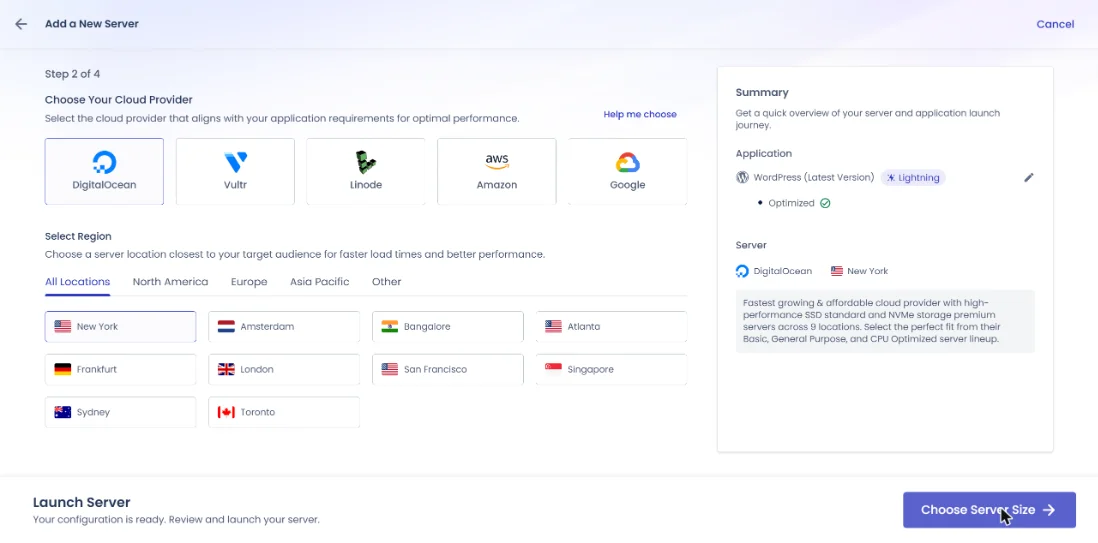
How much does location matter in practice? For a site with a CDN and good caching, the difference between a nearby and a farther data center is small on most pages. You feel it more on pages that can’t be cached: cart, checkout, account area. A detailed location comparison is on my main hosting comparison page.
How do support and service compare?
Both companies offer 24/7 support in English. SiteGround has a very good reputation for support, and Cloudways itself admits as much on its own comparison page. Cloudways support runs over chat and tickets, and deeper application-level support is available through the paid Advanced or Premium add-ons.
I’ve compared them on English support only. If local-language support is critical for you, a regional host may suit you better; for readers who prefer a local host, for example, see my Cloudways vs uPress comparison.
How do security and backups differ?
Both services manage the basic security for you, but in different ways. SiteGround runs an auto-updating web application firewall (WAF), bot protection, 24/7 monitoring and a pre-installed wildcard SSL certificate. Daily backups are stored in a different geographic location from the site.
Cloudways has a server-level firewall, IP whitelisting for SSH and SFTP, two-factor authentication on the account and free Let’s Encrypt SSL. Backups are stored off the server, and you set the frequency and retention. More advanced protection, such as Malware Protection or Cloudflare Enterprise, comes as paid add-ons. The full breakdown is in my complete Cloudways review.
Bottom line: SiteGround gives you a broader security package at no extra cost. Cloudways gives you a good base, and you choose and pay for extra layers as needed.
WooCommerce: where will your store feel better?
A store is where the gap between shared and private hosting shows most. Product pages get cached, but the cart, checkout and account area are rebuilt for every visitor, and each of them uses CPU and memory.
- Small store (dozens of orders a month): SiteGround GrowBig will work well, especially in year one.
- Active store that runs promotions: a 2GB to 4GB Cloudways server gives you dedicated resources, and in Black Friday week you can scale it up for a few days and back down afterwards (on DigitalOcean, when you scale only CPU and RAM).
- Large store: the real comparison is SiteGround Cloud (from $100) against a General Purpose or CPU Optimized server on Cloudways, or Cloudways Autonomous with autoscaling.
The full guide to setting up a store on Cloudways, including choosing a server size, is in my WooCommerce hosting on Cloudways guide.
Pros and cons
SiteGround
- Pros: very low first-year price; email included; daily backups on all plans; excellent support reputation; simple dashboard for beginners; 30-day money-back guarantee.
- Cons: steep price jump at renewal; a year paid upfront; only one site on StartUp; staging only from GrowBig; shared hosting with usage limits; only 11 data center locations; Google Cloud only.
Cloudways
- Pros: the same price every month; no upfront payment and no commitment; private server; unlimited sites; staging on every server; many more data center locations; one-click server scaling; non-WordPress apps too.
- Cons: more expensive in year one for a small site; no email included; the panel is a bit more technical; the trial is only 5 days; no root access.
SiteGround or Cloudways: who each one is for
| If you… | My recommendation |
|---|---|
| Are launching one small personal site and want to spend the minimum in year one | SiteGround StartUp |
| Want email, hosting and a domain in one place, with no fuss | SiteGround |
| Have a SiteGround renewal coming up and several sites | Cloudways |
| Run a WooCommerce store with growing traffic | Cloudways |
| Need a data center SiteGround doesn’t offer | Cloudways (pick from five providers) |
| Are a freelancer or agency building client sites | Cloudways |
| Need control over PHP, Git and SSH on every site | Cloudways (on SiteGround, Git is GoGeek only) |
Cloudways isn’t for you if you have one small site, want to pay as little as possible over the next year, and care about included email. SiteGround isn’t for you if you don’t want to pay a year upfront, manage several sites, or need dedicated resources without paying $100/month for Cloud.
How to move from SiteGround to Cloudways
- Create a Cloudways server close to your visitors (for example, in the same region where most of your audience lives).
- Move the site with the Cloudways migration plugin, or request a managed migration. The managed WordPress migration is free, but only on an upgraded account, not during the trial.
- Move email first. If your mailboxes are on SiteGround, set them up with another provider (Google Workspace, for example) and update the MX records.
- Test the site on the temporary URL, including forms, payments and emails sent from the site.
- Update the A record, and only cancel auto-renewal on SiteGround once everything works.
Estimated time: one to three hours for a typical WordPress site, not counting DNS propagation. The most common mistake: forgetting about email and discovering after cancelling that the mailboxes are gone.
The offer ends on December 4, 2026 at 23:59 (UTC+2).
Start with a free trial, no credit card. Enter the code at checkout and check that it shows up.
Start a free trial server, no credit card. When you move to a paid plan, the code ASAEL takes 30% off your bill for the first three months.
The link fills in the code on the signup form. Just make sure it shows up.
FAQ
In year one, yes: StartUp costs $1.99/month in the Early Black Friday sale (checked 6 Nov 2026), paid a year upfront. At renewal the price rises to $17.99/month, and then an $11 Cloudways server is cheaper. Prices as of November 2026, before tax.
The banner price is a promotional price for the first term only, and it requires paying upfront. At the end of the term the account renews at the regular price, which is shown in small print under the sale price.
As of November 2026, SiteGround has 11 data centers in the US, Europe, Singapore and Australia. If your audience is outside those regions, Cloudways gives you many more locations across its five cloud providers.
No. That’s a SiteGround advantage. On Cloudways you add the paid Rackspace add-on or connect your domain to an outside email provider such as Google Workspace.
Yes. Copy the site to the new server, test it on a temporary URL, and only then update DNS. The old site keeps running until visitors reach the new server.
More comparisons
- Cloudways vs Hostinger
- Cloudways vs Kinsta
- Hosting comparison 2026
- Cloudways pricing explained · Coupon code ASAEL
Sources (checked 6 Nov 2026): SiteGround – Hosting for WordPress, SiteGround Cloud Hosting, Cloudways Pricing, Cloudways – SiteGround Alternative, Which Infrastructure Provider Do I Have to Choose? (Cloudways Knowledge Base). Written and tested by Asael Dreyer · Updated: 6 Nov 2026
Disclosure: this is an independent site, not the official Cloudways site. Some links on this site are affiliate links: if you sign up through them we earn a commission, at no extra cost to you. Full details