
Short answer: Cloudways suits agencies and web developers because it prices per server, not per site: you run several client sites on one server, give each team member access only to what they need, and transfer a whole server to the client’s account at the end of a project. You can handle client billing with Client Billing (there is a free plan), and the Agency Partner Program adds upgraded support, migrations and discounts based on your monthly spend.
Why Cloudways works for agency hosting
I manage hundreds of client sites on dozens of Cloudways servers myself, so this section is written from the side of someone who does it every day. Agency hosting is hosting that lets you manage many sites for different clients from one place, with separation between clients, permissions for your team and a clean way to bill. These are the things that make Cloudways especially convenient for it:
- Per-server pricing. A DigitalOcean server starts at $11 a month (Cloudways DigitalOcean pricing), and you can run as many sites on it as the resources allow, each with its own database.
- No commitment. You pay for what you use. Client left? Delete their server and the charges stop.
- One-click staging and cloning. Test a theme or plugin update on a copy, and only then push it to the live site.
- Developer tools. Git comes preinstalled for automatic deployment, WP-CLI is available, and there is an API for running tasks across several projects at once.
- Client handoff. At the end of a project you transfer the server to the client’s account, billing included, without migrating the site again.
- A location for every client. Five cloud providers and data centers in dozens of countries, so you can put each client’s server in the region closest to their audience.
How to organize clients: one server per client or a shared server?
This is the first and most important decision. It affects your costs, your security and how painless it is when a client leaves. In practice most agencies combine both approaches. If you’re torn between reseller hosting and the cloud, see reseller hosting vs. managed cloud.
| Separate server per client | Several clients on a shared server | |
|---|---|---|
| Cost | Higher (a minimum-size server for every client) | Low, the price is split across the sites |
| Isolation | Full: a traffic spike or hack on one client doesn’t affect the others | Partial: all the sites share resources |
| Client handoff | Simple: transfer the server to their account | You first have to move the site to its own server |
| Billing | Clear: the server cost is the client’s cost | You have to split costs based on an estimate |
| Best for | Stores, large clients, clients who may take the site with them | Small brochure sites you manage over the long term |
My tip: use Projects in the panel to group servers and applications by client, even when several clients share a server. Once you have dozens of clients, that’s the difference between order and chaos. The step-by-step list for handing a site over is here: handing a site over to a client.
Team members and permissions: who sees what
Never share the main account login. Cloudways gives you two ways to grant access, and you should pick the narrowest one that does the job:
| Access type | What it gives | Who it suits |
|---|---|---|
| Application Credentials | SFTP, plus SSH if you enable it, for a single application only. No panel login | An outside developer, a designer uploading files, a temporary consultant |
| Team Member | Panel login with permissions you set: specific servers, specific applications, and billing management if you want | Agency staff, project managers, a client who wants to see their own site |
A common trap: a new team member’s email address can’t be linked to another Cloudways account, not even a trial account. If someone once opened a trial with their email, add them with a different address. The full explanation, with screenshots, is in my guide how to give quick access to a server or site on Cloudways.
Two more layers of protection worth turning on for the whole team: two-factor authentication (2FA) on the account, and an IP allowlist for SSH and SFTP connections.
The code BFCM802 takes 80% off your bill for the first two months (up to $200 off per month), including unlimited free site migrations. New customers only, and only until the offer ends.
The offer ends on December 4, 2026 at 23:59 (UTC+2).
Start with a free trial, no credit card. Enter the code at checkout and check that it shows up.
After Black Friday: 30% off for 3 months with the code ASAEL. On a large server (above about $444 a month) ASAEL already saves more today. BFCM802 vs. ASAEL calculator
Start a free trial server, no credit card. When you move to a paid plan, the code ASAEL takes 30% off your bill for the first three months.
The link fills in the code on the signup form. Just make sure it shows up.
How to bill clients: two approaches
There are two common ways, and each suits a different kind of client.
Approach 1: the agency pays and bills the client (Client Billing)
The servers sit in your account, you pay Cloudways, and you bill the client for hosting and maintenance. Client Billing is a billing tool built into the platform that produces invoices with your logo and colors, sends recurring invoices automatically and lets the client pay online through a Stripe account you connect. You can bill in the client’s currency, set a tax type and a discount rate, and mark cash or bank-transfer payments as paid. For an example of pairing it with a local tax invoice, see billing clients for hosting with a local tax invoice (local invoice example).
| Client Billing plan | Price (USD per month) | Clients | Services | Reports |
|---|---|---|---|---|
| Free | $0 | 1 | 2 | 1 report per month |
| Growth | $4.99 (first month $0) | 10 | 15 | 10 per month |
| Scale | $13.99 | Unlimited | Unlimited | Unlimited |
Every plan includes unlimited invoices, and Stripe transaction fees are charged separately. All plans also include Client Reporting, reports for your clients. How to turn them into a monthly report a client actually reads: a monthly report for a website client.
A note on tax invoices: a Client Billing invoice is not automatically a valid tax invoice in your country. If local rules require a specific invoice format, check with your accountant whether to issue the tax invoice in your own accounting system and use Client Billing only for collection and automation. The full step-by-step setup of the tool is in my guide Client Billing on Cloudways.
Approach 2: transfer the server to the client’s account
You build the site in your account and transfer the server to the client at the end. From then on they pay Cloudways directly, and you can keep access as a team member on their account, if they add you.
- Make sure the client has their own Cloudways account.
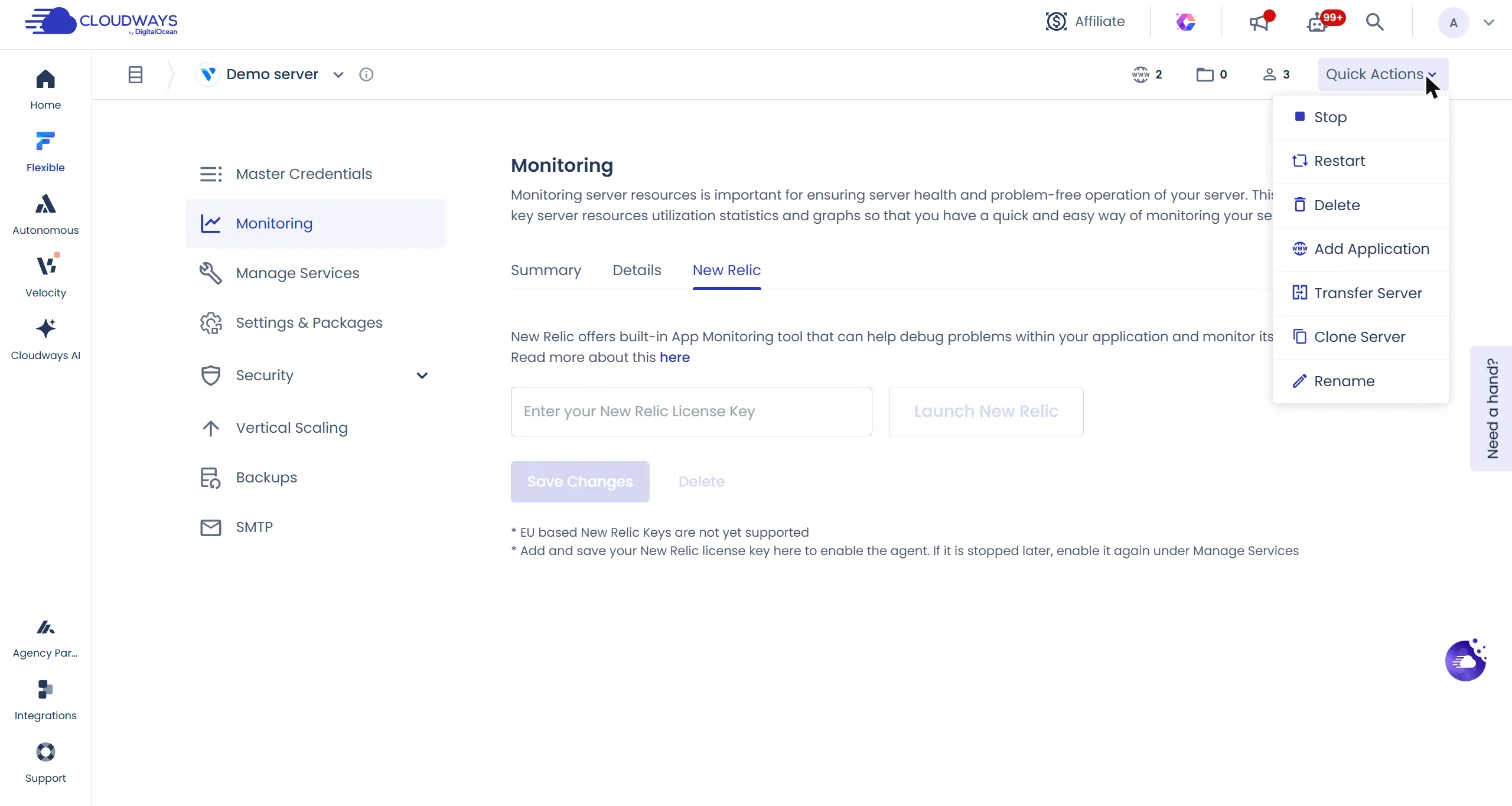
- In the panel, open the server you want to transfer.
- In the server’s actions menu, choose Transfer Server.
- Enter the email address of the destination account and click Transfer Server.
- The client receives an email and has to click Accept Transfer Server Request. The link is valid for 48 hours.
A few things to know before you transfer:
- Only the account owner can transfer a server. A team member can’t.
- Your team members’ access to the project is removed after the transfer.
- If staging and the live site sit on different servers, the link between them can break. The simplest fix: put both on the same server before the transfer.
- If the Elastic Email add-on was set up, the client has to activate it again on their account.
- In the month of the transfer, each account is billed for the days the server was in it.
| Client Billing | Server transfer to client | |
|---|---|---|
| Who pays Cloudways | The agency | The client |
| Margin on hosting | Yes, based on your pricing | None (except through an affiliate program) |
| Control of the server | Yours | The client’s |
| Best for | Maintenance and hosting retainers | Projects that end with a handoff |
The Agency Partner Program
Joining is free and open to any agency with an active website, with no minimum spend. Your tier is set by the monthly spend on your main account, and the benefits follow from the tier. The figures here are from the program page on 6 Nov 2026:
| Tier | Monthly spend | Support level | Site migrations | Growth bonus (credit) | Joining discount |
|---|---|---|---|---|---|
| Bronze | Under $100 | Standard | The free migration plugin | – | – |
| Silver | $100–$499 | Advanced | The free migration plugin | $250 when you reach the tier within 3 months | – |
| Gold | $500–$2,500 | Advanced | Unlimited, free | $500 within 6 months | 10% off the invoice for 6 months |
| Platinum | Over $2,500 | Premium | Unlimited, free | $1,500 within 9 months | 10% off the invoice for 12 months |
From Silver up you also get a dedicated partner manager, and every partner can be listed in the Cloudways agency directory. To put the value in perspective: Advanced support normally costs $100 a month and Premium costs $500 (support add-on prices on the add-ons pricing page), so the benefit is significant from Silver onward. The full breakdown of each tier: the Cloudways Agency Partner Program.
Watch two details. First, by default only the spend on your main account counts. To include spend on client accounts where you have team access, you need to contact your partner manager. Second, the program doesn’t pay you for joining. Commissions on referred customers come from the separate affiliate program, which has a commission calculator and a two-tier track.
An agency’s everyday tools
- Site Manager (on Flexible): manage plugins, themes and users across all your WordPress sites from one dashboard, with one-click login (SSO) to each site’s admin.
- SafeUpdates (in the Site Manager Pro tier; from $3 a month according to the add-ons page): detects updates, takes a backup, tests them on a copy and only then updates the live site.
- Git: automatic deployment from the repository to the server. See Git deployment on Cloudways.
- Staging and cloning: a new test URL is created automatically for every clone.
- Cloudways Copilot: an AI assistant that monitors servers and suggests fixes, handy when you have dozens of servers and nobody watches all of them all the time.
- Separate disk scaling: you can add storage without upsizing the whole server.
Checklist: taking a new client live
This is the order I follow with every new client. It’s based on the Cloudways getting-started guide for agencies, with my own adjustments from real projects.
- Decide: separate server or shared server, and which project it goes in.
- Launch an application (WordPress, WooCommerce, Magento or PHP) or migrate an existing site. WordPress and WooCommerce sites are migrated for free; other applications are paid.
- Test on the temporary URL, then connect the domain and install SSL. For clients whose domain sits with GoDaddy, Namecheap or another registrar, see how to connect a domain to Cloudways.
- Sort out email: Elastic Email or another SMTP service for sending from the site, and Rackspace or an external service for mailboxes.
- Set up performance: Breeze, Redis and, when needed, Cloudflare.
- Secure it: 2FA, an IP allowlist, and consider Malware Protection.
- Set up server-level backups and test one restore.
- Add the client as a team member with limited permissions, or transfer the server to them.
- Set up billing in Client Billing, and turn on billing alerts in your account to keep costs under control.
What it costs an agency: an example
Say you have 16 client brochure sites spread over two 4GB DigitalOcean Premium servers. According to the pricing page, each server costs $54 a month, so $108 for both, before backups, add-ons and taxes. That’s about $6.75 per site per month (prices as of 6 Nov 2026). At that spend you also qualify for the Silver tier of the partner program, with Advanced support.
Your numbers will differ: one heavy store can use more resources than ten brochure sites. All prices are on my Cloudways pricing page.
What’s less good for agencies
- No built-in email. Every client needs a separate email solution, and that’s a conversation to have before the move.
- Invoices in USD and in English. A client who pays Cloudways directly gets a USD invoice, which may not meet the tax-invoice rules in their country.
- Support scope. At the standard level, support handles the server and the platform, not plugins. From the Silver tier up you get Advanced support.
- No root access. A client who needs special system software on the server will need a different solution.
The offer ends on December 4, 2026 at 23:59 (UTC+2).
Start with a free trial, no credit card. Enter the code at checkout and check that it shows up.
Start a free trial server, no credit card. When you move to a paid plan, the code ASAEL takes 30% off your bill for the first three months.
The link fills in the code on the signup form. Just make sure it shows up.
Cloudways for agencies FAQ
There is no limit on the number of applications per server. The limit is resources: if CPU or memory usage sits above 80% on a regular basis, it’s time to upsize the server or split clients onto another server.
Yes. The account owner chooses Transfer Server and enters the email of the client’s account, and the client approves through a link that is valid for 48 hours. From then on the server and its billing belong to the client.
There is a free plan for one client and two services. Growth costs $4.99 a month for 10 clients, and Scale costs $13.99 a month with no limits. Stripe fees are charged separately.
An agency with an active website. Joining is free and there is no minimum spend. Your tier and benefits are set by your monthly account spend, from Bronze to Platinum.
Yes. You can add the client as a team member with access to a specific server or application only, or give them SFTP credentials for one application with no panel access.
WordPress and WooCommerce sites are migrated for free, and there is also a migration plugin to do it yourself. Other applications are migrated for a fee. In the Gold and Platinum tiers of the partner program, migrations are unlimited.
Related guides
- Client Billing on Cloudways: setup and billing clients
- How to give quick access to a server or site
- Git deployment on Cloudways
- Cloudways pricing
- All account and billing guides: Cloudways account, team and billing
Official sources: Hosting for Agencies, Agency Partner Program, Client Billing, Getting Started with Agency on Cloudways, Collaboration Features on Cloudways Platform, How to Transfer a Server to Another Cloudways Account (Cloudways Knowledge Base). Written and checked by Asael Dreyer · Updated: 6 Nov 2026
Disclosure: this is an independent site, not the official Cloudways site. Some links on this site are affiliate links: if you sign up through them we earn a commission, at no extra cost to you. Full details