
Short answer: Kinsta is premium managed WordPress hosting on Google Cloud: a single-site plan starts at $35/month, with bandwidth and storage caps, a polished dashboard and strong support. Cloudways gives you a private cloud server from $11/month (DigitalOcean Standard), with unlimited sites on that server and a choice of five cloud providers. For one important site with a generous budget, Kinsta is an excellent pick. For several sites, for agencies, and for anyone who wants more resources per dollar, Cloudways is far better value.
Kinsta vs Cloudways: premium per-site hosting vs a server you size yourself
Kinsta is a managed WordPress host built entirely on Google Cloud. Every site runs in its own isolated container, and Kinsta handles the server, caching, CDN and security for you. You pay per site and per allowance: monthly bandwidth, storage, or visits, depending on the plan type you pick. Looking at other options besides Kinsta? Here are the best Kinsta alternatives.
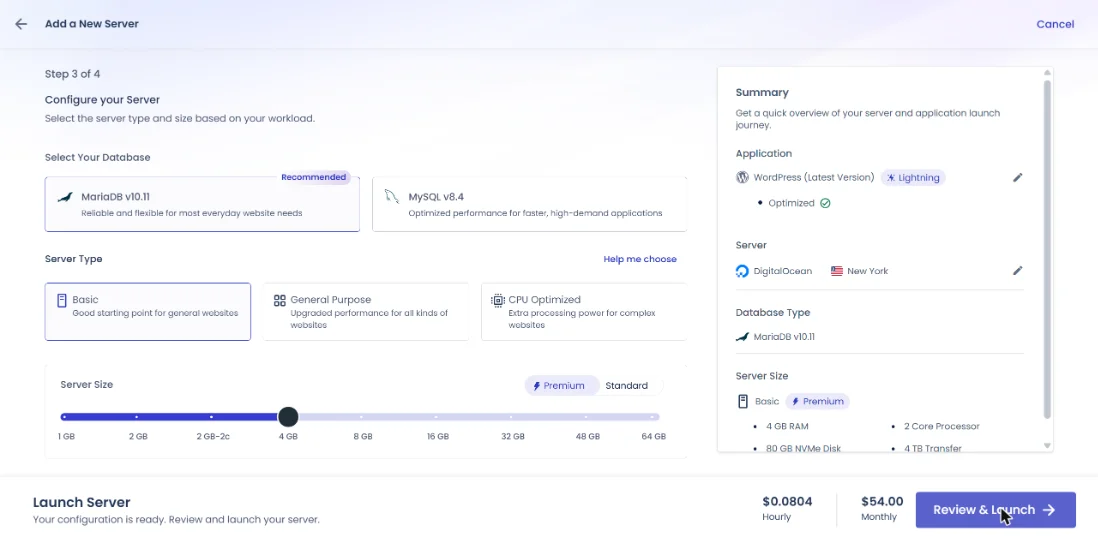
Cloudways manages a private cloud server for you on DigitalOcean, Vultr, Linode, AWS or Google Cloud. You pay by server size. There is no visit cap and no per-site price: whatever the server can handle, you can run.
The way I explain it to clients: Kinsta is a boutique hotel, where you pay per room and get excellent service. Cloudways is an apartment with a management company, where you pay for the size of the apartment and decide how many rooms to fit in. If you want the comparison with the other fully managed platforms, it’s here: Cloudways Autonomous vs Kinsta and WP Engine.
Kinsta vs Cloudways: comparison table
| Feature | Kinsta | Cloudways (Flexible) |
|---|---|---|
| Hosting type | Premium managed WordPress, isolated container per site | Private, managed cloud server |
| Entry price | $35/month (Single 20GB), or $30/month billed annually ($350/year) | $11/month (DigitalOcean 1GB), before tax |
| Current offer | First month for $0 (promotion, checked 6 Nov 2026) | 5-day free trial; code ASAEL |
| Pricing model | Per site, plus bandwidth or visits | By server size, billed hourly with a monthly cap |
| Sites on the entry plan | One WordPress install; each extra site $30/month | Unlimited, limited only by server resources |
| Storage and bandwidth at entry level | 10GB storage, 20GB bandwidth, 125GB CDN | 25GB SSD, 1TB bandwidth |
| Infrastructure | Google Cloud only | Five cloud providers |
| Data center choice | Google Cloud locations; per Kinsta, Tel Aviv is available on all plans at no extra cost | Depends on the provider you pick; Tel Aviv, for example, is on Vultr, plus Google Cloud and AWS on an upgraded account |
| Backups | Daily and automatic, 14-day retention on the entry plan | Automatic, frequency and retention are your choice; $0.033 per GB |
| Staging | Yes | Yes |
| CDN | Included | Cloudflare Enterprise as a paid add-on |
| No email hosting | Not included (Rackspace add-on or an outside provider) | |
| Support | 24/7, real humans, in 8 languages | 24/7 chat and tickets, in English |
| Applications | WordPress (application hosting is a separate service) | WordPress, WooCommerce, Magento, Laravel and custom PHP on the same server |
As of 6 Nov 2026, based on Kinsta’s pricing page, Kinsta’s product update on its Tel Aviv data center, and the Cloudways pricing page. Kinsta prices are in USD and exclude tax.
What do 1, 2 and 10 sites cost?
On Kinsta, every extra site raises the bill. On Cloudways, extra sites cost nothing until the server fills up, and then you scale it. So the gap is small with one site and widens fast as you add more.
| Scenario | Kinsta (monthly billing) | Cloudways (estimated server size) |
|---|---|---|
| One site, low traffic | Single 20GB: $35 | 1GB or 2GB server: $11–$24 |
| One site, about 65,000 visits a month | Single 65k: $50 | 2GB server: $24 |
| Two sites | WP 2: $70 | 2GB server: $24 |
| 10 agency sites | WP 10: $225 | 4GB–8GB server: $46–$88 |
Kinsta prices are from its pricing page on 6 Nov 2026, billed monthly. Pay annually and Kinsta gives you two months free. The Cloudways server sizes are my own estimate from experience: cached brochure sites use very little, busy stores use a lot more. Server prices are before tax, based on DigitalOcean Basic.
Compare what’s inside the price, too. Kinsta includes a CDN, enterprise-level DDoS protection, bot protection, uptime monitoring, an APM tool and malware cleanup. On Cloudways, some of these are paid add-ons, for example Cloudflare Enterprise and Malware Protection. Even with the add-ons, Cloudways stays cheaper once you run several sites.
The code BFCM802 takes 80% off your bill for the first two months (up to $200 off per month), including unlimited free site migrations. New customers only, and only until the offer ends.
The offer ends on December 4, 2026 at 23:59 (UTC+2).
Start with a free trial, no credit card. Enter the code at checkout and check that it shows up.
After Black Friday: 30% off for 3 months with the code ASAEL. On a large server (above about $444 a month) ASAEL already saves more today. BFCM802 vs. ASAEL calculator
Start a free trial server, no credit card. When you move to a paid plan, the code ASAEL takes 30% off your bill for the first three months.
The link fills in the code on the signup form. Just make sure it shows up.
What are the bandwidth, visit and storage limits?
On Kinsta you choose whether your plan is metered by server bandwidth or by visits. The entry plan includes 20GB of server bandwidth a month and 10GB of storage. Extra storage costs $20/month per 20GB. Go over your allowance and Kinsta’s overage terms apply, so read them before you pick a plan.
Cloudways has no visit cap. Every server comes with a generous bandwidth allowance (1TB on the smallest DigitalOcean server), and overage is billed at the provider’s rate, for example $0.02 per GB on DigitalOcean. The real limit is server power: if the site slows down under load, you scale the server up.
What that means in practice: when a post suddenly goes viral, your Kinsta bill can jump because of overage. On Cloudways the bill stays the same, but if the server is too small the site slows down until you scale it.
What do we actually know about performance?
Kinsta runs sites on Google Cloud, and according to the company, on C2 machines and Google’s Premium Tier network, with built-in edge caching and CDN. That’s strong infrastructure, and it’s part of what you’re paying for.
On Cloudways, performance depends on the provider and server size you choose. A DigitalOcean Premium server with NVMe, Vultr High Frequency, or Google Cloud will give different results at different prices. Caching is layered: server-level cache, Redis or Object Cache Pro (included on 4GB servers and up), and the Breeze plugin.
Cloudways published a load test against Kinsta and WP Engine, but it was run in July 2020, by Cloudways itself, on plans that have since changed. So I don’t rely on it. If performance is your main concern, move a copy of your site to both and check TTFB and load time from where your visitors are, on the same day.
How do security and backups differ?
Every Kinsta plan includes a managed firewall (WAF) with DDoS protection, bot protection, SSL certificates including wildcard, and free cleanup if a site gets hacked. Backups are daily and automatic, kept for 14 days on the entry plan and longer on higher plans.
Cloudways gives you a server-level firewall, IP whitelisting for SSH and SFTP, two-factor authentication and free Let’s Encrypt SSL. You decide how often backups run and how long they’re kept, and you pay for backup storage ($0.033 per GB). Malware scanning and removal come with the paid Malware Protection add-on, and advanced DDoS protection through Cloudflare Enterprise.
Bottom line: Kinsta sells security as a complete package. Cloudways gives you a solid base and lets you add layers as needed, so the final price depends on what you choose.
How do billing and taxes work?
Both companies bill in USD, and the listed prices exclude tax. Kinsta accepts credit and debit cards, and ACH or bank transfer on some plans. Cloudways takes credit cards, and if your card isn’t in USD your bank may add a currency conversion fee. If you run a business, ask your accountant how to book invoices from a foreign supplier in your country.
Which data center locations can you choose?
On Kinsta you pick a Google Cloud data center from a list when you add a site. According to Kinsta’s product update on its Google Cloud Tel Aviv data center, that location is available on every plan at no extra cost.
On Cloudways, the locations depend on the provider. Using Tel Aviv again as a test case, there are three routes. Vultr Tel Aviv appeared on the server creation screen on 6 Nov 2026, at Vultr’s prices (the exact price shows on that screen). Google Cloud Tel Aviv is listed in the Cloudways knowledge base, but Google Cloud servers start at $37.33/month and need an upgraded account. AWS is available too, on an upgraded account, at the price shown on the creation screen. The takeaway: check that the provider you want offers a region near your audience before you commit.
Support, dashboard and tools
- Support: Kinsta advertises 24/7 support from real humans in 8 languages. Cloudways support is 24/7 by chat and tickets, in English, with deeper application-level help on the Advanced or Premium support add-ons.
- Dashboard: MyKinsta is one of the cleanest dashboards in the industry, and it’s focused on the site. The Cloudways panel exposes more server-level settings: power if you need it, clutter if you don’t.
- Developer tools: both have SSH, staging and PHP version switching. Kinsta has a built-in APM tool and plugin updates with visual regression testing (a paid add-on). Cloudways has Git, cron, Varnish and Redis management, and it runs non-WordPress apps too.
- Migrations: Kinsta offers unlimited migrations. Cloudways offers a free managed WordPress migration on an upgraded account.
If you want a Kinsta-style “no server to manage” experience on Cloudways, including automatic scaling under load, look at Cloudways Autonomous. Details are in my Autonomous pricing guide.
Pros and cons
Kinsta
- Pros: premium Google Cloud infrastructure; CDN, DDoS protection and APM included; excellent dashboard; support in 8 languages; SOC 2 and ISO 27001 compliance on enterprise plans.
- Cons: expensive, especially for several sites; per-site pricing; bandwidth or visit caps; only 10GB on the entry plan; Google Cloud only; no email hosting.
Cloudways
- Pros: entry price about a third of Kinsta’s; unlimited sites per server; no visit cap; five cloud providers to choose from; non-WordPress PHP apps too; server-level control.
- Cons: advanced CDN and malware protection cost extra; support in English only; you have to pick a server size and keep an eye on it; the trial is only 5 days; no email.
Kinsta or Cloudways: who each one is for
| If you are… | My recommendation |
|---|---|
| A company with one business-critical WordPress site and a comfortable budget | Kinsta |
| An organization that needs an SLA, SOC 2 and an account manager | Kinsta Enterprise |
| Someone who never wants to think about servers | Kinsta, or Cloudways Autonomous |
| A freelancer or agency with many sites | Cloudways |
| A small or mid-sized business that wants good performance on a reasonable budget | Cloudways |
| Running Magento, Laravel or custom PHP | Cloudways |
| A content site with lots of visits and a low budget per visit | Cloudways |
Cloudways isn’t for you if you want a package that includes almost everything with no add-ons and you’re willing to pay for that, or if you never want to make a decision about server size. Kinsta isn’t for you if you manage dozens of small sites, or if your monthly budget per site is under $30.
How do you move from Kinsta to Cloudways?
- Create a Cloudways server in the same region your site uses today (for example, the same part of Europe or the US), so the comparison is fair.
- Move the site with the Cloudways migration plugin, or request a managed migration on an upgraded account.
- If you used Kinsta’s CDN, set up a replacement: Cloudflare (free) or Cloudflare Enterprise through Cloudways.
- Test the site on the temporary URL, including any redirects you set in MyKinsta, because they don’t move with the site files.
- Update DNS, and only close the site on Kinsta after a few days of everything working.
The offer ends on December 4, 2026 at 23:59 (UTC+2).
Start with a free trial, no credit card. Enter the code at checkout and check that it shows up.
Start a free trial server, no credit card. When you move to a paid plan, the code ASAEL takes 30% off your bill for the first three months.
The link fills in the code on the signup form. Just make sure it shows up.
FAQ
Not necessarily; it fits a different situation. Kinsta is great for one important site with a high budget and a wish for full-service hosting. Cloudways is better for several sites, for agencies, and for anyone who wants more resources per dollar.
As of November 2026, the single-site plan starts at $35/month, or $30/month billed annually, before tax. Each extra site costs $30/month, and the two-site plan starts at $70.
Yes. On Kinsta you pick a Google Cloud data center when you add a site, and Kinsta says its Tel Aviv location costs no extra. On Cloudways you pick the provider and location when you create a server, and the locations vary by provider: Tel Aviv, for example, is offered on AWS, Vultr and Google Cloud.
No. Kinsta doesn’t offer email hosting, and on Cloudways email is a paid Rackspace add-on. In most cases you’re better off connecting your domain to Google Workspace or a dedicated email provider.
No. You pay by server size, and each server includes a bandwidth allowance set by the provider. If the site slows down under load, you scale the server; you don’t pay per visitor.
More comparisons
- Cloudways vs SiteGround
- Cloudways vs Hostinger
- Hosting comparison 2026
- Cloudways pricing explained · Coupon code ASAEL
Sources (checked 6 Nov 2026): Kinsta – Hosting plans, Kinsta – Google Cloud Tel Aviv data center, Kinsta – Keep email and hosting separate, Cloudways Pricing, Cloudways Performance Test (2020), Bandwidth Charges of Infrastructure Providers (Cloudways Knowledge Base). Written and tested by Asael Dreyer · Updated: 6 Nov 2026
Disclosure: this is an independent site, not the official Cloudways site. Some links on this site are affiliate links: if you sign up through them we earn a commission, at no extra cost to you. Full details