
Short answer: a 1GB Droplet costs $6/month directly on DigitalOcean, and the same size through Cloudways costs $11. The difference buys you a WordPress-ready server with security, automatic backups, SSL, caching, monitoring and 24/7 support, so you don’t administer Linux yourself. If you’re a developer who can maintain a server and you want root, DigitalOcean direct is cheaper. If your hour is worth more than a few dollars a month, or you have no DevOps person, Cloudways pays for itself.
Unmanaged vs managed server: what’s the difference?
This isn’t a comparison between two competing companies. It’s a comparison between two ways of using the same infrastructure. Cloudways is a DigitalOcean subsidiary, but the services are separate: you can run a managed DigitalOcean server through Cloudways, or an unmanaged Droplet directly on DigitalOcean.
A Droplet is a virtual machine in DigitalOcean’s cloud. Buy one directly and you get a clean operating system and root access, and everything else is on you: web server, PHP, database, firewall, SSL certificates, security updates, backups and monitoring. That’s what an unmanaged server means.
A managed server on Cloudways is the same type of machine at DigitalOcean, which Cloudways provisions with a ready-made stack (Nginx, Apache, Varnish, PHP, MySQL or MariaDB, Redis), secures and maintains. You work through a panel: add a site, issue SSL, back up, clone and scale with a click. What you give up: root access and full control of the operating system.
Note: Cloudways can’t take over management of a Droplet you’ve already created on DigitalOcean. It provisions a new server in its own environment, and you move your sites to it.
What you pay: prices side by side
The table compares DigitalOcean Basic Regular Droplets with DigitalOcean Standard servers on Cloudways, based on the official pages on 6 Nov 2026. In the specs I picked, RAM, vCPUs and disk match, except in the 2GB row.
| Spec | DigitalOcean direct | Through Cloudways | Monthly difference |
|---|---|---|---|
| 1GB RAM, 1 vCPU, 25GB | $6 (1,000GiB transfer) | $11 (1TB bandwidth) | $5 |
| 2GB RAM, 1 vCPU, 50GB | $12 (2,000GiB transfer) | $24 (2TB bandwidth) | $12 |
| 4GB RAM, 2 vCPU, 80GB | $24 (4,000GiB transfer) | $46 (4TB bandwidth) | $22 |
| 8GB RAM, 4 vCPU, 160GB | $48 (5,000GiB transfer) | $88 (5TB bandwidth) | $40 |
DigitalOcean also has a 512MiB Droplet for $4, and Cloudways also offers Premium servers with NVMe storage, from $14 for 1GB. Both bill by usage: since early 2026 DigitalOcean bills per second (60-second minimum) with a monthly cap, and Cloudways bills per hour.
The costs that don’t show in the Droplet price
The comparison above is the sticker price. In practice, with a Droplet you’ll add a few things:
- Backups: on DigitalOcean backups are paid, 20% of the Droplet price for weekly backups or 30% for daily. On a 4GB Droplet that’s another $7.20 for daily backups. On Cloudways, automatic backups are included, and offsite backup storage is billed at $0.033 per GB.
- Control panel: if you don’t want to live on the command line, you’ll use a panel. Some panels are paid, and some need their own installation and upkeep.
- Your time: the initial setup of a hardened WordPress server takes an experienced developer a few hours, plus time every month for updates and incidents. If you pay a professional for that, the $5 to $22 monthly difference disappears fast.
Example: a 4GB server with daily backups costs about $31.20 direct ($24 plus 30%), against $46 on Cloudways plus a few dollars for backup storage. The real gap is smaller than the table suggests, and it’s the price of management. All server sizes and prices are in my Cloudways DigitalOcean pricing guide.
What you get each way: who does which task
| Task | DigitalOcean direct | Cloudways |
|---|---|---|
| Installing the web server, PHP and database | You, by hand or from a 1-Click image | Automatic, preconfigured stack |
| Installing WordPress | You | One click, Breeze included |
| OS security updates | You | Cloudways |
| Server-level firewall | You (or DO’s Cloud Firewall) | Included and managed |
| SSL certificate and renewal | You (Certbot) | Let’s Encrypt in one click, auto-renewal |
| Caching | You install and configure it | Varnish, Redis and Memcached ready; Object Cache Pro free from 4GB servers |
| Backups | Paid add-on (20% or 30%) or your own script | Automatic, one-click restore |
| Staging and site cloning | You | One click |
| Several sites on one server | Possible, with manual configuration | Add an application from the panel |
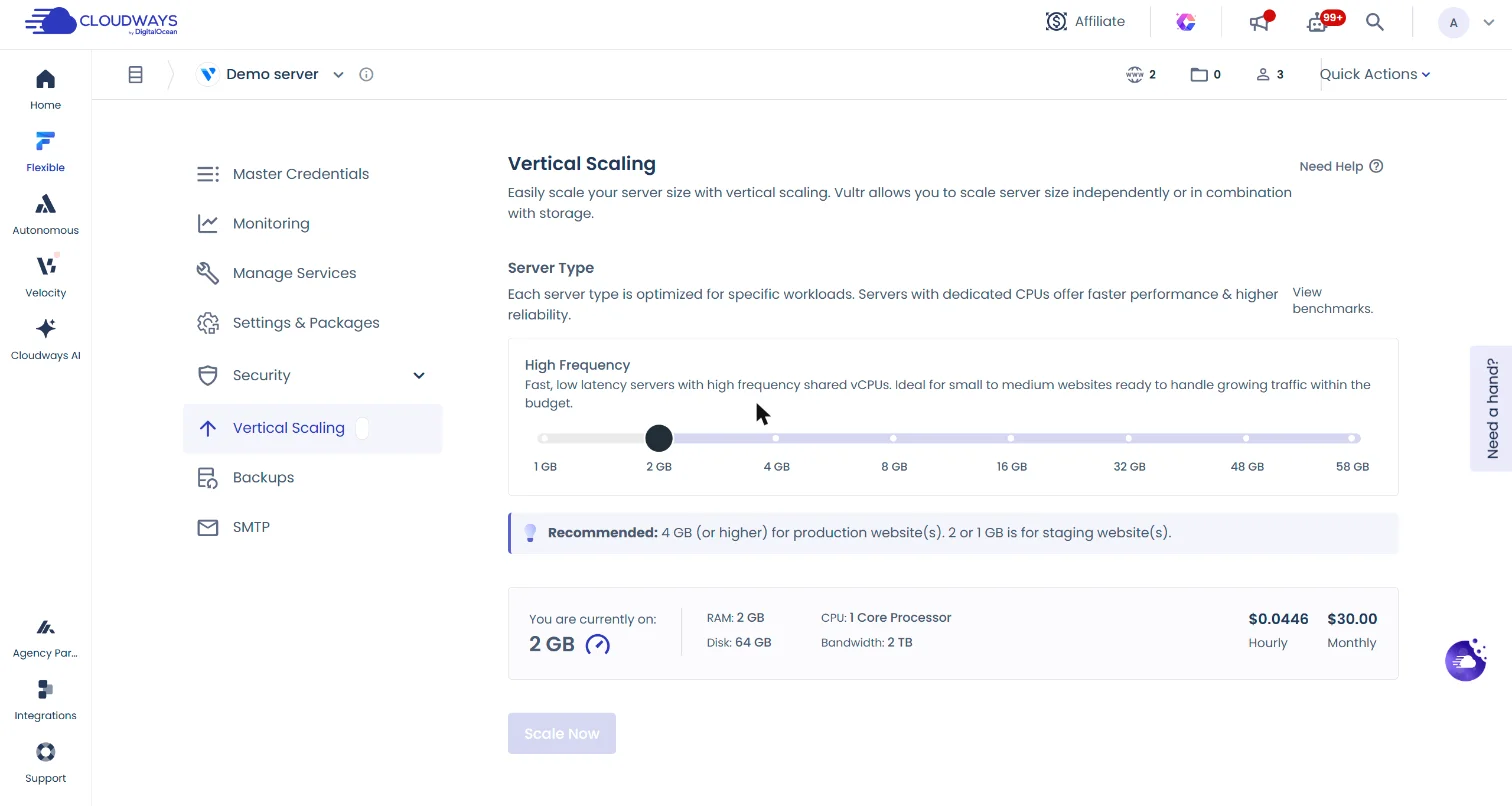
| Scaling the server | Resize in the DO panel | Vertical Scaling in the panel |
| Monitoring and alerts | DO Monitoring, you configure it | Server and application monitoring plus CloudwaysBot alerts |
| Support for server problems | Infrastructure support only | 24/7 chat and tickets covering the server and platform |
| Root access | Yes | No (SSH and SFTP for the master user) |
| Non-PHP applications | Anything | No .NET, Java, Python or Ruby; for Node.js there’s Cloudways Velocity |
What if DigitalOcean has no data center near your audience?
DigitalOcean has a solid but limited list of regions; in Europe, for example, you’ll typically pick Frankfurt, Amsterdam or London. That list is the same whether you open DigitalOcean directly or through Cloudways.
This is where Cloudways has an advantage DigitalOcean direct can’t match: the same panel works with other providers too. If your audience is somewhere DigitalOcean doesn’t cover, the Middle East for instance, you can pick AWS, Google Cloud or Vultr Tel Aviv on Cloudways. Prices there differ from DigitalOcean, so check them in the Cloudways pricing guide.
The code BFCM802 takes 80% off your bill for the first two months (up to $200 off per month), including unlimited free site migrations. New customers only, and only until the offer ends.
The offer ends on December 4, 2026 at 23:59 (UTC+2).
Start with a free trial, no credit card. Enter the code at checkout and check that it shows up.
After Black Friday: 30% off for 3 months with the code ASAEL. On a large server (above about $444 a month) ASAEL already saves more today. BFCM802 vs. ASAEL calculator
Start a free trial server, no credit card. When you move to a paid plan, the code ASAEL takes 30% off your bill for the first three months.
The link fills in the code on the signup form. Just make sure it shows up.
Which one fits you?
| Your situation | My recommendation | Why |
|---|---|---|
| Developer who knows Linux and wants root | DigitalOcean direct | Cheaper, with full control |
| Python, Go or Docker application | DigitalOcean direct | Cloudways Flexible is built for PHP applications |
| Business owner with a WordPress site or store | Cloudways | No server knowledge needed, and support when something breaks |
| Agency managing client sites | Cloudways | Staging, cloning, team permissions and Client Billing |
| Need a region DigitalOcean doesn’t offer | Cloudways with Google Cloud, AWS or Vultr | More locations through the same panel |
| Throwaway project for a few hours | DigitalOcean direct | Per-second billing and a very small Droplet |
Common mistakes when choosing
Comparing only the Droplet price: without backups, monitoring and maintenance time, the comparison is misleading. Work out the full cost for a year.
Spinning up a Droplet and never updating it: an unmanaged server that isn’t patched is an easy target. If you don’t have time for regular updates, a managed server is safer.
Expecting Cloudways to manage an existing Droplet: it doesn’t. You create a new server on Cloudways and move your sites to it, with the free WordPress migration or a migration plugin.
Picking a server that’s too small: 1GB is enough for one or two brochure sites. For a WooCommerce store or several sites, start at 2GB, and at 4GB if you want Object Cache Pro for free.
The bottom line
DigitalOcean direct is an excellent tool for developers: cheap, flexible and open to any technology. Cloudways is the same server with a team managing it for you, and it fits people for whom the site is the business, not a hobby. The monthly difference is the price of peace of mind: backups, updates, SSL and support at two in the morning. Another low-cost provider developers love is Hetzner, and I compare it here: Cloudways vs Hetzner.
The offer ends on December 4, 2026 at 23:59 (UTC+2).
Start with a free trial, no credit card. Enter the code at checkout and check that it shows up.
Start a free trial server, no credit card. When you move to a paid plan, the code ASAEL takes 30% off your bill for the first three months.
The link fills in the code on the signup form. Just make sure it shows up.
FAQ
It depends on your skills. If you run Linux yourself and want root, you’ll save money on DigitalOcean direct. If you want a site that works without maintaining a server, choose Cloudways, which runs the same infrastructure with full management.
A Basic Droplet starts at $4/month (512MiB), and a 1GiB server with a 25GiB disk costs $6. Backups cost an extra 20% or 30% of the Droplet price. Prices checked on 6 Nov 2026.
Because the price includes management: a preinstalled stack, security updates, firewall, SSL, automatic backups, caching, monitoring and 24/7 support. With a Droplet bought directly, all of that is on you.
No. Cloudways provisions a new server in its own environment and doesn’t manage existing Droplets. You move your sites to the new server and then delete the old Droplet.
No. You get SSH and SFTP access for the master user and application users, but not root. That’s part of the managed model, and it prevents changes that would break the stack.
Then pick the nearest DigitalOcean region, or switch provider. On Cloudways you can choose AWS, Google Cloud or Vultr in the same panel, which covers locations DigitalOcean doesn’t, such as Tel Aviv.
More comparisons
- Cloudways vs SiteGround
- Cloudways vs Hostinger
- Web hosting comparison 2026
- Cloudways pricing by cloud provider and Cloudways coupon code
Sources (checked 6 Nov 2026): DigitalOcean Droplet Pricing · Cloudways Pricing · Cloudways Managed DigitalOcean Hosting. Written by Asael Dreyer · Updated: 6 Nov 2026
Disclosure: this is an independent site, not the official Cloudways site. Some links on this site are affiliate links: if you sign up through them we earn a commission, at no extra cost to you. Full details