
Last updated: · By Asael Dreyer
In short: Cloudways is a managed cloud hosting platform. You pick a cloud provider (DigitalOcean, Vultr, Linode, AWS or Google Cloud) and a server size, and Cloudways installs, secures, backs up and monitors the server for you. After years of running hundreds of sites on dozens of servers on the platform, my bottom line is that it is an excellent choice for businesses, freelancers and agencies who want a private, fast server without managing it themselves. It is a weaker fit if you want the lowest possible price, email in the same package, or phone support.
Cloudways review: the bottom line
If you don’t have time to read the whole review, here is what matters. Cloudways does not sell a “hosting package” in the traditional shared-hosting sense. It gives you your own cloud server, with a management layer on top that removes most of the sysadmin work.
| Topic | My summary |
|---|---|
| Overall score | 4.2 out of 5 (based on 6 weighted criteria, see how I calculated it) |
| Starting price | From $11/month (DigitalOcean Standard) for a 1GB server on Flexible, and from $99/month on Autonomous (before taxes, as of 6 Nov 2026) |
| Free trial | 5 days on Flexible and 3 days on Autonomous, no credit card |
| Strongest at | Stable performance, a private server, a simple interface, one-click staging and cloning, pay-as-you-go billing |
| Weakest at | No built-in email, no root access, no phone support, and some add-ons cost extra |
| Especially good for | WordPress and WooCommerce sites for businesses, agencies and freelancers who manage several sites |
The code BFCM802 takes 80% off your bill for the first two months (up to $200 off per month), including unlimited free site migrations. New customers only, and only until the offer ends.
The offer ends on December 4, 2026 at 23:59 (UTC+2).
Start with a free trial, no credit card. Enter the code at checkout and check that it shows up.
After Black Friday: 30% off for 3 months with the code ASAEL. On a large server (above about $444 a month) ASAEL already saves more today. BFCM802 vs. ASAEL calculator
Start a free trial server, no credit card. When you move to a paid plan, the code ASAEL takes 30% off your bill for the first three months.
The link fills in the code on the signup form. Just make sure it shows up.
What is Cloudways and how does it work?
Cloudways is a managed cloud hosting platform. The server itself sits with one of the big cloud providers, and Cloudways takes care of everything above it: the operating system, the web server, PHP, caching, the firewall, backups and monitoring.
The easiest way to picture it is an apartment building. With shared hosting you rent a room in an apartment with hundreds of other tenants, and when a neighbor throws a party, everyone suffers. With a “bare” cloud server you get an empty apartment and you are responsible for the electricity, the plumbing and the locks. With Cloudways you get an apartment of your own, plus a management company that handles all the maintenance.
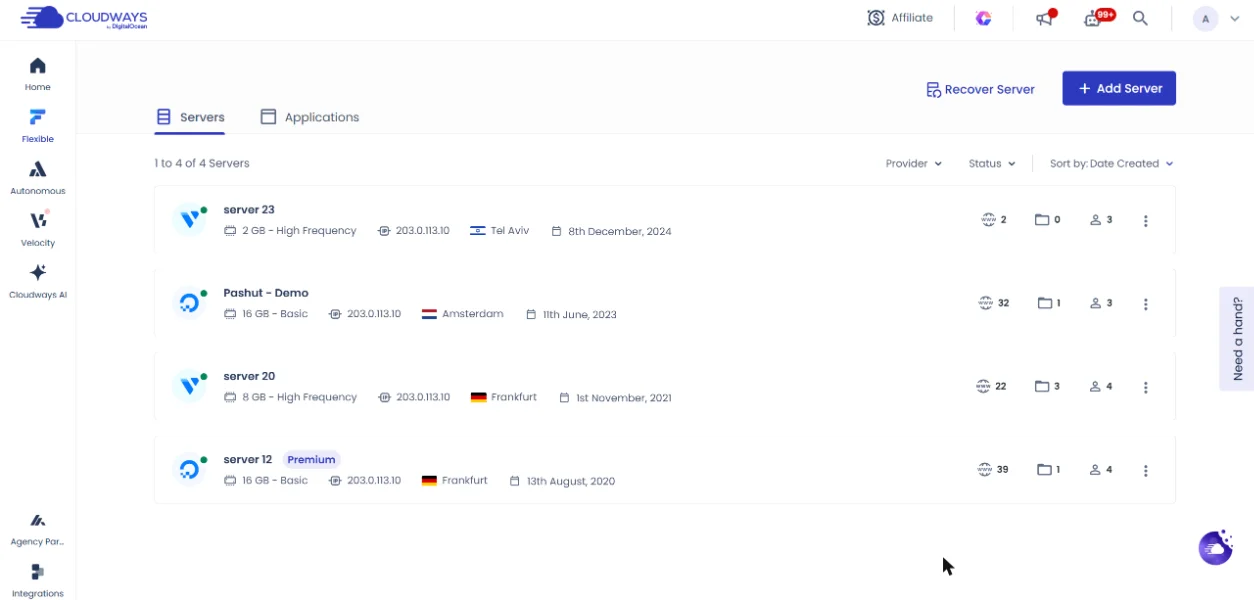
In the management panel it looks like this: there is a list of servers, each server contains applications (every WordPress site is one application), and every application has its own management screen with domains, SSL, backups, cache and access details. You can run as many sites on one server as its resources allow.
Flexible vs Autonomous: two plans, two philosophies
As of November 2026, Cloudways offers four products: Flexible, Autonomous, Velocity (managed hosting for Node.js apps; how much Velocity costs) and Managed AI Agents (hosting for AI agents; Managed AI Agents pricing). For most readers here, the decision is between the first two:
| Flexible | Autonomous | |
|---|---|---|
| What it is | A managed cloud server that you choose and configure | Fully managed WordPress/WooCommerce hosting on Kubernetes with automatic scaling (Autoscaling) |
| Cloud providers | DigitalOcean, Vultr, Linode, AWS, Google Cloud | Google Cloud |
| Sites | As many as the server can hold | One site per plan |
| Starting price | From $11/month | From $99/month (Growth) |
| Control | High: PHP version, server settings, SSH, Git | Deliberately lower, everything is managed for you |
| Cloudflare Enterprise | Paid add-on | Included |
| Free trial | 5 days | 3 days |
My rule of thumb: a brochure site, a blog, or several client sites is a job for Flexible. A busy store, or a site with sharp traffic spikes (launches, campaigns, flash sales) that you don’t want to manage at all, is worth testing on Autonomous. The full price breakdown for both plans is on the Cloudways pricing page.
My hands-on experience with Cloudways
This review wasn’t written from a feature table. I’m Asael Dreyer, and I run an SEO company that keeps hundreds of sites on dozens of servers on the Cloudways platform. These are the things that make a real difference in my day-to-day work:
- A private server. The server you pay for is yours alone. A neighbor’s hacked site or traffic spike doesn’t drag yours down, and that peace of mind doesn’t exist on shared hosting.
- Support that solves problems. Chat is available 24/7, and in my experience the agents usually fix the problem themselves instead of sending you off to read an article. One precision matters: standard support handles the server and the platform, not your site’s plugins and themes.
- A simple interface. Servers, applications inside them, and a clear management screen for each application. A client of mine who had never managed a server was able to find a backup and clear the cache after one explanation.
- Quick access for other people. You can give a developer, designer or client access to the whole account, to a specific server, or to a single site only. I explained how in the guide on how to give quick access to a server or site on Cloudways.
- One-click staging and cloning. You clone a site to a test environment, try a risky update, and push it back to the live site. No plugins and no manual copying.
- Gradual growth. You start with a small server and scale it up as the site grows. Scaling happens from the panel, without building a new server.
- A large community. A great many sites already run on Cloudways, plenty of professionals know the platform, and this site has a big library of Cloudways guides.
If you’d like to hear it from others too, read the interview with Roni Goldman of Digital Forward, the Sigma Digital case study, and the before-and-after speed comparisons for sites that moved to Cloudways.
Here I go through the platform from the start: launching a server, adding a site and the important screens in the panel. The workflow is the same even where a screen has changed in design.
The advantages of Cloudways
These are the advantages I feel in practice, along with the facts behind them from the official site.
Performance: a pre-tuned stack with several cache layers
Every Flexible server comes with a stack that is already tuned for WordPress. The default is the Lightning Stack, which is NGINX-based, and there is also the Hybrid Stack for anyone who needs .htaccess support. Both stacks have a layer that stores copies of whole pages at the server level (in the Hybrid Stack that is Varnish), plus Redis (a cache for database queries) and the Breeze caching plugin, which comes preinstalled. You can find the full setup of this site in how this site’s hosting is built.
Object Cache Pro, a commercial WordPress caching plugin, is included for free on servers of 4GB and up. According to Cloudways it normally costs $95 per month. For WooCommerce stores and sites with many logged-in users, the difference is noticeable.
Pay as you go, no annual commitment
There is no contract and no “first-year promo price” that jumps at renewal. Usage is measured by the hour, and the invoice goes out on the 1st of each month for the previous month. On DigitalOcean, Vultr and Linode the monthly price is a cap: even in a 31-day month you won’t pay more than the price in the price list. If you scale a server mid-month, you pay for each size only for the hours it ran.
Tools that save hours
- A staging environment, and cloning of an application or a whole server.
- Automatic backups and on-demand backups, with restore from the panel.
- A free Let’s Encrypt SSL certificate in a few clicks.
- SSH and SFTP access, deployment from Git, and a choice of PHP version per server.
- Team members with permissions, and transfer of a whole server to a client’s account.
- Cloudways Copilot, an AI assistant that monitors the server and suggests fixes. Every Flexible plan includes 4 free credits (how much Cloudways Copilot costs).
Server-level security
Every server has a dedicated firewall (Imunify360), IP and country blocking, protection against password-guessing attempts (brute force) and a WordPress vulnerability scanner. Malware Protection, which removes malicious code automatically, is available as an add-on from $4 per month. If you’ve read my guide on hardening security on Cloudways, you know you can tighten this even further.
Data center locations, including Tel Aviv
There are AWS, Google Cloud and Vultr data centers in Tel Aviv, and all of them are available on Cloudways. Among the cheaper cloud providers, Vultr has a Tel Aviv location, while DigitalOcean and Linode have no data center in the Middle East, and their closest ones are in Europe, for example Frankfurt, Amsterdam and London.
In practice, for most sites a server in Frankfurt plus a CDN layer gives excellent speed to visitors in Europe and the surrounding regions. A server in a closer, more expensive location is mainly worth it when there is a regulatory requirement to keep data in a specific country, or when every millisecond really matters.
The disadvantages of Cloudways (honestly)
I earn a commission when you sign up through this site, and that is exactly why it matters to me to spell out the less good parts as well. These are the things worth knowing before you move:
- No email hosting on the server. Cloudways doesn’t host mailboxes. For business mailboxes you need the Rackspace add-on (from $1.50 per mailbox per month) or an external service such as Google Workspace. For sending email from the site there is a free Gmail SMTP add-on or a custom SMTP setup.
- No root access. Cloudways runs thousands of servers as one network and doesn’t allow root, so you can’t break the tools it runs. A developer who needs to install system software has to ask support or choose another solution.
- No phone support on the standard plan. Support runs through chat and tickets, in English. The agents are patient, but if you’re not comfortable with technical English you will feel it.
- Billing in US dollars. Prices are in dollars and before taxes, so the amount in your local currency changes with the exchange rate. Your card issuer may also charge a currency conversion fee.
- Add-ons that pile up. Off-server backups are billed at $0.033 per GB and can’t be turned off. Cloudflare Enterprise on Flexible starts at $4.99 per month. It’s worth calculating the full cost, not just the server price.
- Standard support doesn’t cover plugins and themes. Help at the application level (a plugin that takes the site down, performance optimization) comes with the Advanced Support add-on, whose official price is $100 per month or 10% of the invoice, whichever is higher. At the time of my check, a 75% discount was offered on it.
- A small learning curve. If you come from cPanel, you’ll need a few hours to get used to the structure of servers and applications and to connecting a domain through an A record.
- Stopping a server doesn’t save money. A server you’ve stopped keeps being billed, because the resources are still reserved for you. Only deleting it stops the billing.
Who Cloudways is for, and who it isn’t
| A good fit for… | A weaker fit for… |
|---|---|
| Businesses with a WordPress site that brings in customers and can’t afford slowness or downtime | Anyone looking for hosting at a couple of dollars a month for a small personal site |
| WooCommerce stores that need advanced caching and a private server | Anyone who wants email, domain and hosting on a single invoice |
| Agencies and freelancers who manage several client sites | Anyone who needs phone support |
| Anyone who wants to grow gradually without switching companies | Developers who must have root or full control of the operating system |
| Anyone leaving shared hosting because of slowness or hacks | Anyone who needs a Windows server or non-PHP applications (other than Node.js on Velocity) |
What actually changes when you move from shared hosting to Cloudways
Most people who contact me are coming from shared hosting with cPanel. The main difference isn’t only speed, but who controls the resources and who is responsible for what.
| Topic | Typical shared hosting | Cloudways Flexible |
|---|---|---|
| Resources | Shared with other sites, usually with PHP memory limits | The memory and CPU of your server only, and you set the limits |
| Number of sites | Depends on the plan | Unlimited, as many as the server can hold |
| Interface | cPanel or a similar interface | A panel of servers and applications, no cPanel |
| Usually included | Not included, via an add-on or an external service | |
| Pricing | Usually paid upfront for a year, with a jump at renewal | Pay as you go, monthly invoice, no commitment |
| Growth | Switching plans, sometimes moving to another server | Scaling the server from the panel |
The thing that surprises people most is email. If your business email currently lives with your hosting company, plan where it will go before you change your DNS records. Otherwise the site moves over fine, and the emails stop arriving.
Which server size to choose on Cloudways
There is no exact formula, because everything depends on traffic, how heavy the theme is, and your plugins. This is the starting point I recommend to clients, based on my experience:
| Site type | Starting point | Note |
|---|---|---|
| A brochure site or one blog | 1GB | Enough for most small sites, and easy to scale up later |
| A few brochure sites, or one active business site | 2GB | A good balance of price and performance |
| A WooCommerce store | 4GB and up | From 4GB you also get Object Cache Pro for free |
| An agency with dozens of sites | Several medium servers | Better to spread clients across several servers than to put everything on one huge server |
A very useful rule from Cloudways itself: if the server’s CPU or memory usage sits constantly above 80%, it’s time to move to a bigger server. You can see these numbers in the server’s monitoring tab. I explained how to scale in practice in the guide on how to increase server RAM on Cloudways.
Migrating a site to Cloudways: free, with caveats
There are two ways to move a WordPress site. The first is the Cloudways migration plugin, which you run yourself and which also works during the trial period. The second is a managed migration, where a Cloudways team moves the site for you.
According to the pricing page, on Flexible the team migrates your first site for free from any hosting company, and the add-ons page says that migrating WordPress and WooCommerce sites is free, while other applications cost $99 per migration. On Autonomous, managed migrations are unlimited. Before you request a migration, check in the panel how many free migrations your account has left, because the terms change from time to time with promotions.
How much does Cloudways cost?
The following prices are taken from the official pricing page, in US dollars per month and before taxes, as of 6 Nov 2026. Cloudways bills in USD, so the amount on your card statement depends on your bank’s exchange rate and any conversion fees.
| Example server | Specs | Official price | Good for |
|---|---|---|---|
| DigitalOcean Standard 1GB | 1 vCPU, 25GB SSD, 1TB transfer | $11 | A blog or small brochure site |
| DigitalOcean Premium 2GB | 1 vCPU, 50GB NVMe, 2TB transfer | $28 | A few small sites or an active business site |
| DigitalOcean Premium 4GB | 2 vCPU, 80GB NVMe, 4TB transfer | $54 | A WooCommerce store |
| Autonomous Growth | One site, 20GB disk, 150GB transfer | $99 | A busy site with traffic spikes |
This is just a taste. All the plans, cloud providers, add-ons and examples of a complete monthly bill are in the full Cloudways pricing guide. And if you want to bring the cost down at the start, I have a dedicated page on the ASAEL coupon code and how to redeem it.
Cloudways support: what you get and what costs extra
Support is one of the most confusing things about Cloudways, because there are three tiers. Here are the differences according to the official support page:
| Tier | Price | First ticket response time | What it includes |
|---|---|---|---|
| Standard | Included in every account | Up to 12 hours, or 3 hours for a high-priority ticket | 24/7 chat, support for the server and platform (servers, domains, backups, SSL, migration) |
| Advanced | $100 per month or 10% of the invoice, whichever is higher (current promotion: 75% off) | Up to 6 hours, or 30 minutes for high priority | A senior team, help with plugin, theme, database and performance problems |
| Premium | $500 per month or 10% of the invoice, whichever is higher | Up to 2 hours, or 10 minutes for high priority | Everything in Advanced, a private Slack channel and phone support |
For most small and medium businesses, standard support is enough. Advanced is worth a look when you run a store where every hour of downtime costs money and you don’t have a developer on hand.
Common mistakes when moving to Cloudways
Waiting until the end of the trial without a payment method: on Flexible, a trial server that hasn’t been upgraded is deleted when the period ends. Add a payment method early and the server keeps running without a break.
Stopping a server to save money: a stopped server is still billed. If you don’t need it, back up what matters and delete it.
Choosing a distant data center: a server in New York for a site whose customers are all in Europe adds needless response time. Pick the region closest to most of your visitors (Frankfurt for Central Europe, for example), or Tel Aviv with providers that offer it, if your audience is there.
Forgetting email when switching DNS: before you point the domain, make sure the MX records point to the right email service.
Ignoring the cost of backups: off-server backups are mandatory and billed by volume. On a media-heavy site, set a reasonable frequency and retention so the amount doesn’t surprise you.
How I arrived at 4.2 out of 5
The score is my own assessment, not an average of user reviews. I rated each criterion from 1 to 5 based on my experience and the official data, and weighted them by what matters most to a typical site owner.
| Criterion | Weight | Score | Why |
|---|---|---|---|
| Performance and infrastructure | 25% | 4.5 | A private server, a tuned stack, Varnish, Redis, Object Cache Pro from 4GB |
| Price and transparency | 20% | 4 | Pay as you go with no jump at renewal, but backups and add-ons are billed separately |
| Support | 15% | 4 | Available 24/7, but English only and no plugin help on the standard tier |
| Ease of use | 15% | 4.5 | A clear interface, one-click staging and cloning, team permissions |
| Security and backups | 15% | 4.5 | A dedicated firewall, automatic backups, free SSL |
| Language and billing fit | 10% | 3.5 | English-only support, billing in USD, and a Tel Aviv server only with some providers |
| Weighted total | 100% | 4.2 | 4.225, rounded |
What are the alternatives to Cloudways?
Cloudways isn’t right for everyone, and that’s fine. These are the alternatives I run into most often, and who each one suits:
- Kinsta and WP Engine – premium managed WordPress hosting. A good match if you’re willing to pay more for an “everything included” service, but pricing is set by the number of sites, visits and volume, which becomes limiting as you grow.
- SiteGround and Hostinger – cheap shared or managed hosting. The starting price is very low, but it depends on paying upfront for a long term, and the price jumps at renewal.
- Local and regional hosting companies – the big advantage is support in your own language and billing in your local currency, and the drawback is less flexibility in choosing infrastructure and in scaling.
- DigitalOcean directly – a cloud server that is cheaper on paper, but unmanaged: you are responsible for setup, security, updates and backups.
For an organized comparison with prices verified on each provider’s site, see our hosting company comparison.
How to get started with Cloudways
The safe way is not to move your live site on day one. Open a trial account, migrate a copy of the site, and test it on the temporary URL that Cloudways gives every application.
- Open a free trial account (no credit card) and enter the discount code ASAEL (30% off for 3 months) at signup.
- Set up your first server and a WordPress application. The guide on how to open a trial account and launch your first server walks through every screen.
- Migrate the site with the plugin or a managed migration. See how to migrate a site to Cloudways.
- Check speed and functionality on the temporary URL, then connect your domain. See how to connect a domain to Cloudways (step by step, at any registrar).
- Before the trial ends, add a payment method so the server keeps running.
The offer ends on December 4, 2026 at 23:59 (UTC+2).
Start with a free trial, no credit card. Enter the code at checkout and check that it shows up.
Start a free trial server, no credit card. When you move to a paid plan, the code ASAEL takes 30% off your bill for the first three months.
The link fills in the code on the signup form. Just make sure it shows up.
Cloudways FAQ
Yes, with one caveat. The interface is simple and you can launch a server and a WordPress site in a few minutes, but you do need to understand terms like server, application and A record. People coming from cPanel usually get comfortable after a few hours, with the help of the guides on this site.
Yes, but only with some cloud providers. AWS, Google Cloud and Vultr offer a Tel Aviv location. With DigitalOcean and Linode the closest servers are in Europe, for example in Frankfurt.
No. Cloudways doesn’t host email on its servers. You can add mailboxes through the paid Rackspace add-on, or use Google Workspace or another service, and for sending email from the site there is a free Gmail SMTP add-on.
No, not on the standard plan. Support is available 24/7 by chat and tickets, in English only. At the standard level it covers the server and the platform, and help with plugins and themes requires the Advanced Support add-on.
No. You pay as you go, with an invoice at the start of each month for the previous month. You can scale up, scale down or delete a server at any moment, and billing stops when you delete the server and its add-ons.
It depends on what matters to you. A local host gives you support in your own language and billing in your local currency, while Cloudways gives you a private server, a choice of five cloud providers and more flexibility as you grow. A full comparison is on our comparison page.
Related pages
- Cloudways pricing 2026
- Cloudways coupon code ASAEL: how to redeem it
- How to open a free trial account and launch your first server
- Hosting comparison: Cloudways vs the competition
- All guides: The Cloudways guides hub
Official sources: Cloudways Pricing, Cloudways Support, Managed WordPress Hosting, Which Infrastructure Provider Do I Have to Choose? (Cloudways Knowledge Base), Cloudways Changelog. Review written by Asael Dreyer · Updated: 6 Nov 2026
Disclosure: this is an independent site, not the official Cloudways site. Some links on this site are affiliate links: if you sign up through them we earn a commission, at no extra cost to you. Full details

