
Last updated: · By Asael Dreyer
Short answer: no. On 6 Nov 2026 I sent an email to support@cloudways.com, and within minutes an automated reply came back from a Zendesk system (number #1008090): there was a problem submitting the request by email, and I should log in to the Cloudways panel and use Create a Ticket. The route that works is Support Center > Create a Ticket in the panel. That is how I opened ticket #1008105, which was created immediately with the status Open.
| What I tried (6 Nov 2026) | What I got |
|---|---|
| An email to support@cloudways.com | An automated reply within minutes (#1008090), pointing to Create a Ticket. No case was opened |
| The Create a Ticket form from the panel | Ticket #1008105, status Open, immediately on submit. A reply came in about 4 hours, and the request was carried out |
| Several IP addresses in the Server IP field | Rejected. The field accepts one IP only |
| Live chat | It exists, but the chat window loaded only after I accepted Functional cookies |
What happens when you email Cloudways support?
You get an automated reply, not an agent. The address support@cloudways.com exists and is connected to the ticket system (Zendesk), but it doesn’t accept new requests.
This is what I did: on 6 Nov 2026 I sent an email with a detailed technical request. Within a few minutes a reply arrived with a number (#1008090) and the opening line “There was a problem submitting your support request”. Further down, the message explained that I need to log in to the Cloudways Platform and open a request through Create a Ticket.
The practical conclusion: don’t wait for an answer to your email. The number you receive doesn’t mean anyone is handling the request. The official support page also lists only chat and tickets (plus phone and Slack with the Premium add-on), with no email as a contact channel.
How do you open a Cloudways ticket instead of emailing?
You open it from inside the panel, in the ticket system’s form. This is the route that worked for me on 6 Nov 2026:
- Log in to the Cloudways management panel (platform.cloudways.com). No access? Start with a password reset.
- Click the support icon (the question mark) to open the Support Center.
- Choose Create a Ticket.
- A new tab opens with the form at tickets.cloudways.com/hc/en-us/requests/new.
- Fill in the fields (the table in the next section) and attach files.
- Submit. The ticket number appears immediately, with the status Open, and you can follow how it is handled.
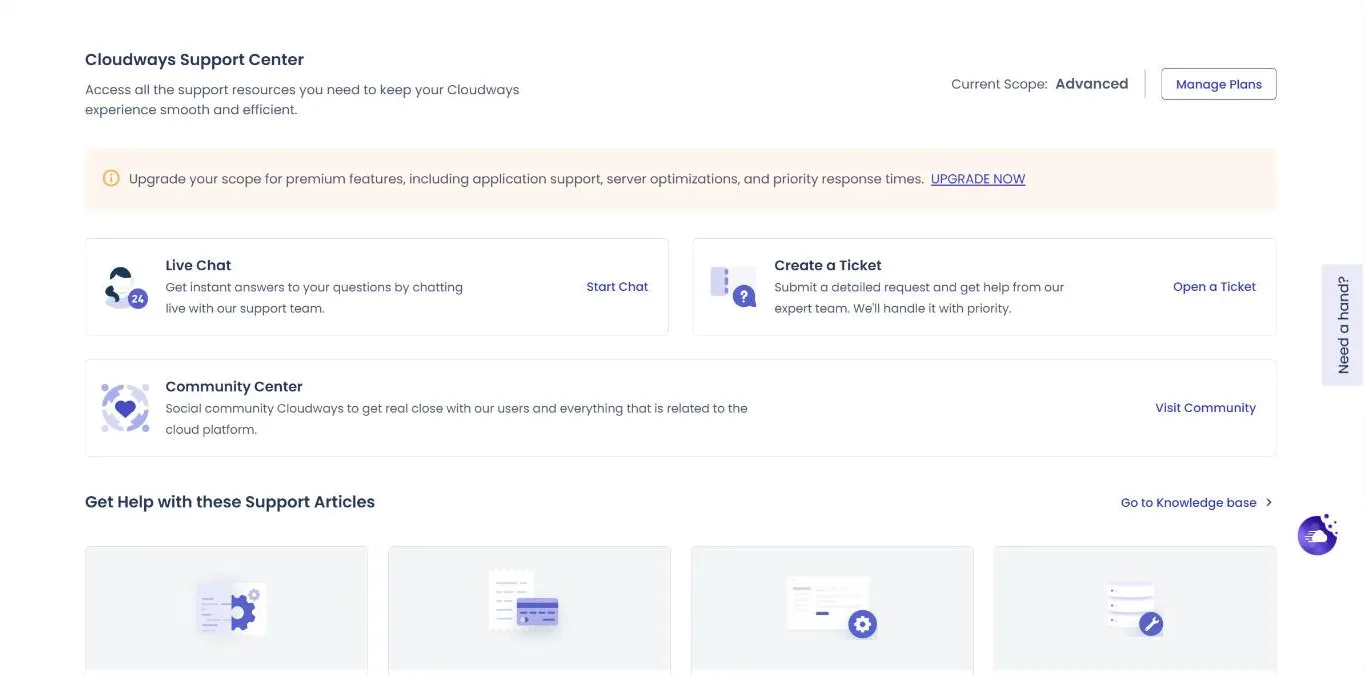
In the official Cloudways guide the route is described through the Need a hand? widget, then Support Ticket and then Submit a request. Both wordings lead to the same form.
What fields are in the form, and what should you write in each?
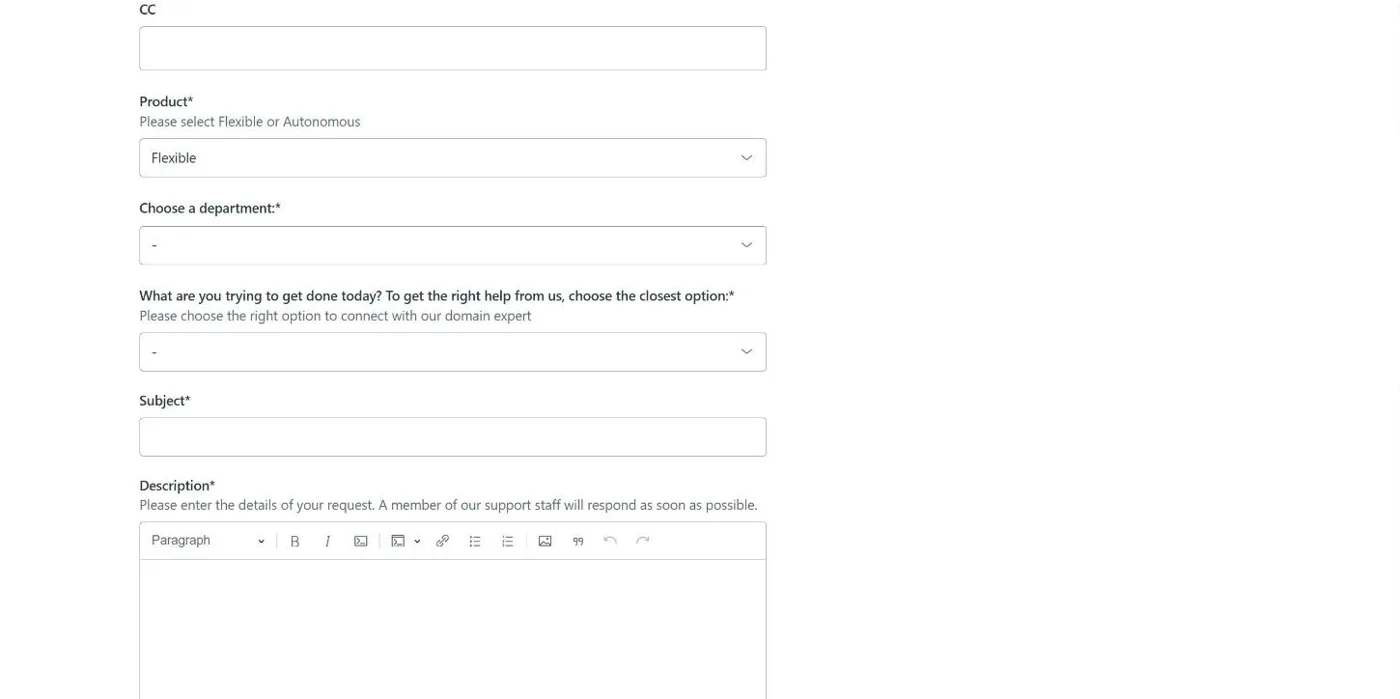
The form has nine main fields. The first ones route the request to the right team, so choose them carefully.
| Field | What I saw | What to write |
|---|---|---|
| Product | Flexible, Autonomous and others | The product the problem server runs on |
| Department | For example Technical Support | Technical on its own, billing on its own |
| Topic | For example Website/Application Errors | The most precise topic available |
| Subject | Free text | The problem plus its scope, for example: 403 for ClaudeBot on all servers |
| Description | Free text | The template further down |
| Priority | Priority level | High only when a site is down |
| first time reporting | Yes/No | If you reported it before, give the previous ticket number |
| Server IP | One IP only | The main server. The rest go in the description |
| Application name | The application name | The name as it appears in the panel |
What do you do when the problem affects several servers?
You write one IP in the field, and everything else in the description. I tried to enter several addresses in the Server IP field (my request affected all the servers on the account), and the form rejected it.
In the description, list each server on a separate line: the server name as it appears in the panel, the server ID and the affected applications. That way the agent doesn’t have to come back to you to ask “and which others?”.
Can you use chat instead of a ticket?
Yes, there is a 24/7 live chat, but it loads only if you accepted Functional cookies. In my test, when those cookies weren’t accepted, the chat window simply didn’t appear.
If you don’t see the chat, open the site’s cookie settings, accept Functional and refresh the page. For a short question chat is faster. For a request worth documenting, like a server configuration change, a ticket is better, because it has a number and a history.
| Channel | Does it work? | When to use it |
|---|---|---|
| Email to support@cloudways.com | No, an automated reply only | Never, for a new request |
| A ticket from the panel | Yes, an immediate number | Incidents, server change requests, billing |
| Live chat | Yes, after accepting Functional cookies | Short questions, a quick check |
What should you attach to a ticket to get an answer in the first round?
Three things: exact identifiers, technical evidence and a timestamp. In my ticket I attached the curl command and its output, and that saved a long explanation.
- The name and ID of the server and the application, as they appear in the panel.
- The curl output: the command
curl -I https://example.com/returns the response code (200, 403, 502) and the headers. Paste it as it is. - The time in UTC: convert your local time to UTC, so the agent can match it against the server logs.
- What you have already checked, so the agent doesn’t suggest it again.
Subject: 403 for one user agent on all my servers

Servers (the IP field takes one IP only):
- server-a (main, IP in the field), apps: app-1, app-2
- server-b, apps: app-3

Issue: requests with user agent X get HTTP 403.
Test (06.11.2026, 10:00 UTC):
curl -I -A "X" https://example.com/?x=1
[paste the output here]

What I checked: WordPress, .htaccess and robots.txt do not block it.
Request: please remove the block on all servers and apps.
Want more on writing a good ticket, the support tiers and response times? It is all in the complete guide to contacting Cloudways support. The example above is based on my own request about blocking AI bots.
How it ended for me: I opened ticket #1008105 through the form on 6 Nov 2026 at 21:59 UTC, with the curl command, its output and the list of servers in the description. The reply came on 7 Nov 2026 at 01:57 UTC, about 4 hours later and within the 12-hour target for a regular ticket. Support removed the nginx block on ClaudeBot, CCBot and Amazonbot on all four servers on the account, and left Bytespider blocked, as I had asked. A repeat curl check the same day returned 200.
Common mistakes and how to solve them
Waiting for an answer to the email: the automated reply looks like a confirmation, because it has a number. It isn’t. Open a ticket from the panel.
Opening a ticket without coordinating with the team: if several people handle the account, decide who opens tickets, so two aren’t opened for the same incident. For giving team members access, see team access.
Several IP addresses in one field: the form rejects it. One in the field, the rest in the description.
“The chat doesn’t work”: usually it’s the cookies. Accept Functional and refresh.
What I haven’t tested yet: whether an email reply to an update notification of an existing ticket gets recorded in the ticket. I’ll update this page when I test it.
The code BFCM802 takes 80% off your bill for the first two months (up to $200 off per month), including unlimited free site migrations. New customers only, and only until the offer ends.
The offer ends on December 4, 2026 at 23:59 (UTC+2).
Start with a free trial, no credit card. Enter the code at checkout and check that it shows up.
After Black Friday: 30% off for 3 months with the code ASAEL. On a large server (above about $444 a month) ASAEL already saves more today. BFCM802 vs. ASAEL calculator
Start a free trial server, no credit card. When you move to a paid plan, the code ASAEL takes 30% off your bill for the first three months.
The link fills in the code on the signup form. Just make sure it shows up.
Frequently asked questions
No. I tested it on 6 Nov 2026: an email to support@cloudways.com got an automated reply within minutes saying that submitting by email failed and asking me to use Create a Ticket in the panel. The request got a number, but no case was opened from it.
The address support@cloudways.com exists, but it returns an automated reply and doesn’t open a request. The channels that work are a ticket from inside the panel and live chat, and with the Premium add-on also phone and Slack.
You probably haven’t accepted Functional cookies. In my test the chat window loaded only after that approval. Change your cookie settings and refresh the page.
Not in the Server IP field, which accepts only one address. Enter the main server in the field, and the other servers, with their names and applications, in the description of the request.
About 3–5 minutes. The ticket number appears immediately on submit, with the status Open. According to the official support page, the first-response target for free support is 12 hours (3 hours for a high-priority ticket).
From what I saw, no. The form opens from inside the panel, and the automated reply to the email explicitly asks you to log in to the Cloudways Platform. If you don’t have access to the account, start with a password reset.
Related guides
- The complete guide to contacting Cloudways support: chat, tickets and response times
- Does Cloudways block AI bots? What I measured and how I asked to remove it
- How to give a team member access to a server
- Cloudways Copilot: solve issues before you contact support
- All guides on the topic: Account, billing and support
- What it costs: Cloudways pricing
Sources: How to Create a Support Ticket (Cloudways Knowledge Base), Cloudways Support, the Submit a request form in the ticket system (requires login), and my own test on 6 Nov 2026 (email #1008090, form #1008105). Written and reviewed by Asael Dreyer · Updated: 7 Nov 2026
Disclosure: this is an independent site, not the official Cloudways site. Some links on this site are affiliate links: if you sign up through them we earn a commission, at no extra cost to you. Full details

