
Last updated: · By Asael Dreyer
Short answer: AWS on Cloudways is an Amazon EC2 server that Cloudways sets up, configures and manages for you, with no AWS account and no need to touch Amazon’s console. As of November 2026 it starts at $20.56 per month (1GB of memory and 2 vCPU), bandwidth is billed by usage ($0.12 per GB), and you can scale CPU and memory both up and down in under 5 minutes. It suits heavy business sites, seasonal traffic and anyone who needs Amazon’s infrastructure, but it costs far more than DigitalOcean, Vultr and Linode and isn’t included in the free trial.
What AWS is, and what exactly Cloudways manages
AWS (Amazon Web Services) is the world’s largest cloud provider. The service relevant to web hosting is EC2: virtual servers you can launch in any of Amazon’s dozens of regions. But a “bare” EC2 is infrastructure only. You have to choose an instance type, configure the network and firewall (Security Groups), install a web server, PHP and a database, handle security updates, backups, SSL certificates and monitoring, and make sense of an invoice with dozens of lines.
Cloudways does all of that for you. In the panel you pick AWS, a size and a region, and within minutes you have an EC2 server with a ready software stack (Nginx, PHP-FPM, Varnish, Redis, MariaDB or MySQL, and a choice between the Hybrid and Lightning Stack), a managed firewall, operating system updates, free SSL, automatic backups, staging, monitoring and 24/7 support. The cost of Amazon’s infrastructure is included in the Cloudways invoice, and you don’t need a separate AWS account.
| Topic | EC2 on its own | AWS on Cloudways |
|---|---|---|
| Installing a web server, PHP and database | You | Ready out of the box |
| Operating system security updates | You | Cloudways |
| Firewall and IP lists | You (Security Groups) | Managed from the panel |
| SSL and automatic renewal | You | Built in |
| Backups and restore | You | Automatic, one click |
| Staging and cloning | You | Built in |
| 24/7 server support | Paid separately to Amazon | Included |
| Root access and full control | Yes | No |
| Several cloud providers in one account | No | Yes |
AWS prices on Cloudways (November 2026)
According to the Cloudways pricing page, there are two series: Standard and Compute Optimized. Prices vary by region. The table shows the prices on the pricing page, and the exact price for the region you choose is displayed before you confirm the server. All the sizes are collected in the Cloudways AWS price list.
| Plan (Standard) | Per month | Per hour | Memory | CPU | Cost for 24 hours* |
|---|---|---|---|---|---|
| Micro | $20.56 | $0.0286 | 1GB | 2 vCPU | about $0.69 |
| Small | $38.56 | $0.0536 | 2GB | 2 vCPU | about $1.29 |
| Medium | $91.84 | $0.1276 | 4GB | 2 vCPU | about $3.06 |
| Large | $183.22 | $0.2545 | 8GB | 2 vCPU | about $6.11 |
| XL | $285.21 | $0.3961 | 16GB | 4 vCPU | about $9.51 |
*The hourly price multiplied by 24, before taxes and before bandwidth and extra disk. Handy for estimating what a one-day traffic spike costs if you scale up for it.
The Compute Optimized series starts at $164.50 per month for 4GB and 2 vCPU, and suits heavy compute workloads. Both series go up to sizes with hundreds of GB of memory.
What else is billed: bandwidth and disk
This is where an AWS bill surprises people, so understand it before you choose:
- Bandwidth: there is no large included allowance like at the cheaper providers. All traffic is billed by usage, $0.12 per GB in every region. A site that sends out 100GB a month adds about $12 to the bill, and one with 500GB adds about $60.
- Disk: the disk for application files and for the database is set separately. According to the pricing page, each extra GB costs $0.10 per month, for files and for the database separately. The operating system disk is fixed.
- Offsite backups: $0.033 per GB.
So the real comparison isn’t just the server price. For a site with lots of images, video or downloads, bandwidth can cost more than the server itself. A CDN serving the static files cuts that amount significantly.
AWS on Cloudways vs Lightsail vs EC2 on its own
Anyone looking for “cheap Amazon” quickly arrives at Amazon Lightsail, Amazon’s simple VPS service. I checked its pricing page on 6 Nov 2026 (the general prices on the page, and regions may differ):
| Memory | Lightsail (with IPv4, Linux) | AWS on Cloudways |
|---|---|---|
| 1GB | $7 (2 vCPU, 40GB, 2TB transfer) | $20.56 + bandwidth and disk |
| 2GB | $12 (2 vCPU, 60GB, 3TB) | $38.56 + bandwidth and disk |
| 4GB | $24 (2 vCPU, 80GB, 4TB) | $91.84 + bandwidth and disk |
| 8GB | $44 (2 vCPU, 160GB, 5TB) | $183.22 + bandwidth and disk |
On paper, Lightsail is far cheaper and includes bandwidth. In fairness: if you know how to run a Linux server and “just” want a server on Amazon, you’ll find a better deal on Lightsail or on EC2 directly. But that’s an empty server. You are responsible for setup, security, updates, backups, caching and support, and there is no staging, cloning or one-click move between providers.
It’s worth looking at the comparison from the other direction too: if you don’t specifically need Amazon, DigitalOcean or Vultr on Cloudways give you the same management at roughly half the price ($46 and $54 for a 4GB server, versus $91.84), with bandwidth included. AWS on Cloudways mostly makes sense when you have a specific reason for Amazon, or when its advantages (below) are worth the difference to you. And if the dilemma is between the two cloud giants, see AWS or Google Cloud on Cloudways: which is cheaper and when.
AWS vs the other providers on Cloudways
According to the Cloudways knowledge base and pricing page, November 2026:
| Topic | AWS | DigitalOcean / Vultr / Linode | Google Cloud |
|---|---|---|---|
| 4GB server price | $91.84 | $46–$59 | about $84 (3.75GB) |
| Bandwidth | By usage, $0.12/GB | Included allowance, $0.01–$0.02/GB beyond it | By usage, about $0.11–$0.17/GB |
| Scaling up | Under 5 minutes, with downtime | Up to about 10 minutes, with downtime | Under 5 minutes, with downtime |
| Direct scaling down | Yes (CPU and RAM) | No, only by cloning | Yes |
| Backup and restore | The fastest, has Snapshot | Slower, no Snapshot | Slower than AWS, has Snapshot |
| A stopped server | Still billed for the disk | Billed in full | Still billed for the disk |
| Free trial | No | Yes | No |
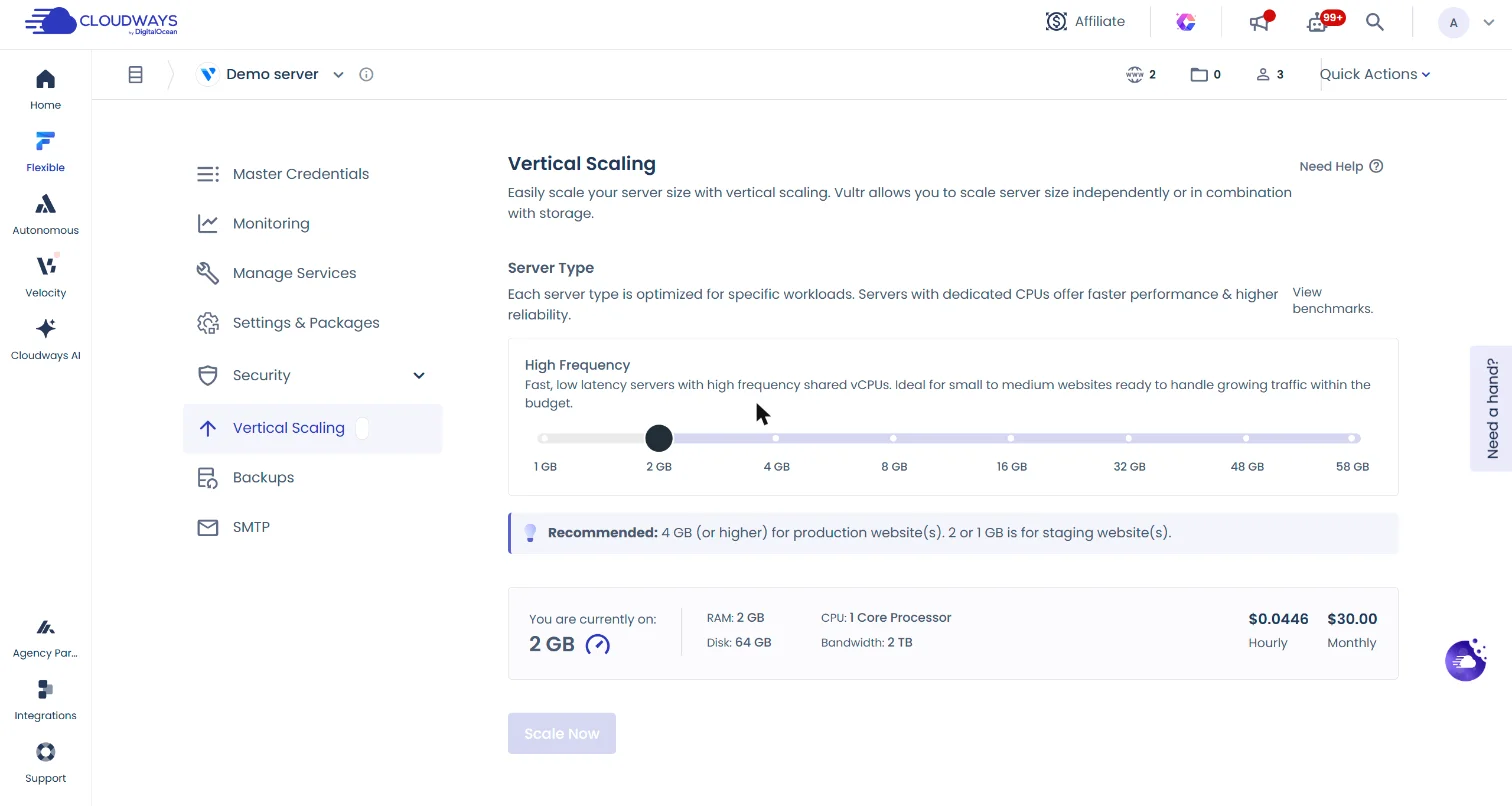
The important row is scaling down. On AWS you can scale a server up before a sale, keep it large for a few days, and scale it back down from the same screen. Because billing is hourly, you pay for the large size only for the hours it was active. At the cheaper providers, scaling down requires cloning to a new server and moving DNS. How to do it is in the guide to scaling a server.
The code BFCM802 takes 80% off your bill for the first two months (up to $200 off per month), including unlimited free site migrations. New customers only, and only until the offer ends.
The offer ends on December 4, 2026 at 23:59 (UTC+2).
Start with a free trial, no credit card. Enter the code at checkout and check that it shows up.
After Black Friday: 30% off for 3 months with the code ASAEL. On a large server (above about $444 a month) ASAEL already saves more today. BFCM802 vs. ASAEL calculator
Start a free trial server, no credit card. When you move to a paid plan, the code ASAEL takes 30% off your bill for the first three months.
The link fills in the code on the signup form. Just make sure it shows up.
Which AWS region fits your audience: Europe, the Middle East or elsewhere?
According to the Cloudways knowledge base (January 2026), AWS has 25 regions on the platform, including Frankfurt, London, Paris, Milan, Stockholm, Ireland and Bahrain. The numbers aren’t consistent across sources: the provider card on the pricing page (6 Nov 2026) talks about 28 data centers, the FAQ on the product page says “more than 30”, and Cloudways’ general data center page shows 150+ data centers across five providers without a breakdown by provider. So there is no single binding number, and the list shown on the server setup screen is the one that counts.
Middle East: AWS has a Middle East data center (il-central-1), and it is available to choose on Cloudways, for low-latency hosting for businesses serving visitors in the region. If a nearby server is the reason you’re considering AWS, you’ll see the exact price for that region on the server setup screen. Google Cloud and Vultr also offer a location there; Google Cloud is explained on the Google Cloud on Cloudways page.
Bahrain is close on the map, but geographic distance and network distance aren’t the same thing. For most sites, Frankfurt with a CDN gives a good, well-known result for visitors in the region. Measure before you decide. The comparison between locations is in the guide to server locations.
When AWS on Cloudways is worth the price
- Strong seasonality: a store that doubles its traffic on Black Friday, at the holidays or during sales, and wants to scale up and down without cloning.
- Fast restore and Snapshot: a site where every minute of downtime costs money, and which wants the fastest backup and restore on the platform.
- A corporate requirement for Amazon: a client, internal compliance or IT policy that requires the infrastructure to be on AWS.
- A global audience and specific regions: Amazon’s wide range of regions, for example in South America or Asia.
- Separate disks: you can grow only the database disk on a large store, without paying for a file disk you don’t need.
And when it isn’t: a brochure site, a blog or a small store with a stable audience and steady traffic. There you’d pay twice as much or more for the server and bandwidth, with no noticeable advantage. DigitalOcean, Vultr or Linode are a better fit.
How to launch an AWS server on Cloudways
- Make sure your account is paid. AWS isn’t available in the free trial, and you’ll need to add a payment method.
- In the panel click to add a server and choose Cloudways Flexible.
- In the first step choose the application type and Stack (Lightning is marked Recommended), and name the server and the application when the wizard asks.
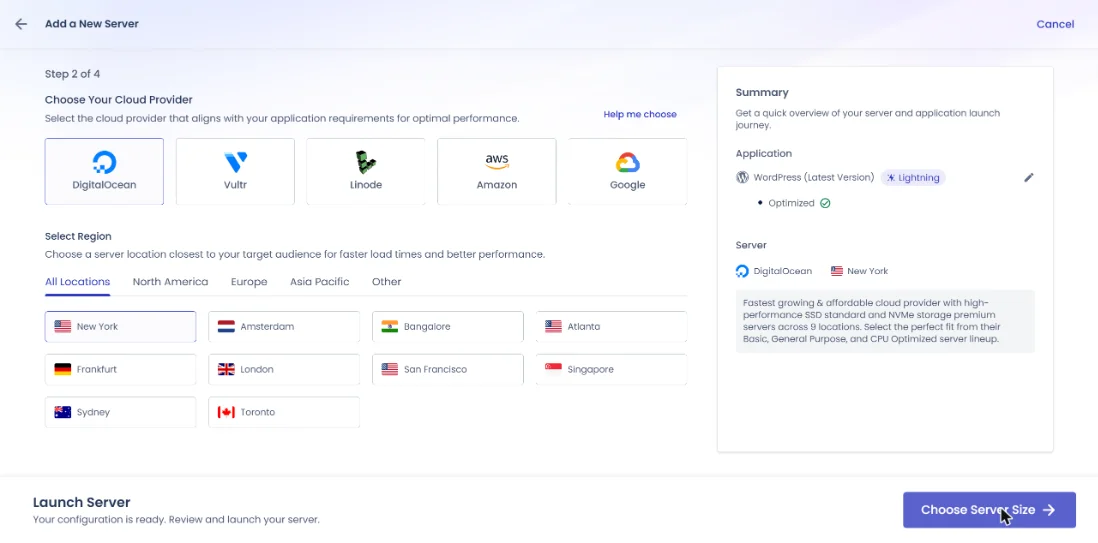
- In the next step, when choosing the provider, click Amazon (AWS) and choose a region.
- In the size step choose a database, a series (Standard or Compute Optimized), a server size, and the disk sizes for files and the database.
- Check the price shown and click Review & Launch, and after the review confirm the server launch (in older documentation the button was called Launch Now). The server is ready within a few minutes.
Full instructions are in the guide to launching a server. Already have a site on AWS? You can’t connect an existing AWS account to Cloudways, but you can move the site to a new AWS server on the platform. WordPress and WooCommerce sites are migrated for free through managed migration, according to the product page.
Pros and cons
| Pros | Cons |
|---|---|
| Amazon’s infrastructure, the world’s largest and best-known provider | Significantly more expensive, especially on small servers |
| Scaling CPU and RAM up and down in under 5 minutes | All bandwidth is paid, $0.12 per GB |
| The fastest backup and restore, with Snapshot | Not available in the free trial |
| Separate disks for files and the database | A stopped server is still billed for the disk |
| A wide range of regions | Scaling up involves a short downtime |
| All your AWS on one Cloudways invoice | No root, and no access to the AWS console or its other services |
The offer ends on December 4, 2026 at 23:59 (UTC+2).
Start with a free trial, no credit card. Enter the code at checkout and check that it shows up.
Start a free trial server, no credit card. When you move to a paid plan, the code ASAEL takes 30% off your bill for the first three months.
The link fills in the code on the signup form. Just make sure it shows up.
Frequently asked questions about AWS on Cloudways
As of November 2026, from $20.56 per month for a Micro server with 1GB of memory and 2 vCPU, billed hourly. On top of that you pay for bandwidth ($0.12 per GB) and any extra disk. The price varies by region, and the exact price is shown before the server is launched.
No. The free 5-day trial on Flexible includes only DigitalOcean, Vultr and Linode. To launch an AWS server you need a paid account, and you only pay for the hours you use.
Yes. AWS has a Middle East data center (il-central-1), and it is available to choose on Cloudways. You see the exact price on the server setup screen.
Lightsail is an unmanaged Amazon server, cheaper and with bandwidth included, but setup, security, backups and support are on you. AWS on Cloudways is a managed EC2 server, with a ready software stack, backups, staging and 24/7 support, at a higher price.
No. Cloudways launches the servers on its own infrastructure, to keep its security and management policies, and the cost is included in its invoice. A site already running on AWS can be moved to a new server through Cloudways.
Not on Flexible. Scaling up and down is manual, from the Vertical Scaling screen. According to the product page, if you need automatic scaling for WordPress and WooCommerce you can look at Cloudways Autonomous.
More cloud providers and related guides
- Google Cloud on Cloudways
- Cloudways server locations: choosing the closest one
- DigitalOcean on Cloudways
- Vultr on Cloudways
- All guides on cloud providers: Cloud providers on Cloudways
- What it costs: Cloudways pricing
Official source: Amazon Cloud Hosting Fully Managed by Cloudways, Cloudways Pricing (checked 6 Nov 2026), Which Infrastructure Provider Do I Have to Choose?, Bandwidth Charges of Infrastructure Providers (Cloudways Knowledge Base), Amazon Lightsail Pricing (checked 6 Nov 2026). Written and checked by Asael Dreyer · Updated: 6 Nov 2026
Disclosure: this is an independent site, not the official Cloudways site. Some links on this site are affiliate links: if you sign up through them we earn a commission, at no extra cost to you. Full details

