
Last updated: · By Asael Dreyer
Short answer: Linode, now part of Akamai, is one of the five cloud providers you can choose on Cloudways. A Linode server on Cloudways starts at $14 per month (1GB of memory, 25GB of disk and 1TB of bandwidth, as of November 2026), is included in the free trial, and the price doesn’t depend on the region (unlike AWS and Google Cloud, according to the pricing page). It suits small and medium sites that want a reliable provider at a lower price than AWS and Google Cloud, but it isn’t the cheapest on Cloudways, it has no data center in the Middle East, and scaling a server down requires cloning.
What Linode is, and what Cloudways adds
Linode is a long-established cloud server (VPS) provider, founded in 2003 and acquired by Akamai in 2022. Today it is also marketed as Akamai Cloud, and in the Cloudways panel it appears as Linode. What it sells is a bare virtual machine: CPU, memory, disk and a network connection. Everything else, such as installing a web server, PHP, a database, security, backups and updates, is on you. IONOS also sells a direct European VPS, and the comparison with Cloudways is in Cloudways vs IONOS.
Cloudways takes that same machine and adds a management layer on top. When you launch a Linode server in the panel, it comes up with a ready software stack (Nginx, Apache, PHP-FPM, MariaDB or MySQL, Varnish, Redis and Memcached), a firewall, free SSL certificates, automatic backups, monitoring, a staging environment, 24/7 support and all the panel’s tools. You don’t open an account with Linode and you don’t get an invoice from them: everything is in your Cloudways account and invoice.
The difference between providers on Cloudways is mostly infrastructure: price, locations, scaling speed and backups. The panel, the support and the tools are the same on all of them.
Linode prices on Cloudways (November 2026)
Linode has three series on Cloudways. As of November 2026, according to the pricing page:
| Plan (Standard) | Per month | Per hour | Memory | CPU | Disk | Bandwidth | Cost for 24 hours* |
|---|---|---|---|---|---|---|---|
| Micro | $14 | $0.0208 | 1GB | 1 vCPU | 25GB SSD | 1TB | about $0.50 |
| Small | $28 | $0.0417 | 2GB | 1 vCPU | 50GB SSD | 2TB | about $1.00 |
| Medium | $59 | $0.0878 | 4GB | 2 vCPU | 80GB SSD | 4TB | about $2.11 |
| Large | $105 | $0.1563 | 8GB | 4 vCPU | 160GB SSD | 5TB | about $3.75 |
| XL | $176 | $0.2619 | 16GB | 6 vCPU | 320GB SSD | 8TB | about $6.29 |
*The hourly price multiplied by 24, before taxes. The prices on the pricing page exclude taxes. There are also larger sizes, up to 192GB. All the sizes and series are collected in the full Linode price list on Cloudways.
- General Purpose: dedicated CPUs (not shared with other customers). Starts at $69 per month for 4GB and 2 vCPU. Suits busy sites whose CPU spikes.
- CPU Optimized: a series focused on processing power. Starts at $89 per month for 4GB and 2 vCPU. Suits heavy compute work.
- The product updates describe a ratio of 4GB per vCPU in General Purpose, and a 2:1 CPU-to-RAM ratio in CPU Optimized. But on the pricing page both series have the same vCPU count at every size, so check the exact specification of each plan on the server setup screen.
Additional costs: bandwidth beyond the allowance costs $0.02 per GB, and offsite backup storage costs $0.033 per GB. Billing is hourly, so a server you keep for two days is billed for two days only. The full explanation is in the Cloudways pricing guide.
What is the difference between Linode direct and Linode through Cloudways?
The fair question: why pay $14 when a similar server costs less at Linode itself? I checked against Linode’s public API on 6 Nov 2026:
| Memory / CPU / disk / bandwidth | Linode direct | Through Cloudways |
|---|---|---|
| 1GB / 1 vCPU / 25GB / 1TB | $5 (Nanode) | $14 |
| 2GB / 1 vCPU / 50GB / 2TB | $12 | $28 |
| 4GB / 2 vCPU / 80GB / 4TB | $24 | $59 |
| 8GB / 4 vCPU / 160GB / 5TB | $48 | $105 |
The specification is identical, and the difference is the price of management. What it buys: installation and maintenance of the whole server, operating system security updates, a configured firewall, automatic backups and one-click restore, staging and cloning, monitoring, a configured cache, SSL certificates, and 24/7 support for the server and the platform.
When Linode direct is better: you (or someone on your team) run Linux servers yourselves, have your own backup and security processes, and need root access or a specific operating system. On Cloudways there is no root, and the operating system is fixed.
When going through Cloudways is better: you are a business owner, a freelancer or an agency, and don’t want to be responsible for a server. In that case the monthly difference is usually less than the cost of an hour of a sysadmin’s time. More on managed vs unmanaged hosting is in the VPS guide.
Linode vs the other providers on Cloudways
A 4GB Standard server, November 2026, according to the pricing page and knowledge base:
| Provider | Price (4GB) | Bandwidth included | Beyond the allowance | Middle East location | Scaling down | Free trial |
|---|---|---|---|---|---|---|
| Linode | $59 (2 vCPU) | 4TB | $0.02/GB | No | Only by cloning | Yes |
| DigitalOcean | $46 (2 vCPU) | 4TB | $0.02/GB | No | Only back to the original size | Yes |
| Vultr | $54 (2 vCPU) | 3TB | $0.01/GB in North America and Western Europe | Yes | Only by cloning | Yes |
| AWS | $91.84 (2 vCPU) | By usage | $0.12/GB | Yes | Yes | No |
| Google Cloud | about $84 (3.75GB, 1 vCPU) | By usage | about $0.11–$0.17/GB | Yes | Yes | No |
What you can learn from this: on Standard plans, Linode is slightly more expensive than DigitalOcean and Vultr at the same size, and far cheaper than AWS and Google Cloud. The Cloudways knowledge base places it at the “medium price”, and lists reliable infrastructure, cheap bandwidth and many data centers as advantages. The full comparisons: DigitalOcean on Cloudways, Vultr on Cloudways, AWS on Cloudways and Google Cloud on Cloudways.
The code BFCM802 takes 80% off your bill for the first two months (up to $200 off per month), including unlimited free site migrations. New customers only, and only until the offer ends.
The offer ends on December 4, 2026 at 23:59 (UTC+2).
Start with a free trial, no credit card. Enter the code at checkout and check that it shows up.
After Black Friday: 30% off for 3 months with the code ASAEL. On a large server (above about $444 a month) ASAEL already saves more today. BFCM802 vs. ASAEL calculator
Start a free trial server, no credit card. When you move to a paid plan, the code ASAEL takes 30% off your bill for the first three months.
The link fills in the code on the signup form. Just make sure it shows up.
Which Linode location should you choose?
According to the Cloudways knowledge base (January 2026), Linode’s data centers on the platform are: Newark, Dallas, Fremont, Atlanta, Toronto, London, Frankfurt, Singapore, Mumbai, Tokyo, Sydney and Melbourne. The numbers aren’t consistent across sources: the provider card on the product page (6 Nov 2026) talks about 25 data centers, and Linode itself has 33 regions in its public list (its API, checked 6 Nov 2026), but not every one of its regions is necessarily available on Cloudways. The product updates also announced additional data centers. The binding list is the one on the server setup screen.
For visitors in Europe and the surrounding region, Frankfurt or London are the sensible choices. Linode has no data center in the Middle East, not even in Linode’s own public region list (checked 6 Nov 2026). If it matters to you that the server is physically in that region, on Cloudways you can choose a server there on AWS, Google Cloud or Vultr. For most sites, a server in Frankfurt with caching and a CDN gives very good load times for the region, at a much lower price. The full comparison is in the guide to server locations.
How to launch a Linode server on Cloudways
- In the panel click to add a server and choose Cloudways Flexible.
- In the first step choose the application type (for example WordPress) and the Stack, and name the server and the application when the wizard asks.
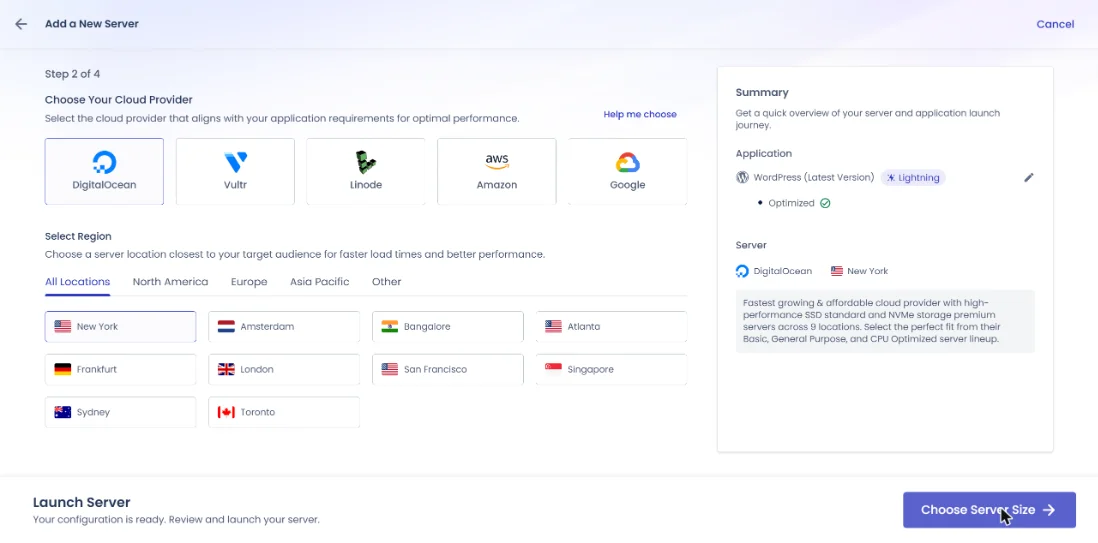
- In the next step, when choosing the provider, click Linode.
- Choose a location, for example Frankfurt.
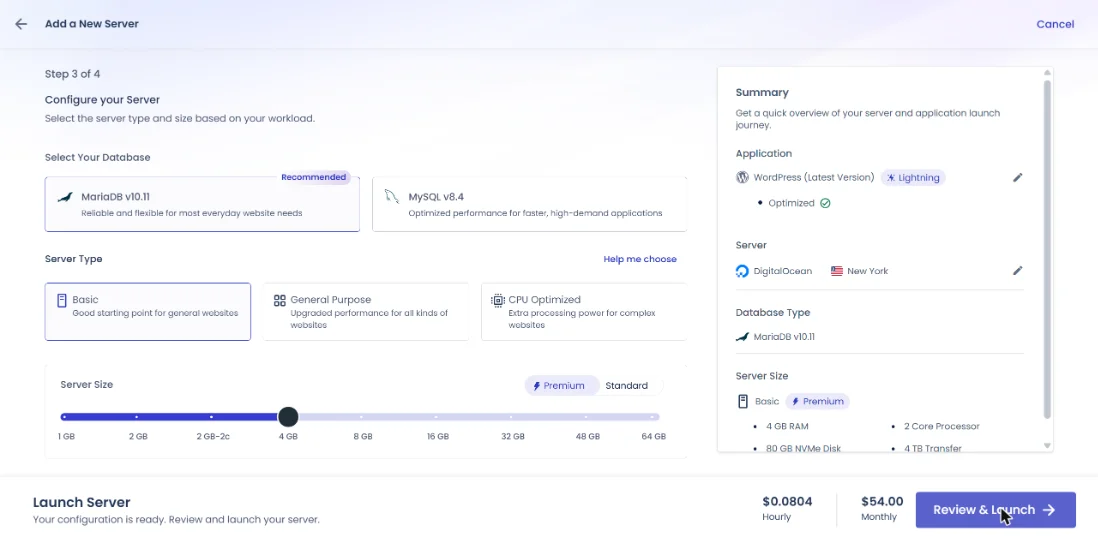
- In the size step choose a database, a series (Standard, General Purpose or CPU Optimized) and a server size.
- Check the price shown and click Review & Launch, and after the review confirm the server launch (in older documentation the button was called Launch Now). The server is ready within a few minutes.
Full instructions, including choosing the database, are in the guide to launching a server.
Scaling, backups and other practical differences
These are the things the Cloudways knowledge base lists as drawbacks of Linode, together with DigitalOcean and Vultr:
- Slower scaling up, up to about 10 minutes, with a short downtime. On AWS and Google Cloud it takes under 5 minutes.
- No direct scaling down. To move to a smaller server you clone to a new server and move the domain. So don’t scale up “just to be safe”: scale up when monitoring shows you need to. How to do it is in the guide to scaling a server.
- Backup and restore are slower than AWS, and there are no Snapshot backups.
- A stopped server is still billed in full. To stop paying you have to delete it.
According to the article on scaling servers (updated 5 Nov 2026), on Linode you can scale up to a larger size in any of the three series. The scale-up is permanent, the server is briefly shut down during it, and scaling down to any smaller size requires cloning.
Pros and cons: who Linode suits
| Pros | Cons |
|---|---|
| Significantly cheaper than AWS and Google Cloud | Slightly more expensive than DigitalOcean and Vultr at the same size |
| Generous bandwidth included, and $0.02 per GB beyond it | No data center in the Middle East |
| The same price in every location | Scaling down only through cloning |
| Available in the free trial | Slower scaling up, with a short downtime |
| Series with dedicated CPU (General Purpose, CPU Optimized) | No Snapshot, and backup and restore slower than AWS |
| Akamai infrastructure, an established and stable provider | A stopped server is billed in full |
Linode suits: brochure sites, blogs and small to medium stores that want a sensible price and a stable provider, agencies that spread clients across several providers, and anyone whose tests show Linode in Frankfurt is faster for them.
Linode suits less: anyone looking for the lowest price (DigitalOcean starts at $11), anyone who needs a server physically in the Middle East, and seasonal sites that need to scale up and down often (AWS or Google Cloud).
My tip: because the free trial includes the three cheaper providers, launch a clean WordPress server on Linode and on DigitalOcean in Frankfurt, measure TTFB from where your visitors are, and choose by what you measured, not by what you read.
The offer ends on December 4, 2026 at 23:59 (UTC+2).
Start with a free trial, no credit card. Enter the code at checkout and check that it shows up.
Start a free trial server, no credit card. When you move to a paid plan, the code ASAEL takes 30% off your bill for the first three months.
The link fills in the code on the signup form. Just make sure it shows up.
Frequently asked questions about Linode on Cloudways
As of November 2026, from $14 per month for a Standard server with 1GB of memory, 25GB of disk and 1TB of bandwidth, billed hourly. A 4GB server costs $59 per month. Prices exclude taxes.
Yes. The free trial on Flexible (5 days, no credit card) includes DigitalOcean, Vultr and Linode. AWS and Google Cloud are available only on a paid account.
No, not in the Cloudways knowledge base list and not in Linode’s own public region list. For visitors in the region, Frankfurt or London are the nearest choices.
Because the price includes management: installing and maintaining the server, security updates, backups, staging, monitoring and 24/7 support. If you know how to run a Linux server yourself, Linode direct is cheaper. If not, the difference usually pays off.
No. Servers on Cloudways are launched through Cloudways’ infrastructure, and everything is billed on a single Cloudways invoice. You can move a site from an existing Linode server to a new server on Cloudways.
Not directly. You clone the server to a smaller one, move the domain and delete the large one. If you expect frequent scaling up and down, consider AWS or Google Cloud, which support scaling down.
More cloud providers and related guides
- AWS on Cloudways: managed Amazon hosting
- Google Cloud on Cloudways
- DigitalOcean on Cloudways
- Cloudways server locations: choosing the closest one
- All guides on cloud providers: Cloud providers on Cloudways
- What it costs: Cloudways pricing
Official source: Managed Linode Hosting – Cloudways, Cloudways Pricing (checked 6 Nov 2026), Which Infrastructure Provider Do I Have to Choose?, Bandwidth Charges of Infrastructure Providers (Cloudways Knowledge Base). Linode direct prices: Linode’s public API, checked 6 Nov 2026. Written and checked by Asael Dreyer · Updated: 6 Nov 2026
Disclosure: this is an independent site, not the official Cloudways site. Some links on this site are affiliate links: if you sign up through them we earn a commission, at no extra cost to you. Full details

