
Last updated: · By Asael Dreyer
In short: Vultr on Cloudways is a Vultr cloud server that Cloudways sets up and manages for you. It starts at $14 per month for a 1GB Standard server, and $16 for a High Frequency server with an NVMe disk. The big advantage for Middle East audiences: Vultr has a Tel Aviv location on the Cloudways server setup screen, at a much lower base price than Google Cloud ($14 for a 1GB server versus $37.33). The drawback: every Vultr server upgrade is permanent, and to go smaller you have to clone to a new server.
What Vultr is, and what you get through Cloudways
Vultr is a cloud provider (IaaS) with data centers on many continents, selling virtual servers by the hour. In the Cloudways dashboard it is listed with 32 locations (the marketing page still says 30), and its High Frequency servers have fast processors and NVMe disks.
Vultr on Cloudways is a Vultr server that arrives ready for websites: a pre-tuned NGINX and PHP-FPM stack, built-in caching (Varnish, Redis and Memcached), a managed firewall, operating system updates, monitoring of more than 15 metrics and an automatic restart for any service that goes down. Billing comes from Cloudways, and you do not need a separate Vultr account.
Why Vultr in Tel Aviv matters if your audience is in the Middle East
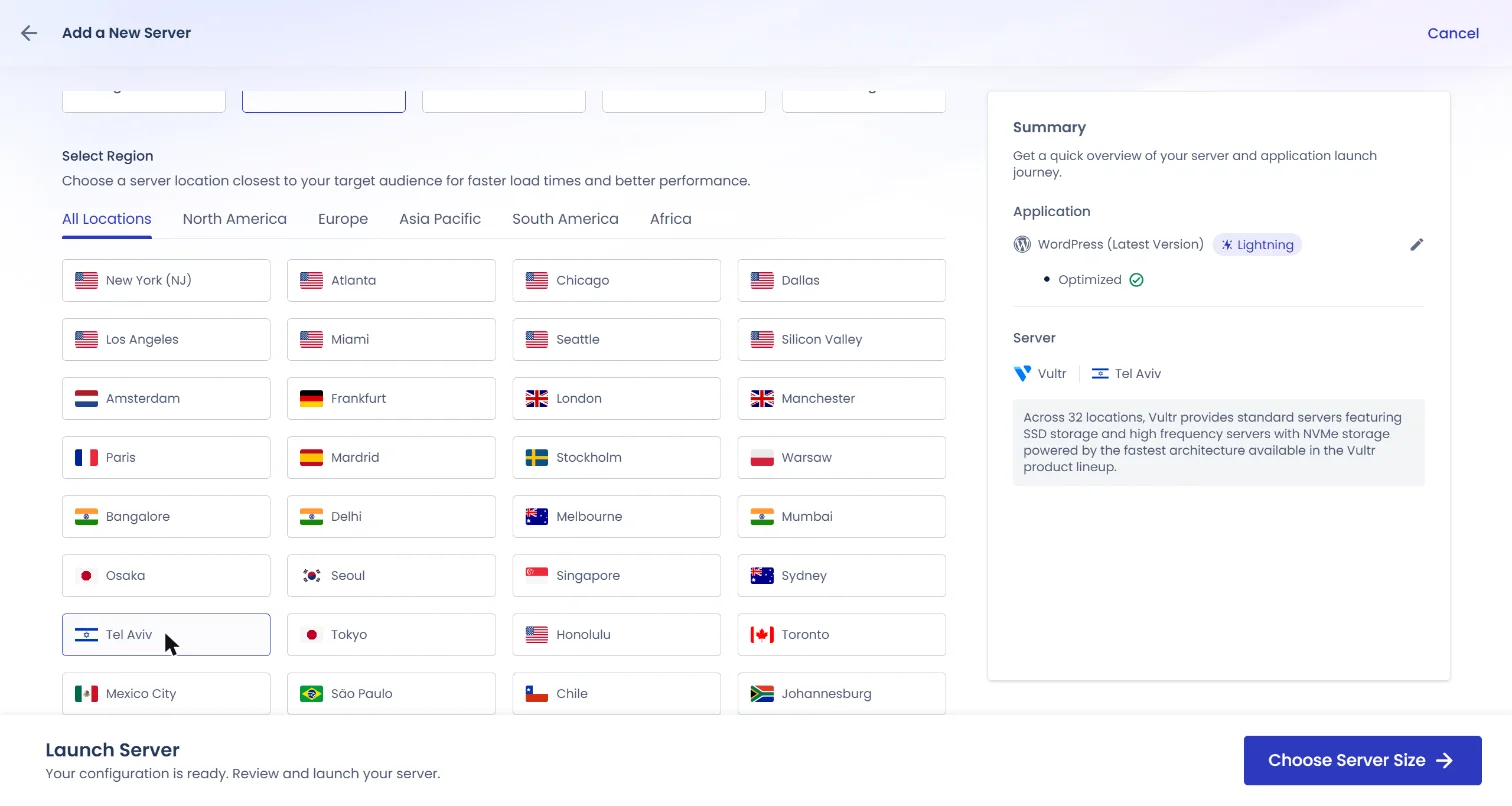
Vultr announced its first data center in Israel, in Tel Aviv, in April 2023. On the Cloudways server setup screen I saw Tel Aviv in Vultr’s location list on 6 Nov 2026.
A server in Tel Aviv shortens the time until a visitor in the region receives the first byte (TTFB), especially on pages that are not cached: the cart, checkout, search and account area. On pages that are cached or served from a CDN, the difference compared with Frankfurt is smaller.
| Options for a Tel Aviv server on Cloudways | Entry price on Cloudways | Notes |
|---|---|---|
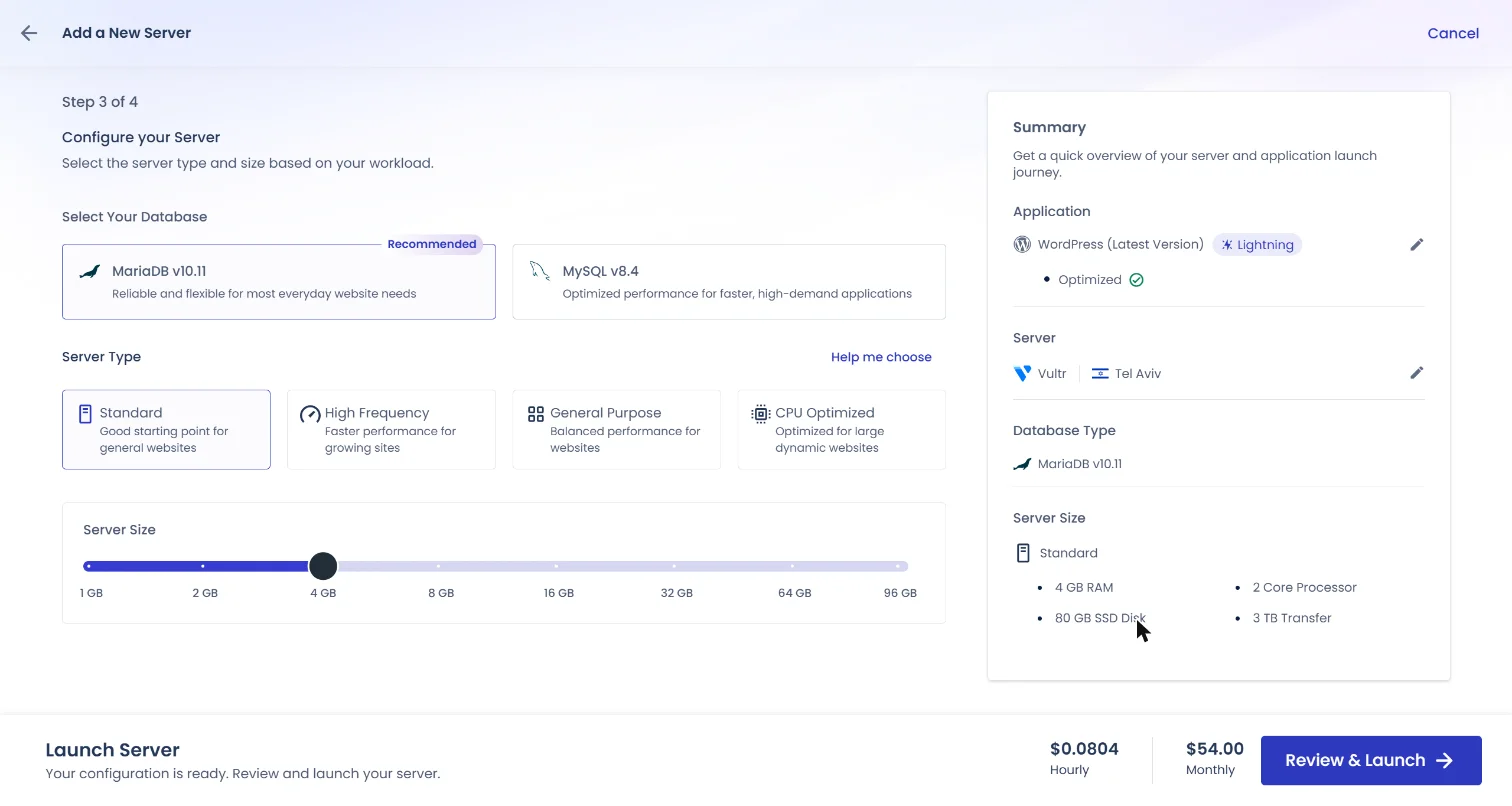
| Vultr | $14 for a 1GB Standard server | I saw it on the setup screen on 6 Nov 2026. On a 4GB Standard server, the Tel Aviv price was $54, the same as the base price. Check the other sizes in the summary |
| Google Cloud | $37.33 for a 1.7GB server | Upgraded account only; bandwidth billed by usage |
| AWS | From $20.56 (in other locations) | Tel Aviv is available, on an upgraded account; the exact price is shown on the server setup screen |
Prices are before taxes, from Cloudways’ pricing page on 6 Nov 2026. The prices on the pricing page are base prices, not per location, so check the amount in the summary before launching. For how to pick a location for your audience, see Cloudways server locations. All Vultr sizes and series are collected on the full Vultr pricing page for Cloudways.
Vultr server types: Standard, High Frequency and dedicated CPUs
- Standard: an SSD disk and a shared CPU. The starting point for brochure sites and blogs.
- High Frequency: an NVMe disk and fast processors, which Cloudways describes as the fastest architecture in Vultr’s lineup. The disk is also larger at the same memory size (32GB versus 25GB on a 1GB server). Suited to WordPress with heavy plugins and to stores.
- General Purpose: a dedicated CPU and an NVMe disk, for busy sites that need steady performance.
- CPU Optimized: a dedicated CPU, with more processing power per GB of memory. For stores and learning platforms with a lot of dynamic content.
My recommendation for most sites: High Frequency. The difference from Standard is $2 per month on the small server, and in return you get NVMe and a larger disk.
How much Vultr costs on Cloudways
| Memory | Standard (SSD) | High Frequency (NVMe) | CPU (Standard / HF) | Storage (Standard / HF) | Bandwidth |
|---|---|---|---|---|---|
| 1GB | $14 | $16 | 1 / 1 vCPU | 25GB / 32GB | 1TB |
| 2GB | $28 | $30 | 1 / 1 vCPU | 55GB / 64GB | 2TB |
| 4GB | $54 | $60 | 2 / 2 vCPU | 80GB / 128GB | 3TB |
| 8GB | $99 | $118 | 4 / 3 vCPU | 160GB / 256GB | 4TB |
| 16GB | $150 | $173 | 6 / 4 vCPU | 320GB / 384GB | 5TB |
Prices are per month in US dollars, before taxes, from Cloudways’ pricing page on 6 Nov 2026. General Purpose starts at $72 (4GB), and CPU Optimized at $57 (2GB). The full price list for all providers is on the Cloudways pricing page.
- Hourly billing with a monthly cap, as with every Flexible server.
- Bandwidth: going over the quota costs $0.01 per GB in North America and Western Europe, $0.025 in Singapore and Tokyo, and $0.05 in Sydney. The overage price for Tel Aviv does not appear in the knowledge base, so if your site uses a lot of bandwidth, ask support.
- A stopped server still costs money, because the resources stay reserved for you. You only stop the billing by deleting the server.
- Backups: $0.033 per GB of backup stored off the server.
A quick comparison: a 1GB server costs $14 on Vultr Standard versus $11 on DigitalOcean. The $3 per month difference mainly buys the option of a server in Tel Aviv.
How to launch a Vultr server in Tel Aviv, step by step
- Log in to the dashboard, choose Flexible and click Add Server.
- In step 1, choose the application type, for example WordPress, and the stack.
- In step 2, choose Vultr. In the location list, choose Tel Aviv (you can filter by region).
- In step 3, choose the database, the server type (for example High Frequency) and a size on the slider. The hourly and monthly price is shown at the bottom of the screen.
- Check the summary and launch the server. Setup takes a few minutes.
If a particular server type does not appear in Tel Aviv, it is not available at that location. In that case, choose a different type, or a location in Europe.
The code BFCM802 takes 80% off your bill for the first two months (up to $200 off per month), including unlimited free site migrations. New customers only, and only until the offer ends.
The offer ends on December 4, 2026 at 23:59 (UTC+2).
Start with a free trial, no credit card. Enter the code at checkout and check that it shows up.
After Black Friday: 30% off for 3 months with the code ASAEL. On a large server (above about $444 a month) ASAEL already saves more today. BFCM802 vs. ASAEL calculator
Start a free trial server, no credit card. When you move to a paid plan, the code ASAEL takes 30% off your bill for the first three months.
The link fills in the code on the signup form. Just make sure it shows up.
Vultr direct or through Cloudways
You can open a server directly on Vultr, and it will cost less. But you get an empty machine, and you configure and maintain everything else yourself. The table is based on the comparison Cloudways publishes on its Vultr page, as of November 2026:
| Topic | Vultr direct | Vultr on Cloudways |
|---|---|---|
| Server stack | You configure it | Pre-tuned |
| Support | Tickets on the infrastructure | 24/7 by chat and tickets, for the server and the platform |
| Backups | Paid machine backups | Managed backups (backup storage is billed separately) |
| Staging | Manual setup | One click |
| Advanced caching | Manual setup | Built in |
| Cloning a server | Through a snapshot | One click |
| Monitoring | Server metrics; application monitoring needs setup | More than 15 server and application metrics |
| Root access | Yes | No (SSH and SFTP are available) |
If you know how to run a Linux server and need root, you will enjoy Vultr direct. For a site owner or an agency that wants to work on the sites rather than the server, Cloudways’ management saves hours of work every month.
What else is included, and what is not
Included: Object Cache Pro on servers with 4GB and above, free SSL, a managed firewall, an IP allowlist for SSH and SFTP, two-factor authentication, protection against bots and repeated login attempts (based on Imunify360), Git, cron, PHP version selection and team member permissions.
Not included: mailboxes, Cloudflare Enterprise, Malware Protection and extended support (Advanced or Premium), all of which are paid add-ons.
What to know before scaling a Vultr server
This is where Vultr differs from DigitalOcean, and it is worth understanding before you pick a size. According to the Cloudways knowledge base (updated November 2026):
- Scaling is permanent. On Vultr you scale CPU, memory and disk together, and there is no way back to a smaller size. To scale down, you clone the server to a new, smaller one.
- There is no direct move from Standard to High Frequency. You have to clone to a new server of the type you want.
- Moving between General Purpose and CPU Optimized is possible (Cross Scaling) on the same server, with the same IP address. From those series you cannot go back to Standard or High Frequency.
- The server goes down for a short time during scaling. Do it during quiet hours, after an on-demand backup.
The practical lesson: do not scale a Vultr server up for a week of sales “and scale it down later”. Plan a size that fits the coming year, or choose DigitalOcean if you need temporary scaling.
Pros and cons of Vultr on Cloudways
- Pros: a server in Tel Aviv at a low base price; High Frequency with NVMe for a small extra; many locations worldwide; cheap bandwidth in Europe and North America; Object Cache Pro included on servers with 4GB and above.
- Cons: $3 more expensive than DigitalOcean on the small server; scaling is permanent, and scaling down only works by cloning; no direct move between certain series; a short downtime when scaling; a stopped server still costs money.
Vultr vs the other cloud providers on Cloudways
| Provider | 1GB server (or the smallest) | Tel Aviv | Scaling down |
|---|---|---|---|
| Vultr | $14 (Standard), $16 (HF) | Yes | Only by cloning |
| DigitalOcean | $11 | No | Possible after scaling up CPU and memory only |
| Linode | $14 | No | Only by cloning |
| AWS | $20.56 | Yes, on an upgraded account | Dynamic scaling up and down |
| Google Cloud | $37.33 (1.7GB) | Yes | Dynamic scaling up and down |
Prices are before taxes from Cloudways’ pricing page, and the scaling details are from the knowledge base, as of 6 Nov 2026. AWS and Google Cloud have no free trial (prices are on the AWS pricing page for Cloudways and the Google Cloud pricing page for Cloudways). For a full comparison of all providers, see cloud providers and server locations on Cloudways.
Who Vultr on Cloudways suits, and who it does not
It suits sites and stores whose visitors are mostly in the Middle East, businesses that want a server in Tel Aviv on a small-site budget, and anyone looking for NVMe at a low price (High Frequency).
It does not suit anyone who needs to scale a server up and down often (DigitalOcean, AWS or Google Cloud are more flexible), and anyone whose audience is only in Europe and wants the lowest price (DigitalOcean is cheaper there).
The offer ends on December 4, 2026 at 23:59 (UTC+2).
Start with a free trial, no credit card. Enter the code at checkout and check that it shows up.
Start a free trial server, no credit card. When you move to a paid plan, the code ASAEL takes 30% off your bill for the first three months.
The link fills in the code on the signup form. Just make sure it shows up.
Sources
- Cloudways Knowledge Base: Guide to scale servers on the Cloudways platform
- Cloudways Knowledge Base: Which infrastructure provider do I have to choose
- Cloudways Knowledge Base: Bandwidth charges of infrastructure providers
- Cloudways Vultr Hosting
- Vultr Blog: Vultr Tel Aviv data center
Frequently asked questions
From $14 per month for a 1GB Standard server, and $16 for a High Frequency server with NVMe, before taxes. Billing is hourly with a monthly cap, as of November 2026.
Yes. As of 6 Nov 2026, Tel Aviv appears in Vultr’s location list on the server setup screen. Choose Vultr in step 2, then Tel Aviv.
Standard uses an SSD disk, and High Frequency uses an NVMe disk and faster processors, with a larger disk at the same memory size. The difference on the small server is $2 per month.
Not directly. Scaling a Vultr server is permanent, and to go smaller you clone the server to a new, smaller one and move your address over to it.
Vultr if you want a Tel Aviv server for a Middle East audience. For a European audience, or when you need temporary scaling up and back down, DigitalOcean is cheaper and more flexible.
Related guides
- Cloudways server locations: where to host your site
- Linode (Akamai) on Cloudways
- AWS on Cloudways
- Google Cloud on Cloudways
- Cloudways pricing
- All guides in this category: Cloud providers and server locations
Official source: Guide to Scale Servers on the Cloudways Platform, Which Infrastructure Provider Do I Have to Choose?, Bandwidth Charges of Infrastructure Providers (Cloudways Knowledge Base); Cloudways Managed Vultr Hosting; Vultr – first data center location in Israel (checked on 6 Nov 2026). Written and checked by Asael Dreyer · Updated: 6 Nov 2026
Disclosure: this is an independent site, not the official Cloudways site. Some links on this site are affiliate links: if you sign up through them we earn a commission, at no extra cost to you. Full details

