
Last updated: · By Asael Dreyer
In short: “Google web hosting” in the professional sense means a server on Google Cloud (the Compute Engine service), not Google Sites or Google Workspace. You can manage such a server yourself, but it takes server administration skills. Through Cloudways you get a managed Google Cloud server, with a ready stack, security, backups and 24/7 support, without a Google Cloud account of your own. As of November 2026 it starts at $37.33 per month (varies by region), which is more than DigitalOcean or Vultr, and it pays off mainly when you need a specific Google location, Google’s network, or the ability to scale a server back down.
Which “Google hosting” are you looking for?
Google has several services that sound like web hosting, and confusing them is very common. Before you choose, it helps to know what each one does.
| Service | What it is | Suitable for a WordPress site? |
|---|---|---|
| Google Sites | A simple site builder, part of Google Workspace | No. No WordPress, no plugins |
| Google Workspace | Business email, Drive, Docs and meetings | No. It is an email and office service, not web hosting |
| Firebase Hosting | Hosting for static sites and JavaScript apps | No, WordPress needs PHP and a database |
| Google Cloud Compute Engine | Virtual servers on Google’s infrastructure | Yes. This is the real “Google web hosting” |
Tip: Google Workspace works very well with a site hosted anywhere else. Many businesses keep their email on Workspace and their site on a cloud server, and that is exactly the combination I recommend with Cloudways too, since it has no full email hosting on the server.
What is Google Compute Engine
Google Compute Engine (GCE) is the virtual machine service of Google Cloud. You get a server of the size you choose, on the same infrastructure and network that Google runs its own services on. You choose a region, a machine type and an operating system, and you pay by time and usage.
According to the Cloudways knowledge base, the advantages of Google Cloud are reliable and powerful infrastructure, fast scaling (including scaling down), snapshot backups and a goal of 100% renewable energy. The disadvantages: the most expensive bandwidth of the five providers, and the account keeps running even when the server is stopped.
What managing a Google Cloud server yourself takes
If you open a direct account on Google Cloud, these are the steps waiting for you before your first WordPress site goes live. For someone who knows Linux it takes half a day, and for a beginner much longer.
- Opening a Google Cloud account, a project and a billing account.
- Choosing a region, a machine type and an operating system.
- Configuring the network: a static IP address and firewall rules.
- Setting up SSH access with keys.
- Installing a web server, PHP, a database and a cache, and tuning them.
- Managing users and permissions (IAM): who on the team may do what in the project.
- Setting up backups (snapshots), monitoring and alerts.
- Ongoing maintenance: security updates, SSL renewal, cost tracking.
The advantage of this route: full control, including root, horizontal scaling (adding servers) and autoscaling, and access to every Google Cloud service. The disadvantage: you are the DevOps team. For an organization that has such a team, that is excellent. For a business without one, it is a recipe for an unpatched server.
What you get on Google Cloud through Cloudways
When you launch a Google Cloud server through Cloudways, Cloudways is the one that holds the account at Google and bills you. You get a GCE server with its whole management layer, according to the official product page:
- A ready stack: NGINX, Apache, Varnish, Memcached and Redis, pre-tuned.
- One-click installation of WordPress, WooCommerce, Magento, Laravel and PHP applications, and as many sites as you like on the same server.
- Managed security: a dedicated firewall, free SSL with automatic renewal and security updates.
- Managed backups, server and application cloning, and unlimited staging.
- Server and application monitoring (more than 15 metrics, according to Cloudways).
- 24/7/365 support by chat and tickets, and a free migration of your first site.
What you will not get: root access, access to the Google Cloud console, or a connection to an existing Google Cloud account of your own. According to the knowledge base this is a fixed policy, so that the platform’s servers stay managed in a uniform way. Other Google Cloud services (such as Cloud SQL) are not available through the panel either.
How much does Google Cloud cost on Cloudways
Prices are from the Cloudways pricing page, as of November 2026, in dollars and before taxes. These are the lowest prices; on Google Cloud the price varies by region, and it is shown to you exactly before you confirm the server. All the sizes are collected in the Cloudways Google Cloud pricing.
| Type | Server | Memory / CPU | Price per month, from |
|---|---|---|---|
| Standard | Small | 1.7GB / shared CPU | $37.33 |
| Standard | Medium | 3.75GB / 1 vCPU | $84 |
| Standard | Large | 7.5GB / 2 vCPU | $152.02 |
| Standard | XL | 15GB / 4 vCPU | $241.50 |
| High Compute | Large | 2GB / 2 vCPU | $89.37 |
| High Compute | XL | 4GB / 4 vCPU | $202.20 |
| Compute Optimized | XL | 16GB / 4 vCPU | $255.37 |
Other costs worth knowing:
- Bandwidth by usage: according to the knowledge base, between $0.11 and $0.17 per GB depending on the region (for example $0.14 in Northern Virginia). A site that sends out 100GB a month pays about $14 extra for that.
- Extra disk: $0.17 per additional GB, for the application files and the database.
- Off-server backups: $0.033 per GB, as with every provider.
According to the Cloudways scaling guide, every Google Cloud server has three disks: one for the application files, one for the database (both can be increased), and a fixed 25GB system disk. That lets you grow only what you need, for example only the database of a large store. The full price list for all providers is in the Cloudways pricing.
Google Cloud vs DigitalOcean, Vultr and Linode on Cloudways
This comparison answers the important question: when is the price difference justified? It takes a server in the 4GB memory range, the lowest prices, November 2026.
| Provider | Server | Price | Bandwidth | Scaling a server down | Tel Aviv location (per the knowledge base lists) |
|---|---|---|---|---|---|
| Google Cloud | Medium, 3.75GB / 1 vCPU | $84 | By usage | Yes | Yes |
| DigitalOcean | Medium, 4GB / 2 vCPU | $46 | 4TB included | Only back to the original size | No |
| Vultr | Medium, 4GB / 2 vCPU | $54 | 3TB included | Not directly | Yes |
| Linode | Medium, 4GB / 2 vCPU | $59 | 4TB included | Not directly | No |
The conclusion: on paper, Google Cloud gives you less CPU for almost double the price, with no bandwidth included. It justifies itself when one of these matters to you: a Tel Aviv server or another Google-specific location (Tel Aviv is also available today on Vultr, at a lower cost, and on AWS), free scaling down of a server (for example after a sales season), Google’s global network, or a corporate requirement to work with Google Cloud. The full comparison pages: DigitalOcean, Vultr and Linode. For a direct comparison with Amazon: AWS or Google Cloud on Cloudways.
The code BFCM802 takes 80% off your bill for the first two months (up to $200 off per month), including unlimited free site migrations. New customers only, and only until the offer ends.
The offer ends on December 4, 2026 at 23:59 (UTC+2).
Start with a free trial, no credit card. Enter the code at checkout and check that it shows up.
After Black Friday: 30% off for 3 months with the code ASAEL. On a large server (above about $444 a month) ASAEL already saves more today. BFCM802 vs. ASAEL calculator
Start a free trial server, no credit card. When you move to a paid plan, the code ASAEL takes 30% off your bill for the first three months.
The link fills in the code on the signup form. Just make sure it shows up.
Google Cloud locations: Europe, the Middle East and nearby options
According to the Cloudways knowledge base, Google Cloud appears in the list of locations with a data center in Tel Aviv (AWS offers a Tel Aviv data center too). Its other locations in the region: Milan and Turin, Frankfurt, Berlin, Paris, Madrid and Doha. Vultr is also available in Tel Aviv today.
A close location makes the most sense for dynamic sites whose audience is concentrated in one region, or when there is a requirement that the data physically sits in the country. For a brochure site with caching and a CDN, a cheaper server in another region will give a very similar experience. The full comparison of locations, including how to measure latency yourself, is in the guide to server locations: where to host your site.
How to launch a Google Cloud server on Cloudways, step by step
Before you start: Google Cloud is not available during the trial period. You need an upgraded account, meaning one with a payment method. The setup itself takes about 15 minutes, most of it waiting.
- Go to the management panel and click Add Server.
- Choose Cloudways Flexible, then the application to install (for example WordPress), and give a name to the application, the server and the project.
- When choosing the cloud provider, choose Google Cloud.
- Choose a server type and size. For a business WordPress site, Medium is a reasonable starting point.
- Choose a location. Note that the price updates according to the region.
- Check the displayed price and click Launch Now. The server will be ready in a few minutes.
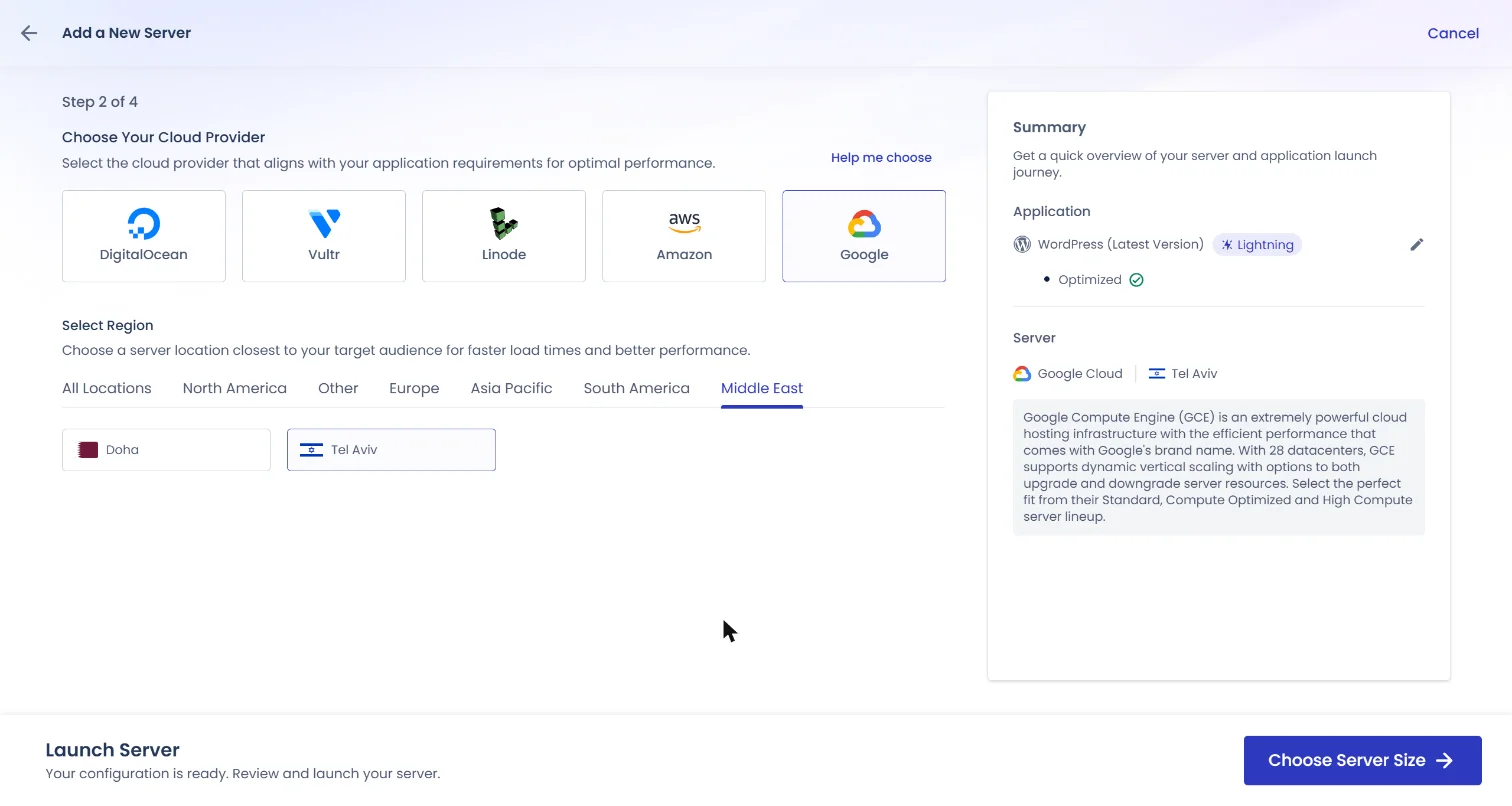
Detailed instructions for launching a server, for every provider, are in the guides in the cloud providers section.
How to scale a Google Cloud server up and down
This is where Google Cloud (together with AWS) differs from the other providers. According to the Cloudways scaling guide:
- You can scale a server down, not just up. Useful after a sales season.
- Increasing a disk is permanent. To shrink a disk you have to clone the server.
- There is a short downtime while scaling. Do it in quiet hours, after a backup.
Pros and cons: who it suits
| Pros | Cons |
|---|---|
| A Tel Aviv data center, among other regional options | Significantly more expensive than DigitalOcean, Vultr and Linode |
| Google’s infrastructure and network | The most expensive bandwidth of the providers, billed by usage |
| Scaling a server up and down | Not available during the trial period |
| Snapshot backups | According to the knowledge base, backup and restore are slower than on AWS |
| Separate disks for applications and the database | No root, and no access to the console or other Google Cloud services |
Suits: stores and dynamic sites with a regionally concentrated audience, organizations committed to Google Cloud, and sites with strong seasonality that want to scale a server down after a peak. Suits less: brochure sites and blogs, sites with a lot of bandwidth (images, video, downloads), and anyone looking for the lowest price.
Common mistakes
Thinking a Google Workspace plan is hosting for a site. It is not. It is email and documents. For a WordPress site you need a server.
Comparing only the server price. On Google Cloud bandwidth is not included. Work out your monthly bandwidth times the price for the region.
Stopping a server to save money. According to the pricing page, a stopped server is still billed. To stop paying, you delete it (after a backup).
Increasing a disk “just in case”. A disk increase is permanent. Increase it only when you need to.
Google Cloud hosting FAQ
Yes, through Google Cloud, in a service called Compute Engine, which provides virtual servers. Google Sites and Google Workspace are different services: a simple site builder and business email. For a WordPress site you need a server, which means Google Cloud.
No. Cloudways opens the server in its own account and bills you directly. On the other hand, you cannot connect an existing Google Cloud account of your own, and you get no access to Google’s console.
As of November 2026, from $37.33 per month for a Small server and $84 per month for a Medium server, before taxes. The price varies by region, and bandwidth is billed separately by usage.
According to the Cloudways knowledge base, Tel Aviv is on the list of Google Cloud locations, along with several in Europe. Check on the server launch screen that the location is available for your account and what it costs there.
No. According to the pricing page, the trial period only includes DigitalOcean, Vultr and Linode. To launch a Google Cloud server you need to add a payment method, and you pay only for the hours of use.
Yes, especially for a large store with seasonal peaks or an audience near one of Google’s less common locations, thanks to the option to scale a server back down after a peak. For a small or mid-sized store, DigitalOcean or Vultr in Europe will usually give good performance for less money.
Other cloud providers on Cloudways
- Cloudways server locations: which is closest to your audience
- DigitalOcean through Cloudways
- Vultr through Cloudways
- Linode (Akamai) through Cloudways
- All the guides on cloud providers: Cloud providers on Cloudways
- Cloudways pricing 2026
Official sources: Managed Google Cloud Hosting – Cloudways · Which Infrastructure Provider Do I Have to Choose? · Guide to Scale Servers on the Cloudways Platform · Bandwidth Charges of Infrastructure Providers (Cloudways Knowledge Base). Written and checked by Asael Dreyer · Updated: 6 Nov 2026
Disclosure: this is an independent site, not the official Cloudways site. Some links on this site are affiliate links: if you sign up through them we earn a commission, at no extra cost to you. Full details

