
Last updated: · By Asael Dreyer
Short answer: good website maintenance includes safe updates, backups that have been tested, security, uptime monitoring and a monthly report. In my example calculation (as of 7 Nov 2026, before tax), it comes to about $35 a month for a brochure site, about $115 for a professional package and about $335 for a WooCommerce store. Site owners: ask to see exactly what is included. Freelancers and agencies: price by time and risk, and automate most of the work.
The short version in numbers (as of 7 Nov 2026):
- My example price list (before tax): about $35 a month for a basic package, about $115 for a professional one and about $335 for a WooCommerce store, based on a rate of $60 an hour.
- Backups on Cloudways: once a day by default, with a week of retention. You can set a frequency from one hour to 7 days and retention of up to 4 weeks.
- Malware Protection: $4 per application per month for up to 5 applications, $3 from 6 to 15, and $2 from 16 up.
- Client Reporting: one report a month on the free plan, 10 on Growth ($4.99) and unlimited on Scale ($13.99).
- Maintenance time (my estimate): an hour and a half to two hours a month for a site with no automation, 20–30 minutes with automation.
What is website maintenance, and why do clients pay for it?
Website maintenance is the ongoing service that keeps a site that is already live working: secure, up to date, backed up and fast. It doesn’t include building new pages or a redesign. It protects what already exists.
A WordPress site needs maintenance because it is made of dozens of components from different vendors: the core, the theme and 15 to 40 plugins. Each one updates at its own pace, and some updates close security holes. A site that isn’t updated becomes an easy target for bots, and a site that is updated without testing breaks now and then. Maintenance is the balance between those two risks. For when to update automatically and when manually, see the update policy for clients.
The client isn’t buying “plugin updates”. They are buying the knowledge that if something goes down at 11 at night, someone will deal with it. When you describe your package, describe that peace of mind and what it prevents, not just a technical list. For updating a store without losing orders, see safe updates for a WooCommerce store.
How much does website maintenance cost a site owner?
For the owner of a brochure site, a reasonable maintenance package usually costs from a few tens of dollars to a couple of hundred dollars a month, and a WooCommerce store costs more. In my example calculation further down this page, at a rate of $60 an hour, I got $35 for a basic package, $115 for a professional one and $335 for a store, before tax. There is no official “market price”, so compare quotes by what they include and not by the number alone.
| Site type | What is reasonable to include | Range from my calculation (before tax) |
|---|---|---|
| Small brochure site | Daily backup, monthly updates, firewall, monitoring | About $30–45 a month |
| Active brochure site or content site | + weekly updates with testing, malware cleanup, a report, 30–60 minutes of changes | About $110–140 a month |
| WooCommerce store | + a dedicated server, a checkout test after each update, evening availability, 2–3 hours of changes | About $310–370 a month |
These ranges are my estimate, based on the example price list in the pricing section, and not a price survey. A much lower price usually means something is missing: a test before updating, a backup stored off the server, or availability when the site goes down. A much higher price should include development hours or an extended service.
Six questions to ask before you sign for maintenance
- Where is the backup stored, off the server or on it, and when did you last check that it opens?
- Are updates tested on a copy before they go to the live site?
- How quickly do you start working when the site goes down, and during which hours?
- Is cleanup after a hack included, or priced separately?
- How many minutes of changes are included each month, and what is the price beyond that?
- Who holds the login details for the domain and the server, and what happens if you stop the service?
The last question matters most: the domain should be registered in your name, not in the web builder’s. And if the answers aren’t clear, you are paying for a promise and not for a process.
What if you want to maintain it yourself?
You can, if you are willing to set aside regular time for it. On Cloudways, one site on a 1GB DigitalOcean Standard server costs $11 a month, plus SafeUpdates from $3 and Malware Protection from $4 per application, according to the Cloudways add-ons page (as of 7 Nov 2026, before taxes). Together that is about $18 a month. The tools do the repetitive work; the decisions, the quarterly backup check and handling incidents stay with you. For what hosting itself costs per year, see how much website hosting costs per year.
What should WordPress maintenance include, and how often?
The basics are a daily backup, continuous monitoring, weekly updates with testing, a monthly report and a trial restore once a quarter. The table lists each task, its frequency and whether it can be automated.
| Frequency | Task | Can it be automated? |
|---|---|---|
| Daily | Full off-server backup | Yes, completely |
| Continuous | Uptime monitoring and an alert when the site goes down | Yes, completely |
| Continuous | Blocking attacks and scanning for malware | Yes, at the server level |
| Weekly | Core, theme and plugin updates, with a check that the site didn’t break | Yes, with an automatic visual check |
| Weekly | Going over security vulnerability alerts | Partly: the alert is automatic, the decision is yours |
| Monthly | A speed check (PageSpeed) and comparison with the previous month | Yes |
| Monthly | Testing forms: that they send and that the emails arrive | Partly |
| Monthly | Client report: what was updated, backups, security, performance | Yes |
| Quarterly | A trial restore from backup to a staging environment, to make sure the backup really works | No, and this is exactly what separates professional work |
| Quarterly | Cleanup: unused plugins, old users, the database | Partly |
| Yearly | Domain renewal, PHP version check, theme compatibility check | Automatic reminder, manual execution |
Notice the quarterly restore row. Most web builders make backups, and few check that the backup opens. A backup that hasn’t been tested is a promise, not a backup. On Cloudways you can clone an application to a staging environment and restore there without touching the live site (staging environment on Cloudways).
How do you build three tiers of a maintenance package?
Three tiers work well: the client chooses, rather than asking “yes or no”. The middle tier is usually the one that sells the most, so it should be the one you most want to sell.
| Basic | Professional | Business / Store | |
|---|---|---|---|
| Managed server hosting + SSL | ✓ | ✓ | ✓ (dedicated server) |
| Daily off-server backup | ✓ (one week retention) | ✓ (two weeks) | ✓ (4 weeks, or a higher backup frequency) |
| Updates | Monthly | Weekly, with a visual check | Weekly + urgent security updates immediately |
| Security | Server firewall | + automatic malware cleanup | + malware cleanup + Cloudflare Enterprise |
| Uptime monitoring | ✓ | ✓ | ✓ + AI-based server monitoring |
| Monthly report | – | ✓ | ✓ + a quarterly call |
| Hours of changes per month | – | 30–60 minutes | 2–3 hours |
| Incident response time | One business day | 4 hours during working hours | One hour, including evenings |
The numbers in the table (hours, response times, retention days) are an example to start from, not a standard. Adjust them to the time you can actually commit to. A promise of “one hour, including evenings” when you work alone is a promise you will break.
How much should you charge for website maintenance?
My example calculation comes to about $35 a month for a basic package, about $115 for a professional one and about $335 for a store, before tax. But there is no single “market price” for website maintenance. Some people sell it for $15 a month and some for $450, and the gap comes from what is included. Instead of copying a competitor’s price, think in three layers:
- Direct cost per site: the site’s share of the server, backups and paid add-ons (for example malware cleanup or safe updates, which are priced per application).
- Your time: how many minutes a month the site actually needs, including the report, client communication and small incidents. Multiply by your hourly rate.
- A risk and availability premium: the money for being available when something goes down, even if nothing happened in a given month. In a store this is the biggest layer.
If you are registered for VAT or sales tax, add it where it applies to you (general information, not tax advice, and the exact treatment should be confirmed with your accountant). And if you pay a supplier in a different currency than you bill in, leave a margin for exchange-rate swings. To run the calculation with your own numbers, I built a pricing calculator for web builders: you enter the number of clients, server size, add-ons and hours, and get a cost and a recommended client price.
Example price list in USD, by the three tiers
The table builds a price for each tier from the three layers above. My assumptions: a rate of $60 an hour, 8 brochure sites per 2GB DigitalOcean Premium server ($28), and a store on its own 4GB Premium server ($54). Prices are before tax and don’t include Site Manager Pro, which is priced per application.
| Basic | Professional | Business / Store | |
|---|---|---|---|
| Direct cost per site | About $4 (server share + 5GB backup) | About $7 (+ Malware Protection at $3) | About $58 (own 4GB server + backup + Malware Protection) |
| Time per month | 20 minutes | 45 minutes ongoing + 45 minutes of changes | 1 hour ongoing + 2.5 hours of changes |
| Cost of time | $20 | $90 | $210 |
| Availability premium | $6 | $15 | $60 (including evenings) |
| Total | $30 | $112 | $328 |
| Example price | $35 | $115 | $335 |
I rounded up to leave room for price changes and for months with an incident. If your rate is different, the cost of time is the row that changes the most, and it is also most of the price. The assumption of 8 sites per server is my own rule of thumb, not official data. Server prices are from the DigitalOcean pricing page, and Malware Protection is from the add-ons pricing page.
How do you save time on website maintenance?
The rule: anything that happens the same way on every site, every week, should run by itself. Your time is reserved for decisions and incidents. This is how it looks on Cloudways, as of November 2026:
Backups
Every new server gets an automatic off-server backup once a day, with a week of retention. You can change the frequency (from one hour up to 7 days) and the retention time (up to 4 weeks). What this means for your packages: you can sell the difference between “one week retention” and “4 weeks”, and it only costs you backup storage. Restoring to a point in time is done from the panel, with an option to undo (backup and restore on Cloudways).
Updates with automatic testing: Site Manager and SafeUpdates
Site Manager is a WordPress management tool in the Cloudways panel, and it replaces the older SafeUpdates. The free Basic plan gives you a central dashboard for all your sites, management of plugins, themes and users, quick updates (directly on the live site, with no testing) and one-click WordPress login (SSO). The Pro plan, priced per application, gives you what really saves time in maintenance:
- SafeUpdates: the update runs first on a temporary copy of the site (staging), goes through tests, and only if everything is fine does it go to the live site. If the test fails, the site automatically returns to its state before the update.
- Visual regression check: a comparison of how up to 5 pages look before and after the update.
- Weekly automatic updates, with the option to exclude specific plugins.
- Critical updates: when the vulnerability scanner detects a severe vulnerability, or one that is being exploited in the wild, the update is pushed immediately and doesn’t wait for the next cycle.
- An activity log of WordPress (updates, content changes, product changes) kept for three months, which you can export into a client report.
- Bulk safe updates (SafeUpdates) across several sites at once. The central dashboard itself and Quick Update are already available on the free plan.
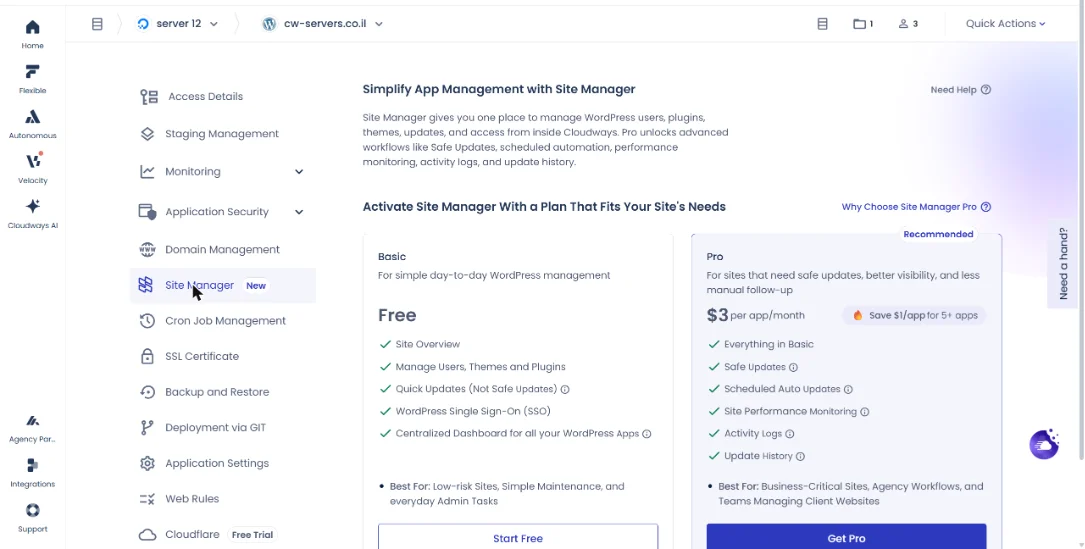
Cloudways claims that SafeUpdates customers save an average of 42 hours of maintenance. That is the vendor’s claim, not my measurement, but the direction is right: the expensive time in updates is the manual check after every update, and that is exactly what gets automated. Details: SafeUpdates and Site Manager on Cloudways. Current prices: add-ons pricing.
Security
A server-level firewall, brute-force protection and a vulnerability scanner are included on Flexible servers. Automatic malware cleanup (Malware Protection) costs $4 per application per month for up to 5 applications, $3 from 6 to 15, and $2 from 16 up. You can turn it on only for the sites on the higher packages, which makes it convenient to price. Details: Malware Protection.
Client reports
Client Reporting produces a branded report with the updates, backups, security scans and performance data, for sites hosted on Cloudways. It is included in all Client Billing & Reporting plans: one report a month on the free plan, 10 on Growth ($4.99), and unlimited on Scale ($13.99). A report that arrives every month is the simplest way to prevent the question “what am I actually paying for?”. What to put in the report and how to save time: the monthly report for a website client.
The code BFCM802 takes 80% off your bill for the first two months (up to $200 off per month), including unlimited free site migrations. New customers only, and only until the offer ends.
The offer ends on December 4, 2026 at 23:59 (UTC+2).
Start with a free trial, no credit card. Enter the code at checkout and check that it shows up.
After Black Friday: 30% off for 3 months with the code ASAEL. On a large server (above about $444 a month) ASAEL already saves more today. BFCM802 vs. ASAEL calculator
Start a free trial server, no credit card. When you move to a paid plan, the code ASAEL takes 30% off your bill for the first three months.
The link fills in the code on the signup form. Just make sure it shows up.
What is different about maintaining a WooCommerce store?
In a store every incident costs money in real time, so you update only after testing, check the checkout after every update, and back up more often. The biggest difference from a brochure site: in a store you must never restore a full backup onto the live site without thinking, because it deletes the orders that came in since the backup.
- Updates on a copy first. A WooCommerce or payment plugin update runs first on staging. After it you run a full test order: add to cart, payment, confirmation email and invoice.
- The payment plugin is the most sensitive plugin. Some plugins have strict version requirements, for example PHP 8.2 or higher. Check the requirements before you upgrade PHP or WordPress. For the test mode of each provider, see WooCommerce payment gateways.
- High-frequency backups. On Cloudways you can set a backup as often as once an hour. On an active store that is the difference between losing a day of orders and losing an hour.
- Careful restores. If you need to restore, restore to a copy first, check what broke, and move over only what you need. Orders and customers that came in after the backup don’t exist in it.
- The cache must not touch the cart and checkout. Varnish on Cloudways excludes them by default, but additional cache plugins sometimes don’t. Check after every settings change.
- Order emails. Once a month, check that the “new order” email reaches both the customer and the store. See WooCommerce emails not arriving.
- An update window. Don’t update on a Friday, before a holiday or before a sale. Before high-traffic days, go through preparing for sale traffic.
Because of all this, a store package is priced differently and usually includes a dedicated server. In the tiers table it is the “Business / Store” column.
What shouldn’t you promise in a maintenance package?
Don’t promise that the site will never be hacked, don’t promise 100% uptime, and don’t promise unlimited fixes. Promise a process and response times, because those are things you can keep.
- “The site will never be hacked”: nobody can guarantee that. Promise a process: protection, monitoring, and a backup you can restore from within a defined time.
- “100% uptime”: even the big cloud providers don’t promise that. Promise a response time, not perfect availability.
- “Unlimited updates, including fixing everything that breaks”: a plugin whose vendor broke something can take hours. Define what is included and what is priced separately.
- “SEO included”: maintenance preserves the technical foundation (speed, uptime, security). It doesn’t replace content and SEO work.
How do you onboard a new client to a maintenance package?
In six steps: an initial check, moving to your server, cleanup, setting up automation, monitoring, and a “report 0” for the client. All the steps are done in the first week.
- An initial health check: versions, outdated plugins, a malware scan and a speed test. This is the baseline for comparison in the following reports.
- If the site is with another provider, move it to your server (the first migration to Cloudways is free, details).
- Initial cleanup: remove unnecessary plugins and old users, and update everything that is waiting.
- Set up backups, automatic updates and protection according to the package tier.
- Set up uptime monitoring with the alert going to you (not to the client).
- Send “report 0” to the client: what you found and what you fixed. This is the document that proves your value in the very first month.
What do you write to a client when you offer a maintenance package?
A short email that explains what the client gets, what they need to give you and what will happen in the first week. This is a sample text I wrote, to adapt to your own style:
Hi [name],
To keep your site running without surprises, I’d like to offer you the [Professional] maintenance package. It includes a daily backup kept for two weeks, weekly updates that are tested before they reach the site, malware protection, uptime monitoring and a short report once a month. There are also [45 minutes] a month for small changes.
The price is [$115] a month plus any applicable taxes, with no commitment beyond the next month. If there is an incident that takes the site down, I start working on it within [4 hours] during working hours.
What I need from you: admin access to the site, the login details for the domain registrar (or confirmation that the domain is with you and renews automatically), and a contact person for incidents.
In the first week I’ll check the state of the site, update whatever is waiting, set up backups and monitoring, and send you an opening report with what I found and fixed.
[Signature]
What should a monthly maintenance report contain?
A good report can be read in a minute. The client doesn’t need to see every log line. They need to know that the site is safe, that someone worked on it, and what is worth doing next. A structure that works:
- A one-line summary: “The site was up all month, 14 updates were installed, no malware was found.”
- Uptime: the uptime percentage from the monitoring tool, and how many minutes of downtime there were (if any), with a short explanation.
- Updates: how many updates were installed, and if something failed and rolled back, what you did.
- Backups: when the last backup ran and how many restore points are available.
- Security: the scan results, attempts that were blocked, and vulnerabilities that were closed.
- Speed: this month’s PageSpeed score against the previous month.
- One recommendation: one thing worth improving (heavy images, an old plugin, a slow page). It is also a natural source of additional paid work.
If your sites are on Cloudways, most of this data is collected automatically in Client Reporting and in the Site Manager activity log. What’s left for you is to write the summary line and the recommendation, and that is the part the client actually reads.
What does a full monthly report look like, as an example?
This is a sample report for a brochure site, in the same seven-section structure. The numbers in it are invented, for illustration only:
Summary: The site was up all month, 12 updates were installed, no malware was found.
Uptime: 99.9% according to the monitoring tool. There was one 6-minute outage on the 14th, during maintenance work by the cloud provider.
Updates: 12 updates (WordPress core, 10 plugins and the theme). One update failed its test and was rolled back automatically. It will be installed after the vendor fixes it.
Backups: the daily backup ran successfully. There are 14 restore points. The quarterly restore test was done on the 3rd.
Security: a clean scan. 230 login attempts were blocked. One vulnerability in a forms plugin was closed.
Speed: mobile PageSpeed score 82 (79 last month).
Recommendation: the images on the homepage are heavy. Compressing them could improve mobile load time. I’d be glad to send a quote.
How much time does maintenance actually take?
Here is a field estimate (not official data) for an average brochure site with 20 plugins. Without automation: about an hour and a half to two hours a month, mostly manual updates, checking that the site didn’t break, and writing a report. With automated backups, updates and reports: about 20 to 30 minutes a month, mostly going over the results and communicating with the client. That difference, multiplied by 30 clients, is the difference between a business and extra work you can’t keep up with.
What mistakes do people make with maintenance packages?
The same price for a brochure site and a store: a store needs more time, more care and more availability. It needs its own package.
Updating directly on the live site, with no testing: it works nine times, and on the tenth it breaks the checkout on a Friday. Update on a copy first, manually or automatically.
No report: a client who doesn’t see any work cancels the package in the month when nothing happened. That is, in the month when you did a good job.
Change hours with no cap: “small changes” turn into a project. Set a quota, and what happens after it.
Not updating the price: hosting costs, exchange rates and your own time change. Set an annual price update in the agreement.
The offer ends on December 4, 2026 at 23:59 (UTC+2).
Start with a free trial, no credit card. Enter the code at checkout and check that it shows up.
Start a free trial server, no credit card. When you move to a paid plan, the code ASAEL takes 30% off your bill for the first three months.
The link fills in the code on the signup form. Just make sure it shows up.
Sources
- How to Use Cloudways Site Manager
- How to Configure a Server-level Backup
- Malware Protection
- Cloudways SafeUpdates
- Client Billing & Reporting
- Cloudways Add-ons (SafeUpdates and Malware Protection prices)
Website maintenance FAQ
In my example calculation (as of 7 Nov 2026, before tax), about $35 a month for a basic brochure site, about $115 for a professional package with weekly updates and a report, and about $335 for a WooCommerce store. There is no official market price, so compare quotes by what they include.
Core, theme and plugin updates, daily backups, security and scans, uptime monitoring and a client report. Professional packages also include a monthly speed check, a backup restore test and a quota of hours for small changes.
It depends on what is included and on the type of site, so it is worth calculating rather than copying. Add up the direct cost per site, your monthly time multiplied by your rate, and a premium for availability. A store is always more expensive than a brochure site, because the risk and the time are greater.
Once a week is a good pace for most sites, with a test before the update goes to the live site. Severe security updates are worth installing immediately, without waiting for the regular cycle.
You can reduce the risk a lot. Tools like SafeUpdates in Cloudways Site Manager run the update first on a temporary copy, compare how the pages look, and roll the site back automatically if something fails. An occasional manual check is still recommended.
Hosting is the server the site runs on. Maintenance is the ongoing work on the site itself: updates, backups, security, monitoring and fixes. You can sell them separately, but it is simpler for the client to buy one package.
It depends on what you wrote in the agreement. I recommend including cleanup and restore in the higher packages, and pricing it separately in the basic package. When there is server-level protection and a daily backup, that kind of cleanup is usually fairly short.
In my example calculation, about $335 a month before tax, including a dedicated server, malware cleanup, evening availability and two and a half hours of changes. Most of the price is your time, so it varies with your rate and the size of the store.
Related guides
- Hosting for web designers: models, pricing and tools
- How much website hosting costs per year
- WordPress update policy for clients
- Managing multiple sites – Site Manager, MainWP and ManageWP
- Hosting and maintenance pricing calculator
- SafeUpdates and Site Manager on Cloudways
- Cloudways for agencies
Official source: How to Use Cloudways Site Manager, How to Configure a Server-level Backup, Malware Protection (Cloudways Knowledge Base); Cloudways SafeUpdates; Client Billing & Reporting; Cloudways Add-ons. The price ranges and the example price list are my own calculation. This guide was written and reviewed by Asael Dreyer · Updated: 7 Nov 2026
Disclosure: this is an independent site, not the official Cloudways site. Some links on this site are affiliate links: if you sign up through them we earn a commission, at no extra cost to you. Full details

