
Last updated: · By Asael Dreyer
Short answer: the Cloudways API lets you manage servers and applications on Cloudways from code, a script or an automation tool. The recommended route is an Access Token instead of the old API key: in the profile menu choose API Integration, click Create Access Token, pick a name, an expiration and permissions (Limited, Read-Only or Full), and copy the token, which is shown only once. Only the primary account owner can create tokens, and the rate limit is 100 requests per minute.
What is the Cloudways API and why would you need it?
An API is an interface through which one piece of software talks to another. Instead of clicking in the panel, your script sends a request (for example “show me the list of servers” or “clear the cache on an application”), and Cloudways carries it out and returns a response in JSON.
Who is it useful for? Agencies that set up sites for clients from a fixed template, developers who want automatic deployment from Git, and anyone building a monitoring dashboard or a monthly report across all their servers. The Cloudways MCP server, which connects AI assistants to your account, also runs on the same tokens. If MCP is a new term for you, read what MCP is.
An Access Token is a credential that represents one integration. Each token has its own name, expiration and permissions. That’s the main difference from the old key: there used to be a single key with full access to the whole account, and now you can give every tool exactly what it needs, and revoke it without affecting the others.
| Topic | The old API key | Access Token |
|---|---|---|
| Status | Deprecated; according to Cloudways its end of life is set for 15 Oct 2026 | The current method |
| How many you can create | One key per account | As many as you need, one per integration |
| Permissions | Full account access | Limited, Read-Only or Full |
| Expiration | None | A day, a month, 3 months, 6 months, a year or Never |
| Revoking | Replacing the key breaks every integration | Revoke a single token only |
Which permission level should you choose for a token?
The principle Cloudways recommends is “least privilege”: give every integration only what it must have.
| Scope | What it allows | When to choose it |
|---|---|---|
| Read-Only Access | Read only (GET requests): lists, server details, monitoring | Dashboards, reports, monitoring tools |
| Limited Access (Beta) | Only the groups and actions you select, for example Server, Application, Git, Monitoring, Services, Lists, App Management | Most integrations, for example a deployment script that only needs Git |
| Full Access | All actions: create, change and delete | Only when you really need everything, and only in a system you trust |
Before you start
- Sign in as the primary account owner. Team members don’t see API Integration and can’t create tokens, even with full permissions.
- Prepare a safe place to keep the token: a password manager, an environment variable or a secrets vault.
- Decide in advance what the integration needs to do, so you can pick the right permissions.
How to create an Access Token for the Cloudways API, step by step
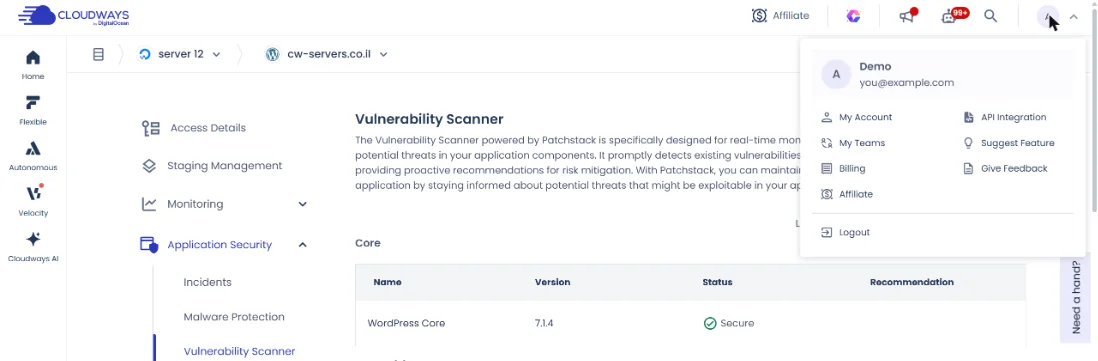
- Sign in to the management panel, open the profile menu in the top right corner and choose API Integration.
- In the Access Token Details area click Create Access Token.
- In Access Token Name write a name that explains where the token will be used, for example “Monitoring Dashboard” or “Staging Deployment Script”.
- In Expiration choose the shortest period that is enough. The exact date is shown below the selection.
- In Scope choose Limited Access, Read-Only Access or Full Access. With Limited, tick categories or individual actions, and you can search by name.
- Click Create Access Token. The button stays inactive until you fill in a name, expiration and permissions.
- On the Access Token Created screen click the copy icon and immediately save the token somewhere safe.
- Tick I have successfully copied the Access Token and click Done.
Important: the full token is shown only once. After you close the screen you can’t see it again or recover it. If you lost it, create a new token and revoke the old one.
How do you send your first request? Playground and curl
The safe way to get to know the API is the API Playground, a browser interface where you run any action and see the response.
- Open the Cloudways API site (developers.cloudways.com) and choose Playground.
- Click Authorize, go to the Access Token tab, paste the token and click Authorize.
- Open a simple read action, for example the list of servers, and run it.
Note: despite the name “Playground”, every action there runs on your real account. Cloudways recommends trying actions that change anything on a test server only. The Playground also respects permissions: a Read-Only token can’t create or delete.
From code: according to the official OpenAPI specification on Cloudways’ developer site, authentication is of the Bearer type: you send the token in the Authorization header, against https://api.cloudways.com/api/v2/. This is what a request for the server list looks like (with no real token, just an environment variable):
curl -H "Authorization: Bearer $CW_TOKEN" \
  https://api.cloudways.com/api/v2/servers
Keep the token in an environment variable (here CW_TOKEN) and not inside the code. The documentation marks the server/ path without an s as deprecated, so the example uses servers. An invalid token returns 401. For the exact structure of each action, its parameters and responses, check the API documentation, which is the authoritative source.
What you can do with the API
| Category | Example uses |
|---|---|
| Lists | Cloud providers, regions, server sizes and selectable values |
| Server and Server Management | Launching a server, server details, scaling, settings and usage monitoring |
| Service | Starting, stopping and restarting Apache, Nginx, PHP-FPM and MySQL |
| Application and App Management | Creating an application, backups, domains, Cron and SSL |
| Git | Connecting a repository, pulling changes and automatic deployment |
| Projects | Organizing servers and applications into projects |
| Security | Managing allowed and blocked IP lists |
| CloudwaysBot | Alerts, channels and notification preferences |
The rate limit is 100 requests per minute. A script that goes through many servers should include a short pause between requests and handle error responses.
How I used the API to check which providers offer a server in a given region (Tel Aviv as the example)
On 6 Nov 2026 I called GET /api/v1/regions, which returns every region of every cloud provider on Cloudways. As an example I looked for the Middle East region of Tel Aviv. The result: it is available on AWS (il-central-1), Google Cloud (me-west1) and Vultr (tlv). DigitalOcean and Linode have no region there.
This is a good example of what the API is for: the answer comes straight from the system that launches the servers, so it is more current than help articles. In practice, one of Cloudways’ knowledge base articles still doesn’t show Tel Aviv in Vultr’s list of locations, while the API does.
The request I sent
I used the old authentication method, because that’s the one I had set up: first you get a temporary OAuth token from your email and API key, then you send it as a Bearer header. The access details are in environment variables, not in the code:
# 1. Temporary token from the email and API key (the old method)
curl -s -X POST https://api.cloudways.com/api/v1/oauth/access_token \
  --data-urlencode "email=$CW_EMAIL" \
  --data-urlencode "api_key=$CW_API_KEY"
# The response includes access_token; save it in CW_OAUTH

# 2. The list of regions
curl -s -H "Authorization: Bearer $CW_OAUTH" \
  https://api.cloudways.com/api/v1/regions
With a new Access Token you skip step 1 and send the token straight in the Authorization header, as in the earlier example. According to the OpenAPI specification, the same action also exists in version 2 at the path /regions.
The response structure (shortened)
The response is a regions object with a key for each provider, holding an array of regions with id and name. I shortened it and kept only what is relevant to the Tel Aviv example:
{
  "regions": {
    "amazon": [ …, { "id": "il-central-1", "name": "…" }, … ],
    "gce":    [ …, { "id": "me-west1",     "name": "…" }, … ],
    "vultr":  [ …, { "id": "tlv",          "name": "…" }, … ],
    "do":     [ … 10 regions, none in Israel … ],
    "linode": [ … 26 regions, none in Israel … ]
  }
}
To see only those regions, you can filter with jq:
curl -s -H "Authorization: Bearer $CW_OAUTH" \
  https://api.cloudways.com/api/v1/regions \
| jq '.regions | map_values(map(select(.id | test("il-central-1|me-west1|tlv"))))'| Provider (key in the API) | Tel Aviv? | Region ID | Verification with the provider |
|---|---|---|---|
| AWS (amazon) | Yes | il-central-1 | Israel (Tel Aviv) in the AWS region list |
| Google Cloud (gce) | Yes | me-west1 | me-west1 in Tel Aviv according to Google Cloud |
| Vultr (vultr) | Yes | tlv | tlv, Tel Aviv in Vultr’s public API |
| DigitalOcean (do) | No | – | 10 regions, none in Israel |
| Linode (linode) | No | – | 26 regions, none in Israel |
As of 6 Nov 2026, based on my API call. Want to understand what this means for speed and price? See the guide to choosing a regional server, and the guides for each provider: AWS regions, Google Cloud regions and Vultr regions.
The server list: GET /api/v1/server
You pull the list of servers in the account with GET /api/v1/server, with the same Bearer header. Each server comes back with its ID, name, provider, region, IP and the list of applications on it. This is the structure, with values hidden:
{
  "status": true,
  "servers": [
    {
      "id": "XXXXXX",
      "label": "my-server",
      "status": "running",
      "cloud": "vultr",
      "region": "…",
      "public_ip": "0.0.0.0",
      "apps": [ { "id": "…", "label": "…", "application": "wordpress", … } ]
    }
  ]
}
Keep two things in mind. First: according to the OpenAPI specification, the /server path is marked deprecated, because it returns all the servers and applications with no pagination. In new code use /servers from version 2. Second: according to the example in the specification, the response can also include passwords (for the master user, the applications and the databases). Don’t keep it in logs, don’t paste it into a chat, and don’t publish IPs or server IDs, just as I didn’t here.
How do you manage and revoke existing tokens?
The Access Token Details table shows for each token its name, permissions (Scopes), when it was created, when it was last used (Last Used) and when it expires. From the three-dots menu on the row:
- Edit: change the available settings, such as name, expiration and permissions. Changing the name doesn’t change the token value.
- View Scopes: for Limited tokens, the list of allowed actions.
- Revoke: cancel permanently. You confirm with Revoke Key, and every integration using the token stops working immediately.
- Reveal Credentials: a switch on each token that determines whether SSH and SFTP passwords can appear in the MCP server’s results. It is off by default, and leave it that way unless you have a reason.
A tip from practice: go through the Last Used column once a quarter. A token that hasn’t been used for months is probably left over from a finished project, and it’s better to revoke it.
Moving from the old API key? What to check
The old API key (an email and a key, exchanged for a temporary token through oauth/access_token) is deprecated. According to Cloudways’ tokens article, its end of life is set for 15 Oct 2026, after which the keys will be revoked and integrations that use them may stop working.
What I saw in practice: on 6 Nov 2026, three weeks after that date, my calls with the old key against api/v1 still worked (see the example above). That doesn’t mean it will keep working. Treat it as a grace window that can close without notice, and move to tokens now.
- List every place the old key was used: scripts, Git webhooks, monitoring tools, MCP connections.
- Create a separate Access Token for each one, with the permissions it needs.
- Replace the key with the token, and check that the integration works.
- Delete the old key from all configuration files.
In an MCP connection, the old X-CW-Email and X-CW-Api-Key headers were replaced by the X-Access-Token header. The details are in the Cloudways MCP guide. For practical use of AI in managing a site, see managing a WordPress site with Claude and ChatGPT.
Common mistakes and how to fix them
I don’t have API Integration in the menu: you are signed in as a team member. Only the primary account owner can access the API.
401 or access_denied: the token has expired, was revoked, was copied with a space, or the integration is still sending the old key. Create a new token and check the header.
The action is rejected even though the token is valid: the permission you chose has no access to the action. Check View Scopes, or create a Limited token with the missing category.
Errors after many requests: you exceeded the limit of 100 requests per minute. Add a pause and try again.
A token was committed to Git: revoke it immediately with Revoke, even if the repository is private, and create a new one. Deleting the file doesn’t remove it from the commit history.
The code BFCM802 takes 80% off your bill for the first two months (up to $200 off per month), including unlimited free site migrations. New customers only, and only until the offer ends.
The offer ends on December 4, 2026 at 23:59 (UTC+2).
Start with a free trial, no credit card. Enter the code at checkout and check that it shows up.
After Black Friday: 30% off for 3 months with the code ASAEL. On a large server (above about $444 a month) ASAEL already saves more today. BFCM802 vs. ASAEL calculator
Start a free trial server, no credit card. When you move to a paid plan, the code ASAEL takes 30% off your bill for the first three months.
The link fills in the code on the signup form. Just make sure it shows up.
Frequently asked questions
In the profile menu choose API Integration, then Create Access Token. Fill in a name, expiration and permissions, copy the token, which is shown once, and confirm you copied it.
Don’t rely on it. Cloudways set its end of life for 15 Oct 2026 and replaced it with Access Tokens. In my case it still worked against api/v1 on 6 Nov 2026, but the keys are supposed to be revoked, so every integration should move to a token.
Not directly. Only the primary account owner sees API Integration and can create tokens. You can create a token with limited permissions and hand it to the team member, carefully.
100 requests per minute. Scripts that go through many servers or applications need a pause between requests.
No. The token is shown only once and can’t be generated again. Create a new token, update the integration, and revoke the old one if you suspect it was exposed.
AWS (il-central-1), Google Cloud (me-west1) and Vultr (tlv). DigitalOcean and Linode have no region in Israel. I checked this with a call to GET /api/v1/regions on 6 Nov 2026.
According to the example in Cloudways’ OpenAPI specification, yes: it can include passwords for the master user, the applications and the databases. Don’t keep the response in logs and don’t share it. Use a Read-Only token when you only read data.
Related guides
- Cloudways MCP: managing your server with an AI assistant
- How to use Cloudways Copilot
- Cloudways Autonomous
- SafeUpdates: safe updates for WordPress
- Cloudways server locations
- All guides on this topic: AI and automation on Cloudways
- The full review: Cloudways hosting review
Sources
- How to Create and Manage Cloudways API Access Tokens – Cloudways Knowledge Base
- Cloudways API (OpenAPI) – the /regions, /server and /servers paths, checked 7 Nov 2026
- AWS Regions – AWS
- Regions and zones – Google Cloud
- Vultr API: regions – Vultr
- My own API calls: GET /api/v1/regions, 6 Nov 2026 (the cw-servers.com account)
Official source: How to Create and Manage Cloudways API Access Tokens (Cloudways Knowledge Base) · Cloudways API Playground · Cloudways API (OpenAPI). Written and checked by Asael Dreyer · Updated: 7 Nov 2026
Disclosure: this is an independent site, not the official Cloudways site. Some links on this site are affiliate links: if you sign up through them we earn a commission, at no extra cost to you. Full details

