
Short answer: there are three ways to run OpenClaw: on your own computer, on a VPS you install and secure yourself, or on managed hosting such as Cloudways Managed AI Agents, which starts at $9.99/month and goes live in a few minutes. Your own VPS gives you full control and root access, but security, updates and backups are on you. Managed hosting takes all of that off your plate, at the cost of some flexibility (no root, one agent per server). As of November 2026, for most small businesses that want an agent working 24/7 on WhatsApp or Slack, managed hosting is the shorter and safer route.
What OpenClaw is, in one sentence
OpenClaw is an open-source AI agent (MIT license) that runs on your own computer or server and connects to the chat apps you already use, such as WhatsApp, Telegram and Slack. It uses a language model of your choice (Claude, GPT, Gemini and others) to get things done: answer messages, manage a calendar, research a topic and run recurring tasks. A full beginner’s explanation is in my guide What is OpenClaw. I wrote about the difference between a self-run agent and a closed service here: OpenClaw vs closed agent services.
The heart of OpenClaw is the Gateway: a single process that runs all the time, manages conversations and connects the channels to the agent. For the agent to reply at 2 a.m., the Gateway has to run on a machine that’s always on. That’s the whole question behind “where do I host OpenClaw”.
What are the three ways to run OpenClaw? Comparison table
You can run OpenClaw on your computer, on a VPS or on managed hosting, and the table sums up the practical differences. Each option is covered in detail below.
| Your own computer | Your own VPS | Managed hosting (Cloudways) | |
|---|---|---|---|
| Server cost | $0 (your electricity and your machine) | Depends on the provider, e.g. $12/month for 2GB on DigitalOcean | From $9.99/month (Scout, 2GB) |
| Setup time | About 30 minutes | One to two hours, if everything goes smoothly | A few minutes, through the panel |
| 24/7 availability | Only while the computer is on and online | Yes | Yes |
| Security and OS updates | On you | On you | Managed |
| OpenClaw updates | Manual | Manual | Versions Cloudways tests before rollout |
| Backups | On you | Your own scripts | Built-in daily backup |
| Root access | Yes | Yes | No (SSH and terminal available, installs via npm) |
| Number of agents | As many as you want | As many as the server can handle | One agent per server |
| Model (LLM) cost | With every option you pay the model provider separately, by usage or subscription | ||
Prices are accurate as of 6 Nov 2026 and exclude tax. The VPS price is an example from DigitalOcean’s official price list; there are cheaper and more expensive providers.
Should you run OpenClaw on your own computer?
Yes, if you just want to try it: it’s the fastest route. Install it, connect a model and start talking to the agent. Good for learning and experimenting.
Two long-term problems: the agent only works while the computer is on, and an agent running on your personal machine has access to everything on it. Cloudways flags this as the main risk: if the agent receives a malicious instruction (say, through a message or an untrusted skill), your files, browser and saved passwords are exposed. The OpenClaw documentation also recommends treating every incoming message as untrusted input.
Option 2: installing OpenClaw on your own VPS
A VPS (virtual private server) is a Linux server in the cloud that you rent and manage. You get root access, and you’re responsible for everything else. It’s the right route if you know Linux, want several agents on one server, or need special software at the system level.
The installation in brief, per the official docs
These are the main steps from OpenClaw’s Linux installation page, as of November 2026. The project moves fast, so check the official documentation before you start.
- Rent a Linux server from a cloud provider and connect to it over SSH. Update the operating system and set up a firewall.
- Install Node.js in the version the docs require. In November 2026 the docs recommend Node 26 and also support a recent Node 24 release.
- Install OpenClaw via npm:
npm i -g openclaw@latest(on newer npm versions the docs add the flag--allow-scripts=openclaw). Alternatively, use the official install script from the OpenClaw website. - Run the onboarding process with service installation:
openclaw onboard --install-daemon. This sets up the Gateway as a systemd service that restarts automatically. - Reach the dashboard through an SSH tunnel, not through an open port:
ssh -N -L 18789:127.0.0.1:18789 user@host, then openhttp://127.0.0.1:18789/in your browser. 18789 is the Gateway’s default port. - Run a security check:
openclaw security audit, and fix whatever it finds. - Connect a model and channels (WhatsApp, Telegram, Slack) and define who is allowed to talk to the agent.
What you need to secure on a VPS
The installation itself is simple. The real work is keeping the server safe over time. Based on OpenClaw’s security documentation and general server-management experience:
- Don’t expose the Gateway to the internet. In a standard install it listens on localhost only. If you open it up, you need authentication, HTTPS, and a careful read of the official exposure guide. Note: in containers the default is different and the port is exposed.
- Keep pairing on. By default, an unknown sender in a direct message gets a pairing code and never reaches the agent. Don’t turn that off.
- API keys. A leaked model-provider key can cost you real money. Store it with restricted file permissions and set a spending cap with the provider.
- Skills from unknown sources. A skill is code and instructions the agent runs. Review it before you install it.
- Updates. Both the operating system and OpenClaw. An untested update can break workflows, so back up before every update.
- Backups. The agent’s memory, settings and connections live on disk. Without a backup, a server failure wipes them.
When a VPS is the right choice: you’re comfortable running Linux, you want several agents on one server, you need root (for example to install system-level software), or you want to connect channels that a managed panel doesn’t support.
Option 3: managed OpenClaw hosting on Cloudways
Managed AI Agents is a Cloudways product that sets up a dedicated server for you with OpenClaw (or Hermes) preconfigured. You pick a location and a server tier, connect a model-provider key and connect a chat channel. Cloudways manages the server, SSL, security updates and backups. For the differences between the agents, see Hermes Agent.
What you get
- A dedicated server per customer, isolated from your computer and from other customers.
- Verified OpenClaw updates: Cloudways tests every version before it reaches your server.
- Daily backup and restore to a known-good point from the panel.
- Managed SSL and a firewall.
- A setup wizard that connects a model provider, an agent personality (Souls), skills and a channel.
- Channels from the panel: WhatsApp (by scanning a QR code, like WhatsApp Web), Slack, Discord and Telegram.
- Model providers: Anthropic, OpenAI, Gemini, OpenRouter and DigitalOcean, plus connecting an existing ChatGPT/Codex subscription. Model costs don’t go on your Cloudways invoice.
- Terminal and SSH for OpenClaw CLI commands, file transfers and installing npm packages.
What it costs
| Tier | Price per month | CPU and memory | Best for |
|---|---|---|---|
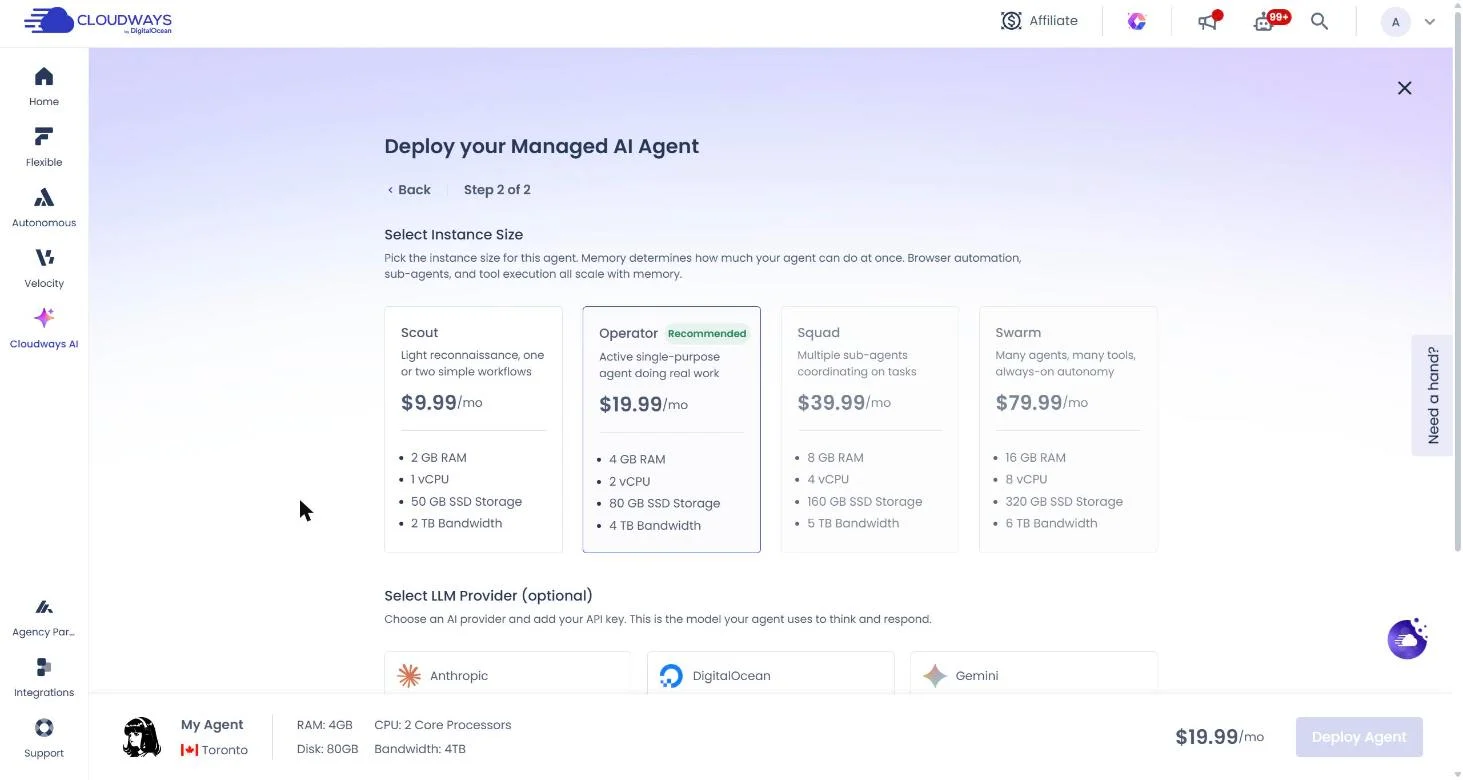
| Scout | $9.99 | 1 vCPU, 2GB | Testing, one agent with light activity |
| Operator | $19.99 | 2 vCPU, 4GB | An active customer-facing channel, 1–2 sub-agents |
| Squad | $39.99 | 4 vCPU, 8GB | 3–5 sub-agents in parallel |
| Swarm | $79.99 | 8 vCPU, 16GB | Many sub-agents and tools running all the time |
Prices are accurate as of 6 Nov 2026. According to the product page you pay only for the server, with no hidden fees and no renewal penalties. Full details, including model costs and examples for a business and an agency, are in the Managed AI Agents price list.
The limitations, honestly
- No root and no sudo. Extra packages are installed via npm in the agent’s folder. If you need system-level installs, you’ll need a VPS.
- One agent per server. Three separate agents = three servers. A higher tier gives the same agent more resources, not room for more agents.
- No free trial. According to the Cloudways help article, you can’t launch Managed AI Agents on a trial account; you need to upgrade to a paid account first. You can start on Scout and delete the server if it doesn’t work out.
- You can’t switch between OpenClaw and Hermes on the same server. Want to try the other one? Launch another server.
- Channels: the panel shows four channels. OpenClaw itself supports many more (Signal, Teams, iMessage and others). If you need one of those, ask support whether it can be configured through the terminal.
The code BFCM802 takes 80% off your bill for the first two months (up to $200 off per month), including unlimited free site migrations. New customers only, and only until the offer ends.
The offer ends on December 4, 2026 at 23:59 (UTC+2).
Start with a free trial, no credit card. Enter the code at checkout and check that it shows up.
After Black Friday: 30% off for 3 months with the code ASAEL. On a large server (above about $444 a month) ASAEL already saves more today. BFCM802 vs. ASAEL calculator
Start a free trial server, no credit card. When you move to a paid plan, the code ASAEL takes 30% off your bill for the first three months.
The link fills in the code on the signup form. Just make sure it shows up.
What does it really cost to run OpenClaw?
The cost is more than the server price. In practice there are three components:
- The server. Here the gap is smaller than you’d expect: Cloudways Scout (2GB, 1 vCPU) costs $9.99, and a DigitalOcean Basic server with 2GB and 1 vCPU costs $12 (both prices checked on 6 Nov 2026). There are cheaper VPS providers, but the difference is a few dollars a month.
- The model. This is usually the biggest component. It’s the same with every option, because in all of them you bring your own key (BYOK). An agent that answers lots of messages on a strong model can cost more than the server.
- Your time. Installation, hardening, updates, backups and fixing things when they break. Even one hour a month of a business owner’s time is worth more than the server price difference.
My conclusion: a VPS only saves money if your time on the server is nearly free, meaning you already run servers anyway. For everyone else, managed hosting is cheaper once you count everything.
So which should you choose? By type of user
| Who you are | Recommendation | Why |
|---|---|---|
| You just want to try it and understand it | Your own computer, without access to sensitive files | Free, fast, and you don’t need 24/7 availability |
| Small business owner, agent for WhatsApp or email | Managed hosting, Scout or Operator | Always on, backed up, no server work |
| Freelancer building agents for clients | Managed hosting, one server per client | Full isolation between clients, a clear invoice for each |
| Developer who wants several agents and experiments | Your own VPS | Root, several agents on one server, full flexibility |
| Company with IT and security requirements | VPS or cloud managed by the IT team | Full control over policy, network and permissions |
How to launch OpenClaw on Cloudways, step by step
The whole process takes about 10 minutes, including connecting WhatsApp. A detailed guide with screenshots is in my AI agent setup guide for Cloudways. A step-by-step guide to connecting the agent to messaging: connecting an AI agent to WhatsApp and Slack.
- Log in to the management panel and choose AI Agents from the menu.
- Choose OpenClaw, name the agent and pick a location (Region).
- Pick a server tier. If the agent will answer customers on an active channel, start with Operator.
- Connect a model provider: choose a provider and paste an API key (or connect a ChatGPT/Codex subscription).
- Finish the setup wizard: personality (Souls), skills and channel.
- On the LLM & Channels tab, click Connect WhatsApp, generate a QR code and scan it with your phone.
- Send a test message to the connected number and make sure the agent replies.
Note: a WhatsApp number can only be connected to one OpenClaw agent at a time. If you want to move it to another agent, disconnect it first.
Common mistakes
Opening port 18789 to the internet on a VPS: this is the fastest way to expose your agent. Use an SSH tunnel or a private VPN.
An API key with no spending cap: an agent stuck in a loop can burn through a budget in one night. Set a monthly limit with the model provider, whatever hosting option you use.
Starting on Scout with a busy customer channel: 2GB is enough for testing, not for an agent handling dozens of conversations at once. Cloudways recommends Operator or higher for an active customer-facing channel.
Connecting the agent to every account on day one: start with narrow permissions (one calendar, one channel), and widen them once you’ve seen how it behaves.
Frequently asked questions
On a computer or VPS: install Node.js in the version the docs require, run npm i -g openclaw@latest, then openclaw onboard –install-daemon. On Cloudways managed hosting there’s no installation at all: choose OpenClaw in the panel, connect a model-provider key, and the agent is up within minutes.
Two components: the server and the model. A server on Cloudways managed hosting starts at $9.99/month, and your own VPS costs about the same or slightly less. The model is paid separately to the provider (Anthropic, OpenAI, Google and others), by usage, and it’s usually the bigger component.
The software itself, yes. OpenClaw is open source under the MIT license, and there’s no paid plan. You pay for the machine that runs it (if it isn’t your own computer) and for the language model it uses.
On a VPS you install, secure, update and back up everything yourself, and you get root access. With managed hosting Cloudways does all of that, including testing OpenClaw updates before rollout and a daily backup, but there’s no root and it’s one agent per server.
For testing, yes, with care. An agent running on your computer has access to the files and accounts on it, so a malicious message or an untrusted skill can do damage. For regular use, a separate server is better, managed or VPS, with access only to what the agent needs.
Yes. On Cloudways you connect by scanning a QR code with your phone, similar to WhatsApp Web. One number can be connected to one agent at a time. It’s best to use a separate number for the agent rather than your personal one.
No. According to the Cloudways help article (as of November 2026), Managed AI Agents aren’t available on a trial account and you need to upgrade to a paid account. You can start on the Scout tier at $9.99/month and delete the server if it doesn’t suit you.
The offer ends on December 4, 2026 at 23:59 (UTC+2).
Start with a free trial, no credit card. Enter the code at checkout and check that it shows up.
Start a free trial server, no credit card. When you move to a paid plan, the code ASAEL takes 30% off your bill for the first three months.
The link fills in the code on the signup form. Just make sure it shows up.
Related guides
- What is OpenClaw: a beginner’s explanation
- Cloudways Managed AI Agents: full review
- Setting up an AI agent on Cloudways, step by step
- Managed AI Agents pricing: Scout to Swarm
- All guides in this area: AI and automation
Sources (checked 6 Nov 2026): OpenClaw Docs · OpenClaw – Linux / VPS · OpenClaw – Gateway Security · openclaw/openclaw on GitHub · Cloudways Managed OpenClaw · How to Get Started with Managed AI Agents · How to Connect Communication Channels · How to Install Custom Packages (Cloudways Knowledge Base) · DigitalOcean Droplet Pricing. Written and reviewed by Asael Dreyer · Updated: 6 Nov 2026
Disclosure: this is an independent site, not the official Cloudways site. Some links on this site are affiliate links: if you sign up through them we earn a commission, at no extra cost to you. Full details