
Last updated: · By Asael Dreyer
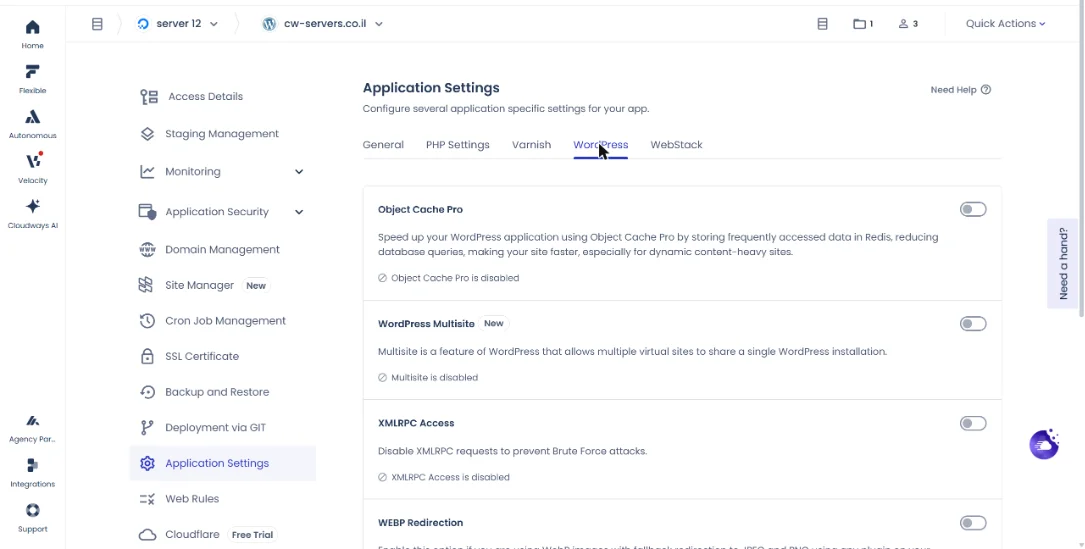
Short answer: I turned on Object Cache Pro (Redis) on this site, which runs on Cloudways, on 7 Nov 2026. Database queries dropped from 35 to 5–6, but load time without page cache didn’t improve, even after 3 days. In other words, on a small site Redis takes load off the database, and it really speeds things up mainly for WooCommerce stores, logged-in users and the admin area. According to the pricing page, the plugin is included free on Flexible servers of 4GB and up, and you turn it on in Application Settings, the WordPress tab, with the Object Cache Pro switch.
What did I measure on my site before and after turning on Redis?
This site runs on Cloudways, and the plugin was off until 7 Nov 2026. Turning it on took about half a minute: one switch in Application Settings and a confirmation. The site didn’t go down for a moment, and every page I checked kept returning 200. To know whether anything changed, I ran the same test before and after: a fixed PHP script (five get_posts calls of 50 posts each, a settings read and a post count), plus an external TTFB measurement, without page cache, six times per measurement. After 3 days, once the cache was warm, I measured again.
| Metric | Before (7 Nov 2026) | Right after (7 Nov 2026) | After 3 days (10 Nov 2026) |
|---|---|---|---|
| Database queries in the test script | 35 | 5–10 | 5–6 (about 85% fewer) |
| PHP time of the test script | 23ms | 46–64ms | 46–63ms |
| TTFB without cache (median of 6 tests) | about 0.85 seconds | 0.85–0.99 seconds | 0.92–1.03 seconds (three pages) |
What it means: Redis isn’t magic. The drop in queries is real and sharp, and the database does far less work. But PHP time actually went up, and TTFB stayed in the same range of about a second. On a small site like mine the queries were fast even before, and now every cache read is one more round trip to Redis. The real speed work is done by page caching: Varnish on the server and HTML caching on Cloudflare, which serve most visits without running PHP at all. I laid out all my layers in the hosting stack of this site, and you’ll find what counts as a good TTFB in the TTFB guide.
So when does Redis make a difference?
- A WooCommerce store. The cart, checkout and “My account” aren’t kept in page cache, and there every query you save is noticeable. See also slow WooCommerce checkout.
- Logged-in users. Course sites, membership clubs and forums, where most visitors bypass the page cache.
- The admin area. wp-admin is never kept in page cache. I haven’t measured my own admin separately yet, so here I’m relying on the documentation. If yours is slow, start with the slow wp-admin guide.
- A large database or a lot of traffic. When queries are heavy or numerous, an 85% saving in queries translates into much less load on the server.
One more thing I found along the way: a Redis service was already running on my server before I turned on the plugin. It was just sitting there with no site using it. If Redis is active in your server settings and the switch in the application is off, it’s worth checking.
What are Redis and Object Cache, and why they matter especially for stores
WordPress depends heavily on the database. Every page load runs dozens of queries: site settings, menus, products, users. An object cache stores the results of those queries in memory, so next time WordPress gets the answer from memory instead of asking the database again. An object cache helps especially in wp-admin, which isn’t kept in page cache, as explained in slow wp-admin.
Redis is a data store that runs in the server’s RAM and serves as the storage for the object cache. Object Cache Pro is a premium WordPress plugin that connects WordPress to Redis efficiently. The Cloudways pricing page (checked on 10 Nov 2026) says the plugin is worth $95 a month and is included at no charge on Flexible servers of 4GB and up. The help article only says it’s free for supported WordPress applications, so on a smaller server check the terms before you turn it on.
Why does it matter? A page cache, like Breeze or Varnish, serves a ready-made copy of a page that looks the same to everyone. But a shopping cart, checkout, a “My account” area, a course site with logged-in users and the WordPress admin can’t be stored as a ready-made page. In all of those, WordPress has to rebuild the page each time, and that’s where the object cache saves most of the work.
| Cache type | What it stores | When it helps | On Cloudways |
|---|---|---|---|
| Varnish | Whole pages at server level | Anonymous visitors, content pages | Installed at server level |
| Breeze | Pages, CSS and JS at WordPress level | Anonymous visitors, file optimization | Preinstalled |
| Object Cache Pro + Redis | Results of database queries | Cart, checkout, logged-in users, admin area | Preinstalled on optimized WordPress |
The question “Varnish or Redis?” doesn’t really exist. According to Cloudways, they do different things and work together. Keep both active.
Is Object Cache Pro already active on your site?
In most cases, yes. According to Cloudways, the plugin comes preinstalled and active on the following applications, provided the Redis service is running on the server (on new servers it’s on by default):
- Cloudways-optimized WordPress
- WooCommerce
- WordPress Multisite
- A WordPress install with the Astra package
On the Clean WordPress version the plugin isn’t preinstalled, but you can turn it on. The plugin is available only in the new Cloudways interface. To check, log in to the WordPress admin, go to Plugins and then Installed Plugins and look for Object Cache Pro, or check the switch in the application settings in the platform.
Before you turn it on
- The Redis service is running on the server. If not, turn it on in the server settings: in Manage Services, and in the new interface Redis also appears as a card in the Packages tab.
- PHP 7.4 or higher. On a lower version the plugin won’t be installed, and lowering PHP below 7.4 will turn it off. See changing the PHP version.
- No other object cache plugin. Remove plugins like Redis Object Cache, WP Redis, Memcached Object Cache, Memcached Redux or Cachify first. Two object cache plugins together conflict.
- Do you have W3 Total Cache or LiteSpeed Cache? They do both page caching and object caching. Turn off their object cache settings before you enable Object Cache Pro.
Regular page cache plugins don’t interfere. According to Cloudways, Object Cache Pro works alongside Breeze, WP Rocket, WP Fastest Cache, Swift Performance, WP Super Cache, Cache Enabler and WP-Optimize.
Turning on Object Cache Pro on Cloudways, step by step
- In the platform, open the server list (Flexible, the Servers tab) and choose your site’s server.
- Click the www icon in the server’s row and choose the application. You can also switch between servers and applications with the selectors in the top bar.
- In the application menu choose Application Settings and go to the WordPress tab.
- Turn on the Object Cache Pro switch.
- In the confirmation window click Confirm. The plugin is installed and activated automatically.
- If the plugin doesn’t show up in the WordPress plugin list, refresh the admin area.
The Object Cache Pro dashboard
Cloudways configures the plugin automatically, and in most cases there’s nothing to change. To see that it works, go to Plugins, Installed Plugins in WordPress, and under Object Cache Pro click Settings. There you’ll find the cache status, cache size, performance metrics, a button to clear the cache (Flush) and logs for diagnosing problems. In addition, the WordPress Site Health screen shows checks from the plugin.
What happens when you turn off Object Cache Pro or Redis stops?
Turning it off for one application: on the same screen, Application Settings, the WordPress tab, turn off the Object Cache Pro switch and confirm with Confirm. The plugin is deactivated and removed from the application.
Stopping Redis on the server: if you stop the Redis service, Object Cache Pro is turned off in all applications on the server, but stays installed. When you start Redis again, the plugin resumes working in the applications where it was active. Applications where it was off beforehand stay off.
Object Cache Pro in staging and cloning
When the plugin is active on the original site, here’s what happens when you create a staging environment or clone the application:
| Destination | Object Cache Pro in the copy |
|---|---|
| The same server | Installed and active |
| Another server that meets the requirements (Redis running, PHP 7.4+) | Installed and active |
| Another server that doesn’t meet the requirements | Not installed |
| A new server | Installed and active |
If the plugin was off on the original site, it will be off in the copy too. The full staging guide: staging environment on Cloudways.
The code BFCM802 takes 80% off your bill for the first two months (up to $200 off per month), including unlimited free site migrations. New customers only, and only until the offer ends.
The offer ends on December 4, 2026 at 23:59 (UTC+2).
Start with a free trial, no credit card. Enter the code at checkout and check that it shows up.
After Black Friday: 30% off for 3 months with the code ASAEL. On a large server (above about $444 a month) ASAEL already saves more today. BFCM802 vs. ASAEL calculator
Start a free trial server, no credit card. When you move to a paid plan, the code ASAEL takes 30% off your bill for the first three months.
The link fills in the code on the signup form. Just make sure it shows up.
How does Redis ACL separate sites on the same server?
When several sites sit on the same server, they all use the same Redis. Without restrictions, Redis usually runs with a single default user with full access. If one of the sites gets hacked, it can in theory read or delete the cache of the other sites.
Redis ACL (Access Control Lists) solves this: each application has its own user, with permissions only to its own data. It’s especially relevant for agencies and freelancers who keep different client sites on one server.
- Check that all applications on the server are ready to work with a Redis username, password and prefix (see the notes below).
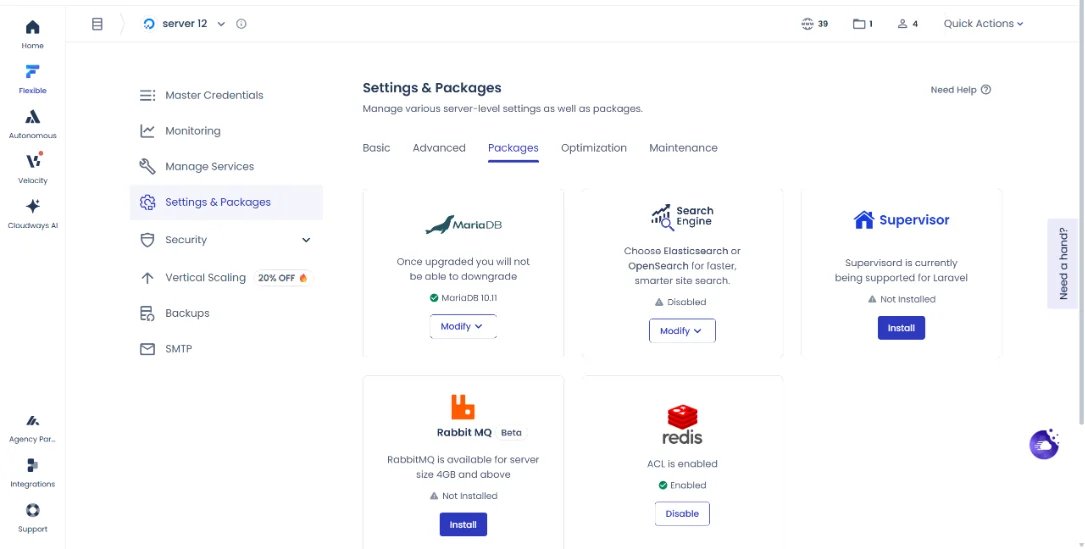
- Open the server and, in the server menu, choose Settings & Packages.
- Go to the Packages tab.
- On the Redis card, in the ACL row, click Enable. The process takes a few minutes, and you get a message on the same screen when it finishes.
Note before you turn it on: WordPress sites with Object Cache Pro are configured automatically by Cloudways. If a site uses a different Redis plugin, such as Redis Object Cache or W3 Total Cache, you have to configure it according to that plugin’s documentation. Also note that Magento doesn’t support a Redis username, so on a server with Magento that uses Redis you should leave ACL off.
And what is Relay?
Relay is a PHP extension that replaces the standard component (PhpRedis) Object Cache Pro uses to talk to Redis. Instead of going to Redis over the network on every request, Relay keeps a copy of commonly used data in PHP’s own memory. According to Cloudways, this shortens the path to the data and takes load off Redis, especially on large stores and LMS sites.
According to the Cloudways documentation (updated October 2025), Relay is available on Cloudways Autonomous, and in applications created there after 30 Sep 2025 it’s on by default. How to switch between Relay and PhpRedis is explained in the Cloudways Autonomous guide.
What Cloudways support covers
According to Cloudways, support for Object Cache Pro is limited to installing the plugin and Redis on supported WordPress applications. Settings and changes beyond that are the site owner’s responsibility. In practice, the automatic setup is enough for most sites, and if something behaves oddly, the first step is clearing the cache from the plugin’s dashboard.
Common mistakes and how to fix them
The site breaks or shows stale data after you turn it on: usually there’s another object cache plugin. Remove it, flush the cache in Object Cache Pro (Flush) and check again.
The switch doesn’t appear or doesn’t save: check that the Redis service is running on the server and that the PHP version is 7.4 or higher. Also make sure you’re in the new interface of the platform.
The plugin turned off on its own: someone stopped Redis on the server, or lowered the PHP version below 7.4. Start Redis or update PHP, and the plugin resumes working.
After you turned on Redis ACL, one site stopped using the cache: the site uses a different Redis plugin that wasn’t configured with a username and password. Configure it according to its documentation, or switch to Object Cache Pro.
Store changes don’t show up: if a price or stock update doesn’t appear, it’s usually the page cache and not Redis. Clear Varnish and Breeze, and only if that doesn’t help, clear the object cache. Full clearing steps are in the cache clearing guide.
Sources
- Speed up your WordPress application using Object Cache Pro – Cloudways Knowledge Base
- How to enable Redis ACL on Cloudways – Cloudways Knowledge Base
- What is Relay and how to switch to it from PHP Redis on Cloudways Autonomous – Cloudways Knowledge Base
FAQ
It depends on the server size. According to the Cloudways pricing page it’s free on a Flexible server of 4GB and up, and the help article says it’s free for supported WordPress applications. It comes preinstalled on optimized WordPress, WooCommerce and Multisite. Outside Cloudways it’s a paid premium plugin.
Varnish stores whole pages and serves them to anonymous visitors. Redis, through Object Cache Pro, stores the results of database queries and helps on dynamic pages like the cart, checkout and the admin area. They complement each other, and on Cloudways you run both.
Yes. According to Cloudways, the plugin works with page cache plugins like Breeze, WP Rocket, WP Super Cache and WP-Optimize. Just don’t run another plugin that does object caching at the same time.
Remove Redis Object Cache, then turn on Object Cache Pro from the platform: Application Settings, the WordPress tab, the Object Cache Pro switch. After turning it on, check the plugin’s dashboard.
Less than a store. On a brochure site most visitors get pages from the page cache, so the big effect is in the admin area and on pages that aren’t cached. On a WooCommerce store or a site with logged-in users the difference is much more noticeable.
It’s recommended when several sites, especially for different clients, sit on the same server. ACL separates each site’s data in Redis. On a server with Magento that uses Redis, leave it off.
Not always. On my site, where most visits are served from page cache, Redis cut database queries from 35 to 5–6, but TTFB without cache stayed around one second even after 3 days (measured on 10 Nov 2026). The difference is noticeable mainly on WooCommerce stores, sites with logged-in users, the admin area and a large database.
Related guides
- Varnish on Cloudways: what it is, when to enable it and how to configure it
- Breeze: the Cloudways cache plugin
- Which cache plugin to choose on Cloudways
- How to speed up a WordPress site on Cloudways
- Advanced Breeze settings
- Cloudways pricing
- All guides on this topic: Performance and speed guides
Official source: Speed Up Your WordPress Application Using Object Cache Pro, How to Enable Redis ACL on Cloudways, What is Relay and How to Switch To It from PHP Redis (Cloudways Knowledge Base). This guide was written and checked by Asael Dreyer · Measurements were taken on this site on 7 Nov 2026 and 10 Nov 2026 · Updated: 10 Nov 2026
Disclosure: this is an independent site, not the official Cloudways site. Some links on this site are affiliate links: if you sign up through them we earn a commission, at no extra cost to you. Full details

