
Last updated: · By Asael Dreyer
Short answer: You can recover a deleted server or application on Cloudways up to 14 days after deletion, as long as at least one backup remains. On Flexible, go to the server list (My Servers) and click Recover Server, or to the applications tab (My Applications) and click Recover Application, then choose what to restore. The recovered server gets a new IP address and the application a new default URL, so you need to update the domain’s DNS records. After 14 days the backups are deleted permanently.
How recovery works, and why time matters
Deleting on Cloudways does not delete the backups right away. The system keeps the backups of a deleted server or application, and you can rebuild them from those. This is not an “undo” for the original server. A new server, or a new application, is created with the data from the latest backup.
Two conditions must be met. First: there must be a backup from before the deletion. Cloudways takes the first backup of a server within 24 hours of creating it, so a server deleted on its first day may have no backup at all. Second: fewer than 14 days have passed. After that the backups are deleted, and Cloudways explicitly states that it is not responsible for data loss after that window.
How long a backup is kept after deletion
| Situation | Recoverable? | Time window |
|---|---|---|
| A server deleted on Flexible | Yes, if there is at least one backup | 14 days |
| An application deleted on Flexible | Yes, if there is at least one backup | 14 days |
| An application deleted on Autonomous | Yes, if there is a backup from before the deletion | 14 days |
| A server deleted because of an unpaid invoice | Yes, after the payment is settled | 14 days from deletion |
| A deleted Staging environment | No | You can only create a new one from the live site |
| A server with no backups at all | No | – |
Why servers get deleted without you deleting them
Besides manual deletion, the system deletes servers in three situations: an unpaid invoice, an insufficient balance, or an abuse report that was not dealt with. According to the documentation, a server keeps running for 48 hours after an invoice goes unpaid, and sometimes Cloudways turns it back on for 24 hours so you can pay. A charge blocked by your bank (for example a recurring charge in US dollars from abroad) is one possible cause. It is worth making sure your card is approved for recurring international payments.
Before you start
- Recovery is available only on a full account. If your trial has ended, upgrade the account. According to Cloudways, even after upgrading you can recover within 14 days of the deletion.
- If the deletion was caused by a debt, settle the invoice first.
- Have access to your domain’s DNS management ready (at the domain registrar, Cloudflare or DNS Made Easy). You will need to update an A record.
- If you will recover to an existing server, make sure it has enough free disk space.
- DigitalOcean servers (General Purpose and CPU-Optimized) created in the new interface, and the applications that ran on them, can be recovered only from the new interface, not from the classic one.
How do you recover a deleted server on Flexible?
- In the side menu, hover over Flexible and open the server list (My Servers, the Servers tab).
- On the servers page, click Recover Server.
- Choose the server from the list and click Recover Server.
- Check the new server’s specification: cloud provider, size, location, and on AWS and GCP servers also the file and database storage size. You can change these.
- Click Recover, and wait for it to finish.
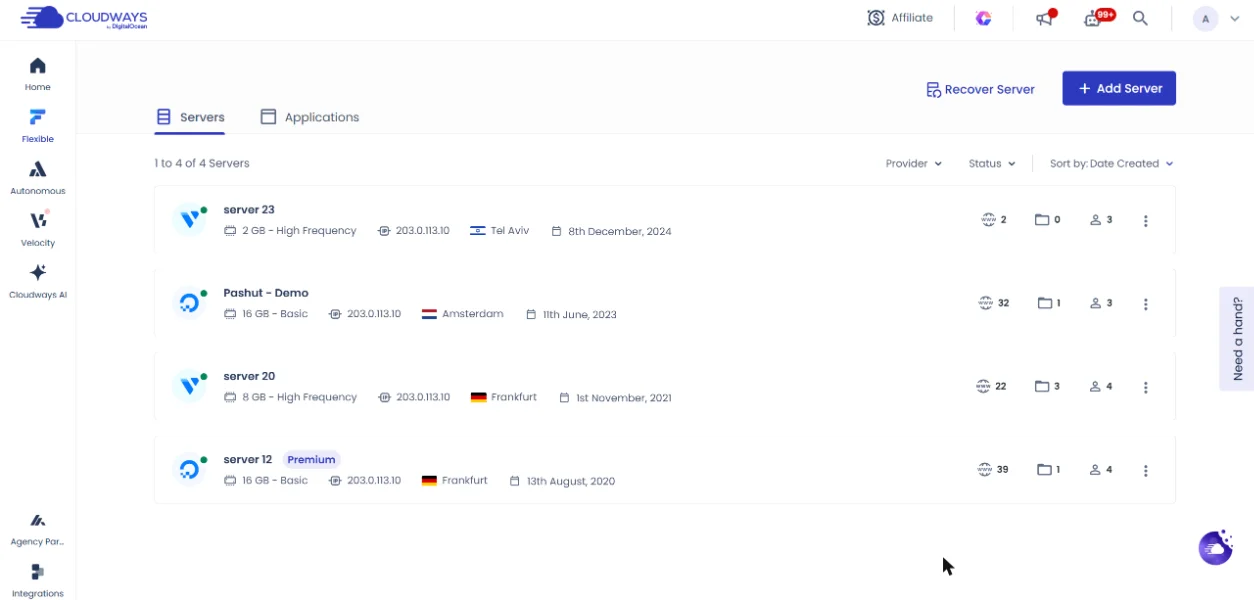
Two limitations: you cannot choose a server smaller than the original, only the same size or larger. And you cannot change the database type: a server that ran on MariaDB comes back on MariaDB, and a server on MySQL 8.4 comes back on MySQL 8.4.
There is an upside too: recovery is a chance to change location or provider. If the original server was far from your audience, you can now pick a location closer to them.
How do you recover a deleted application?
On Flexible
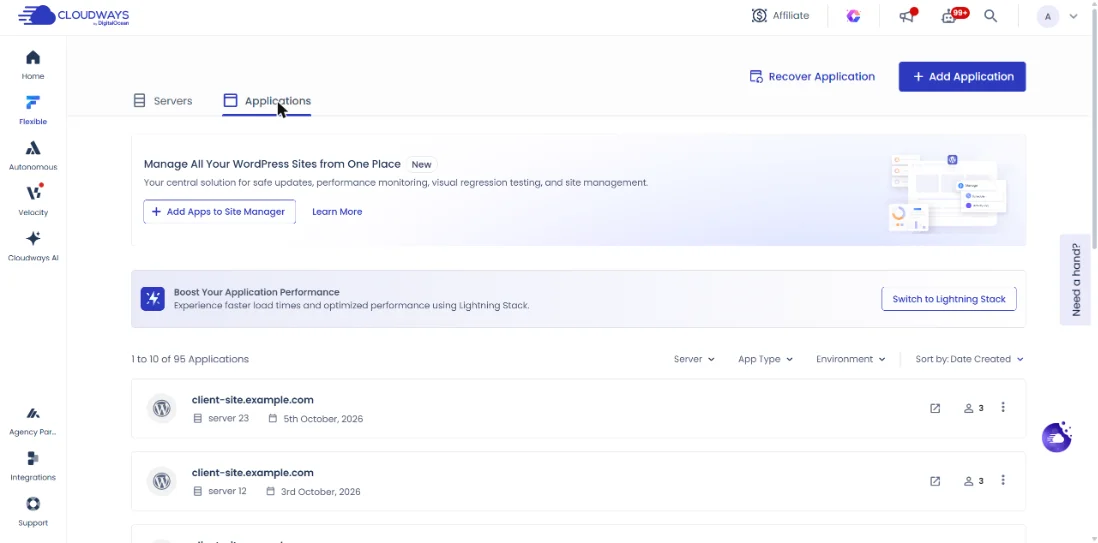
- In the side menu, hover over Flexible and click My Applications.
- Click Recover Application.
- Choose the application and click Recover Application.
- Choose where to recover it: to the same server, to another existing server, or to a new server.
- Click Continue.
On Autonomous
- In the side menu, hover over Autonomous and click My Applications.
- Click Recover Application.
- Choose the application and click Recover Application.
Application deleted but the server still exists? There is another option on Flexible: restore the server backup to a point when the application was still there. Note that this rolls all applications on the server back to that point in time, including changes made since on other sites. In most cases, Recover Application is the safer route.
The code BFCM802 takes 80% off your bill for the first two months (up to $200 off per month), including unlimited free site migrations. New customers only, and only until the offer ends.
The offer ends on December 4, 2026 at 23:59 (UTC+2).
Start with a free trial, no credit card. Enter the code at checkout and check that it shows up.
After Black Friday: 30% off for 3 months with the code ASAEL. On a large server (above about $444 a month) ASAEL already saves more today. BFCM802 vs. ASAEL calculator
Start a free trial server, no credit card. When you move to a paid plan, the code ASAEL takes 30% off your bill for the first three months.
The link fills in the code on the signup form. Just make sure it shows up.
After recovery: new IP, DNS and a checklist
As far as the system is concerned, the recovered server and application are a new server and a new application. The server has a new IP address, because the old one was released on deletion, and the application has a new default URL in the style of wordpress-XXXX.cloudwaysapps.com. As long as your DNS points to the old address, the site will not come up.
- Copy the new IP address from the server page in the platform.
- At your DNS provider, update the A record: Host
@, Value the new address. Do the same for the www record if it is an A record and not a CNAME. Delete old A records. - In the platform, add the primary domain and any additional domains back to the application. See connecting a domain to Cloudways.
- Reinstall the SSL certificate once DNS has updated. If something goes wrong, see troubleshooting SSL errors.
- Check email sending (SMTP or Elastic Email), Cron jobs and add-ons such as Malware Protection.
- Test the site: pages, forms, login and sending email.
A DNS update can take a few hours to propagate, and in the meantime some visitors will still reach the old address. With most registrars the change is made in their DNS management panel, unless you moved DNS management to Cloudflare.
Common mistakes and how to fix them
The server or application does not appear in the recovery list: one of three reasons. More than 14 days have passed, or the deletion is still in progress (wait a few minutes and try again), or it is a Staging environment, which cannot be recovered.
“We restore servers with at least one Application. Please restore Application instead”: the server has no backup that contains an application. Try recovering the application itself instead of the server.
“Unfortunately, there is no backup available for this Application”: the application has no backups, so it cannot be recovered through Cloudways. If you have a local backup, that is your only option.
“Server does not have enough space”: the target server does not have enough room. Free up disk space, scale the server up, or choose another or a new server.
The recovery succeeded and the site does not load: almost always DNS still pointing at the old IP. Check the A record, and remember that propagation takes time. If the browser shows ERR_CONNECTION_TIMED_OUT, read how to fix ERR_CONNECTION_TIMED_OUT.
The old restore points are gone: this is expected. After an application is recovered, its previous Point-in-time Restore points are no longer available.
How to avoid getting here
- Keep a local backup, outside Cloudways. After 14 days, that is what will save you. See downloading a manual site backup.
- Take a manual backup before any risky action: deleting an application, changing important settings or migrating.
- Keep a valid payment method and a sufficient balance. Cloudways recommends keeping at least 50% of your server costs in the account.
- Act fast. Found a deletion? Recover right away, not at the end of next week.
Sources
- How to recover or restore a deleted application or server on Cloudways – Cloudways Knowledge Base
- How long does Cloudways keep a backup of deleted server – Cloudways Knowledge Base
- Will IP address(es) be changed on the recovery of my deleted server(s) – Cloudways Knowledge Base
Frequently asked questions
14 days from deletion, on both Flexible and Autonomous. After that the backups are deleted permanently and you cannot recover through Cloudways.
Yes. The old address is released when the server is deleted, and the recovered server gets a new one. You need to update the domain’s A record to the new address and delete the old records.
Yes. When recovering an application on Flexible, you choose whether to recover to the same server, to another existing server or to a new server.
No. Deleted Staging environments cannot be recovered. If the live site exists, you simply create a new Staging from it.
From the latest available backup. You cannot choose an earlier point in time during the recovery process, and the application’s earlier restore points are not available afterwards.
Settle the invoice, and then recover the server within 14 days of the deletion. If more than 14 days have passed, only a local backup is left, if you kept one.
Related guides
- How to back up a site and restore a backup on Cloudways
- Downloading a manual site backup from Cloudways
- How to connect a domain to Cloudways hosting
- Cloudways website hosting
- All guides in this category: Backup and restore guides
Official source: How to Recover or Restore a Deleted Application or Server on Cloudways, How Long Does Cloudways Keep a Backup of Deleted Server, Will IP Address(es) be Changed on the Recovery of My Deleted Server(s)? (Cloudways Knowledge Base). Written and checked by Asael Dreyer · Updated: 6 Nov 2026
Disclosure: this is an independent site, not the official Cloudways site. Some links on this site are affiliate links: if you sign up through them we earn a commission, at no extra cost to you. Full details

