
Last updated: · By Asael Dreyer
In short: moving from Wix to WordPress is a rebuild, not a one-click transfer: according to the Wix Help Center, a Wix site runs only on Wix’s servers and can’t be exported to other hosting. So you export what you can (contacts and products as a CSV file), copy the content and images, build the site in WordPress on a server of your own, set up 301 redirects from every old URL to its new one, and only at the end point the domain. That’s how you keep your Google rankings. A brochure site of 10–20 pages usually takes a few working days.
Why people move from Wix to WordPress, and when you shouldn’t
The reasons I hear most from small businesses: wanting full ownership of the site, technical control over SEO (URL structure, schema, speed), connecting a store to the payment providers and invoicing tools they actually need, and a cost that climbs as you add apps.
When not to move: if your site is a business card of a few pages, you’re happy with it, and nobody will maintain WordPress, Wix is probably fine for you. WordPress needs updates, backups and decisions. If you haven’t decided yet, read the honest comparison of Wix and WordPress first.
What you can get out of Wix and what you can’t
This is the most important point to understand before you start. Wix is a SaaS platform: the site, the design and the code exist only inside its system. What comes out of it is data, not a site.
| What | Can you export it? | How |
|---|---|---|
| The site’s design and code | No | Rebuild in WordPress (theme + page builder) |
| Page text | Manually | Copy from the live site or from the editor |
| Blog posts | Partly | Copy manually; some blogs have an RSS feed you can import from. Check in your dashboard |
| Images | Yes | Download from the Wix media manager |
| Contacts | Yes | Export to a CSV file from Contacts (up to 50,000 per export, according to the Help Center) |
| Products (Wix Stores) | Yes | Export to CSV (up to 5,000 rows per file; digital products aren’t supported, according to the Help Center) |
| Past orders | Yes, for records | Export orders from Wix Stores, for safekeeping and bookkeeping |
| The domain | Yes | Keep it at the registrar and change DNS, or transfer it to another registrar |
Good to know: Cloudways’ free migration service is meant for WordPress sites moving from another hosting company. It does not move Wix sites, because there are no site files or database to copy. You do the rebuild yourself or with a site builder.
What replaces in WordPress what you had in Wix
In Wix, many things come built in or as an app from its store. In WordPress every capability comes from a theme, a plugin or the server. The table helps you plan ahead what you’ll need, so you don’t find out halfway through the build that something is missing.
| In Wix | In WordPress | Note |
|---|---|---|
| Drag-and-drop editor | The built-in block editor, or a page builder like Elementor | Pick one and stick with it. Switching page builders later is double work |
| Hosting and security | A server at a hosting company | On managed cloud, server updates, backups and SSL are the company’s responsibility |
| Wix Stores | WooCommerce | Free, with plugins for payments and invoicing in your market |
| Forms | A forms plugin (Contact Form 7, WPForms and similar) | Set up email sending through SMTP so messages don’t land in spam |
| SEO settings | Yoast or another SEO plugin | Full control over titles, schema and the sitemap |
| URL redirects | The Redirection plugin or server rules | Mandatory in a migration, see below |
| Accessibility | An accessibility plugin + theme adjustments | Accessibility regulations may apply to your site depending on where your audience is. Check with a specialist whether and how they apply to you |
| Backup | Server-level backup | Cloudways has automatic backup and restore from the panel |
My rule: as few plugins as possible, and every plugin from a known source that gets updates. A WordPress site with 15 reputable plugins will be faster and more stable than one with 40 small ones.
Before you start
- Don’t cancel your Wix plan until the new site is live and the domain points to it.
- Check where the domain is registered: at Wix, or at another registrar (GoDaddy, Namecheap and the like).
- Check where your business email lives (for example Google Workspace bought through Wix). The MX records have to move with you.
- Make sure you have access to the site’s Google Search Console. If you don’t, verify it now, while the old site is still live.
Moving from Wix to WordPress, step by step
The steps are split into six parts, from mapping to launch. Don’t skip the mapping. It’s what protects your rankings.
Part 1: Map every URL and all the content
- Open the Wix site’s sitemap (usually at
/sitemap.xml) and list every URL in a spreadsheet: pages, posts, products and categories. - In Google Search Console, under Pages and Performance, mark which URLs bring traffic. These are the pages you can’t afford to lose.
- For each old URL, write in another column the new URL it will have in WordPress. This is the “key” for the 301 redirects.
- Save the SEO title and meta description of every important page, so you can copy them to WordPress.
Part 2: Export the data from Wix
- Export your contacts to a CSV file from the Contacts area of the Wix dashboard.
- If you have a store: in the dashboard, under Products, choose More Actions and then export products to a CSV file. Export the orders too, for safekeeping.
- Download the original images from the media manager, in folders by page, so they’re easy to upload again.
- Copy the text of every page and post into a document, together with the headings (H1, H2) exactly as they are.
Part 3: Set up WordPress on a server of your own
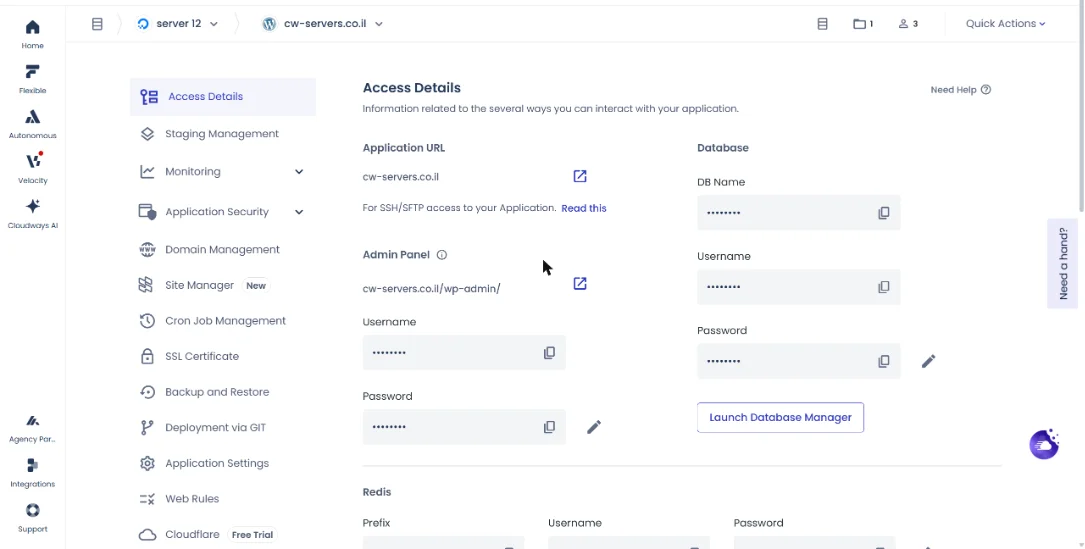
- Open a Cloudways account and create a server with a WordPress application. Choose the data center closest to most of your visitors. The full guide: how to launch a server on Cloudways.
- Log in to the WordPress dashboard through the temporary address Cloudways gives the application. That way you build without touching the live site.
- Set Settings and then Permalinks to “Post name” before you create any content, so the URLs are clean from the start.
- Choose a theme that supports your site’s language, including RTL if you need it, and install an SEO plugin (Yoast, for example) and a redirect plugin (Redirection, for example).
Part 4: Build the site and move the content
- Create the pages following your mapping spreadsheet, with the same text, headings and alt tags for the images.
- Move the blog posts. If you have an active RSS feed, an RSS import plugin can save work; otherwise copy them manually.
- For a store: install WooCommerce, and on the Products screen use Import to import the CSV file from Wix. Match the columns (name, price, stock, images) on the import’s mapping screen.
- Connect a payment provider and an invoicing service. The comparison of providers is in the guide payment gateways in WooCommerce.
- Copy the SEO title and meta description you saved to each page.
Part 5: 301 redirects from Wix, the part that protects your rankings
A 301 redirect tells Google and the browser “this page has moved to a new address, permanently”. Google passes most of the ranking power to the new URL. Without redirects, every old link and every Google result will lead to a 404 error.
- In the redirect plugin, create a redirect from every old URL in your spreadsheet to its new URL. If the URL is the same, no redirect is needed.
- Watch for URL patterns that repeat (for example all the posts under one folder). You can handle them with a single rule using a regular expression, instead of dozens of redirects.
- Redirect URLs that have no equivalent to the closest page on the topic, not to the home page.
Part 6: Launch and point the domain
- Test the new site on the temporary address: every page, every form, and in a store a complete test order.
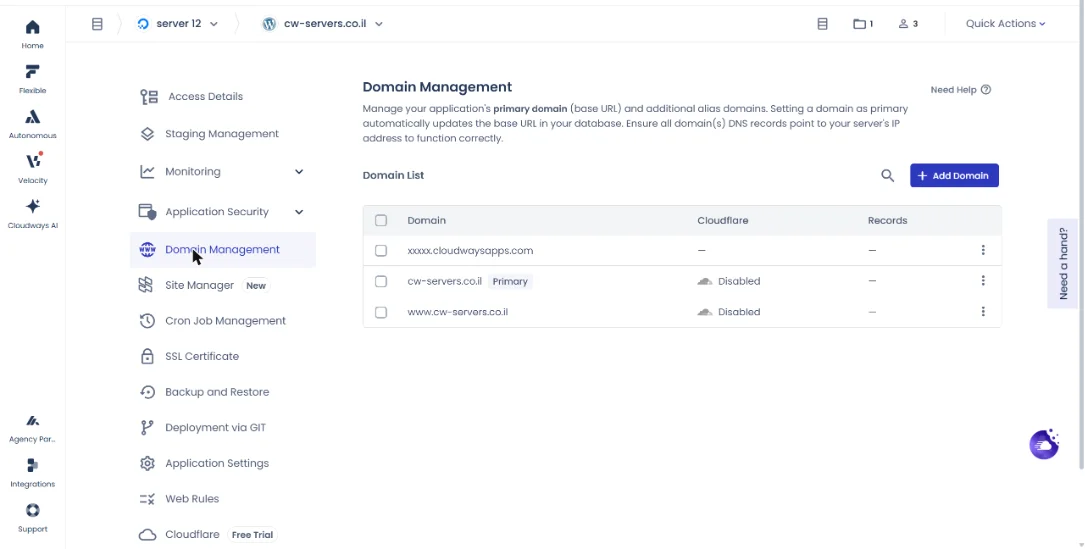
- Add the domain to the application on Cloudways, as explained in the guide how to connect a domain to Cloudways.
- At the registrar (or at Wix, if the domain is registered there), change the A record to the server’s IP address. Don’t touch the MX records if the email stays with the same provider.
- After the DNS updates, install a Let’s Encrypt SSL certificate from the panel.
- Submit WordPress’s new sitemap to Google Search Console, and watch for 404 errors in the first weeks.
- Only after a week or two of stability, cancel your Wix plan.
The code BFCM802 takes 80% off your bill for the first two months (up to $200 off per month), including unlimited free site migrations. New customers only, and only until the offer ends.
The offer ends on December 4, 2026 at 23:59 (UTC+2).
Start with a free trial, no credit card. Enter the code at checkout and check that it shows up.
After Black Friday: 30% off for 3 months with the code ASAEL. On a large server (above about $444 a month) ASAEL already saves more today. BFCM802 vs. ASAEL calculator
Start a free trial server, no credit card. When you move to a paid plan, the code ASAEL takes 30% off your bill for the first three months.
The link fills in the code on the signup form. Just make sure it shows up.
How not to lose your Google rankings
A small temporary dip in traffic after a migration is normal, because Google has to recrawl. A sharp, prolonged drop almost always comes from one of four causes, and all of them are preventable.
| The cause | How to prevent it |
|---|---|
| Old URLs return 404 | 301 redirects for every URL that has traffic or links |
| Content was shortened or changed a lot | Move the full text, headings included, and change things only after rankings settle |
| Titles and meta descriptions were lost | Copy them from your mapping spreadsheet |
| The new site is slower | A server with reserved resources, caching and compressed images. Test speed before launch |
Common mistakes and how to fix them
Cancelling Wix before moving the email: if your email was bought through Wix, check with the provider how to continue the subscription separately, and keep the MX records exactly as they are.
Products were imported without images: in the Wix file the images appear as links. If the import doesn’t download them, upload the images manually or import again after you’ve checked that the links are open.
The new site got indexed on the temporary address: make sure that during the build, under Settings and then Reading, “Discourage search engines from indexing this site” is ticked. And remember to untick it on launch day.
Right-to-left text is aligned to the left: the theme doesn’t support RTL properly. Test the theme on a sample page before you build the whole site.
What the migration costs
WordPress itself is free. The costs are hosting (at Cloudways from $11 a month (DigitalOcean Standard) for a whole server, before taxes, as of November 2026), a paid theme and plugins if you need them, and the working hours of the build. If you’re not building it yourself, the rebuild is usually the expensive part. All the current server prices are on the Cloudways pricing page. And if you’re wondering whether you can host without paying at all, you can read about free web hosting.
Frequently asked questions
Not as a complete site. According to the Wix Help Center, the site runs only on Wix’s servers and can’t be hosted elsewhere. You can export data like contacts and products as a CSV file, and you rebuild the design and pages in WordPress.
You map all the old URLs, keep the same content and headings, and set up a 301 redirect from every old URL to its new one. After launch you submit a new sitemap to Search Console and watch for 404 errors.
Yes. You can leave it registered and only change the DNS records so they point to the new server, or transfer it to another registrar. If the domain was bought through Wix, check the process in the Wix Help Center.
No. Cloudways’ free migration moves WordPress sites from another hosting company. A Wix site has no files or database to copy, so you rebuild it in WordPress.
A brochure site of 10–20 pages usually takes 2–5 working days, including mapping, building and redirects. A store with hundreds of products takes longer, mainly because of the product import and connecting payments.
If your business email lives with a provider like Google Workspace, it keeps working as long as you don’t touch the MX records. You only change the site’s A record.
Yes, partly. You export the products to CSV and import them into WooCommerce with the built-in import tool, matching the columns. Old orders are saved as a file for your records, and payments are connected again from scratch.
Related guides
- How to open a server and a site on Cloudways (including the free trial)
- Launching a server on Cloudways, step by step
- Connecting a domain to Cloudways
- Wix or WordPress: an honest comparison
- Hosting migration checklist
- All the guides on this topic: Hosting migration guides
Sources: Exporting or Embedding Your Wix Site Elsewhere, Wix Contacts: Exporting Your Contacts, Wix Stores: Exporting Your Product List (Wix Help Center, checked 6 Nov 2026); Cloudways Free Website Migration, How to Request a Managed Application Migration (Cloudways). This guide was written and tested by Asael Dreyer · Updated: 6 Nov 2026
Disclosure: this is an independent site, not the official Cloudways site. Some links on this site are affiliate links: if you sign up through them we earn a commission, at no extra cost to you. Full details

