
Last updated: · By Asael Dreyer
Short answer: New Relic APM is an application performance monitoring tool that shows which function, query or plugin is slowing your site down. To connect it on Cloudways: copy the License Key from your New Relic account, open your server, go to Monitoring and then the New Relic tab, paste the key and save, then enable the New Relic service under Manage Services. It is switched on at the server level, so every application on that server gets monitored. According to Cloudways and New Relic’s pricing page (checked 6 Nov 2026), there is a free plan with up to 100GB of data per month.
What APM is and when you need New Relic
APM (Application Performance Monitoring) is monitoring from the inside. A regular server monitor tells you the CPU is at 90%. An APM tool tells you why: which page is slow, which database query takes two seconds, and which call to an external service is hanging.
New Relic is an external APM service. An agent installed on the server collects data from your PHP processes and sends it to your New Relic account, where you see graphs, slow transactions and errors. The data lives at New Relic, not at Cloudways. For a step-by-step way to track down a slow plugin, see how to find which plugin is slowing your site.
Cloudways already ships with built-in monitoring, so you don’t always need New Relic. The table below helps you decide.
| Tool | What it answers | When it’s enough |
|---|---|---|
| Cloudways server monitoring | How much CPU, memory and disk the server uses | When you want to know if the server is overloaded or too small |
| Application monitoring and logs | Where traffic comes from, which requests and errors occur | When you’re hunting bots, 500 errors or popular pages |
| Cloudways Copilot | An explanation of a server issue and a suggested fix | When you want a quick diagnosis without digging through graphs |
| New Relic APM | Which function, query or plugin causes the slowness | When the site is slow and regular monitoring doesn’t explain why |
Before you start
- A New Relic account. If you don’t have one, sign up on the New Relic website.
- A valid License Key. This is a 40-character key created when you sign up, and it identifies the account the data is sent to.
- Permission to manage the server in the Cloudways platform.
- Keep in mind that enabling it applies to every application on the server. If client sites live there, make sure they’re fine with it.
How to connect New Relic to Cloudways, step by step
Step 1: Copy the License Key from New Relic
- Log in to your New Relic account.
- Open the User Menu and choose API Keys.
- Find the key labeled Original account license key and click the three dots (⋯) next to it.
- Click Copy Key.
Step 2: Add the key to your server in Cloudways
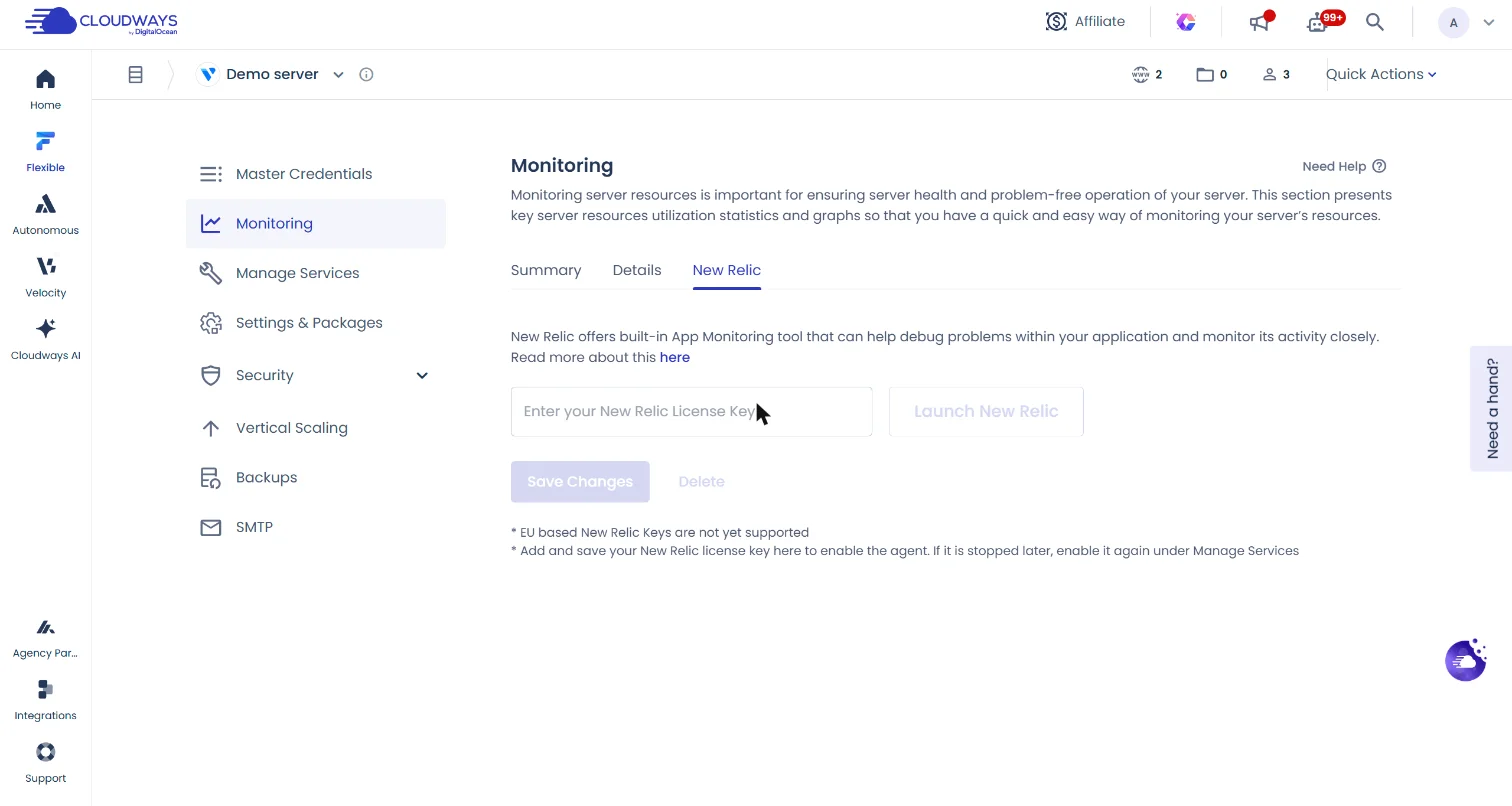
- Log in to the platform, open Servers and select your server.
- Under Server Management, choose Monitoring.
- Switch to the New Relic tab.
- Paste the key into the New Relic License Key field.
- Click Save Changes.
Step 3: Enable the New Relic service
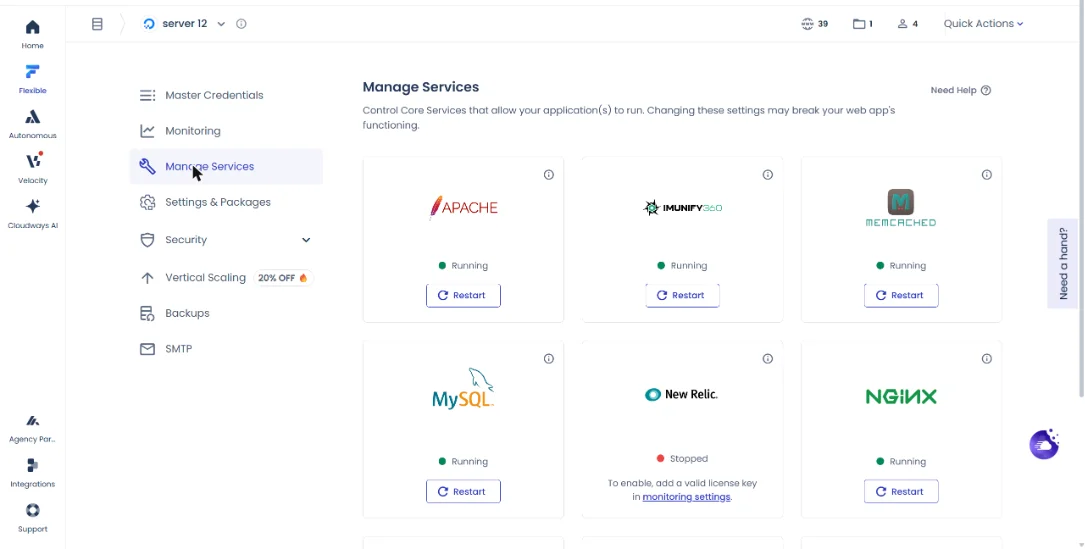
- On the same server, under Server Management, choose Manage Services.
- Find New Relic and turn it on (Enable).
- Open New Relic APM in your account and wait for data to start arriving. It only shows up when the site gets traffic, so click through a few pages if your site is quiet.
If you’ve used New Relic before and switched accounts, the same screen lets you view the existing key and update it.
What to check in New Relic after connecting
New Relic’s interface is rich, and it’s easy to get lost. These are the three places that answer most questions about a slow WordPress or WooCommerce site:
- Transactions: pages and requests ranked by the total time they consume. A cart or search page at the top of the list is your first suspect.
- Databases: the slowest and most frequent queries. A query that runs thousands of times a minute points to a plugin that isn’t using a cache.
- External services: calls to third-party APIs, such as a payment gateway, an invoicing system or a shipping service. If the external service is slow, your page will be slow too.
A tip from experience: plugins that call an invoicing system or a payment gateway on every page load are a common culprit. New Relic shows you exactly how long each of those calls takes.
How do you turn New Relic off?
APM is mostly useful while you’re investigating a problem. When you’re done, you can switch the service off: on the server, under Manage Services, disable New Relic. That avoids unnecessary resource use on the server and going over the data quota in your New Relic account. The key stays saved, so you can enable it again whenever you need it.
Common mistakes and how to fix them
No data in New Relic: check that you both saved the key and enabled the service in Manage Services. They are two separate steps. Also make sure the site is getting traffic.
You copied the wrong key: New Relic has several kinds of keys. You need the one labeled Original account license key, 40 characters long, not a user key or a browser key.
You wanted to monitor just one site: on Cloudways, enabling it works at the server level, and every application on the server will be monitored. If you need separation, consider moving the site to its own server.
You went over the data quota: a busy site sends a lot of data. Check your plan in New Relic, and switch the service off when you don’t need it.
The problem turns out to be the server, not the code: if New Relic shows everything is uniformly slow, the problem is probably resources. Check server monitoring and consider scaling up.
The code BFCM802 takes 80% off your bill for the first two months (up to $200 off per month), including unlimited free site migrations. New customers only, and only until the offer ends.
The offer ends on December 4, 2026 at 23:59 (UTC+2).
Start with a free trial, no credit card. Enter the code at checkout and check that it shows up.
After Black Friday: 30% off for 3 months with the code ASAEL. On a large server (above about $444 a month) ASAEL already saves more today. BFCM802 vs. ASAEL calculator
Start a free trial server, no credit card. When you move to a paid plan, the code ASAEL takes 30% off your bill for the first three months.
The link fills in the code on the signup form. Just make sure it shows up.
Sources
- How to use New Relic APM to monitor your applications – Cloudways knowledge base
- Introduction to New Relic for PHP – New Relic’s official documentation on the PHP agent
- PHP agent compatibility and requirements – requirements and compatibility of New Relic’s PHP agent
Frequently asked questions
There is a basic plan. According to the Cloudways knowledge base article and New Relic’s pricing page (checked 6 Nov 2026), there is a free plan with up to 100GB of data per month. Check New Relic’s site for the current terms.
In your New Relic account, in the User Menu under API Keys. The right key is labeled Original account license key and is 40 characters long. Copy it with Copy Key from the three-dot menu.
Not through the platform. On Cloudways, New Relic is enabled at the server level, and every application on the server gets monitored. If you need separation, move the site to its own server.
Built-in monitoring shows resource usage, traffic and logs. New Relic goes inside the code and shows which function, query or external call is responsible for the slowness. Use it when regular monitoring doesn’t explain the problem.
On the server, under Manage Services, disable the New Relic service. The key stays saved in the New Relic tab, and you can enable it again at any time.
Related guides
- Server monitoring on Cloudways
- Application monitoring on Cloudways
- Logs and debugging on Cloudways
- CloudwaysBot alerts by email and Slack
- All guides on this topic: Monitoring and alerts on Cloudways
- The full review: Cloudways hosting review
Official source: How to Use New Relic APM to Monitor Your Applications (Cloudways Knowledge Base). Written and checked by Asael Dreyer · Updated: 6 Nov 2026
Disclosure: this is an independent site, not the official Cloudways site. Some links on this site are affiliate links: if you sign up through them we earn a commission, at no extra cost to you. Full details

